Hoster is an ultra-groovy Hosts file Manager, Editor and Helper-outter.
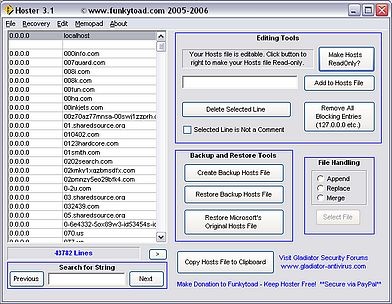
Below you’ll find a list of Hoster’s functions.
Append File – Allows selection of a file to be appended to your current hosts file.
Replace File – Allows selection of a file to replace your hosts file.
Merge File – Allows selection of a file to be merged with your current hosts file.
Create Backup – Creates a Backup of you current hosts file. Backup file will be placed where ever Hoster.exe resides on your Hard drive.
Restore Backup – Restores the backup hosts file.
Restore MS Hosts – Restores the hosts file to Microsoft’s original hosts file.
Add to Hosts Files – Adds the line item into your hosts file.
Delete Line – Deletes highlighted line from hosts file.
Toggle Comment – Toggles whether or not a line is a comment (‘#’).
Sort File – Sorts the current hosts file in alphanumeric order, removes all comment lines.
Swap Localhost – Swaps the current hosts file between 127.0.0.1 and 0.0.0.0
Remove Block Items – Removes all blocking lines in the current hosts file.
Copy to Clipboard – Copies the current hosts file to the clipboard.
Make Hosts read-only/writable toggle
Download Hoster.
Read more about what is hosts file and how to use hosts file here and here.





