If you’ve ever received a message like “Your Binance verification code is xxxxxx” urging you to call a support number or enter a code, beware—this is a classic phishing scam in disguise. Scammers send fake messages mimicking Binance alerts to trick you into giving up sensitive info or calling fraudulent support lines.
The key to spotting these scams is the Anti-Phishing code—a unique 8-character identifier that Binance includes in every legit message. If the code is missing or incorrect, it’s a red flag that you’re dealing with a fake. Unfortunately, scammers have gotten clever, sometimes inserting bogus codes to appear more convincing.
Always double-check your anti-phishing code and never call numbers or follow links from unexpected Binance messages. This tiny security step can save you from losing access to your funds and falling victim to costly fraud. Keep reading to learn how scammers manipulate messaging and what steps you can take to stay safe while managing your crypto.
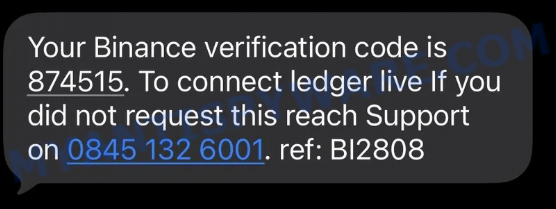
A typical “Your Binance verification code” scam text message may look like this:
Your Binance verification code is 874515. To connect ledger live If you did not request this reach Support
on 0845 132 6001. ref: B12808
🕵️♂️ How the Binance Verification Code Scam Operates
The Binance Verification Code Scam is a form of fraud targeting cryptocurrency users. 🚨 Scammers send fake Binance verification messages to trick victims into revealing personal information or contacting fraudulent support lines. 🔗 Step-by-Step Breakdown of the Scam:
📩 Sending Fake Verification Codes
Scammers send messages claiming to be from Binance, such as: “Your Binance verification code is xxxxxx. To connect Ledger Live If you did not request this reach Support on [fake phone]. ref: B12808.” These messages are unsolicited and designed to create urgency and confusion.
📞 Providing Fake Support Numbers
The messages include phone numbers for “support” that are operated by scammers. When victims call these numbers, they are coerced into revealing sensitive details like private keys, passwords, or authorizing fraudulent transactions.
🎭 Spoofing Authentic Binance Communications
Scammers often mimic Binance’s style and language, including references to account actions and codes, to appear legitimate and lower users’ suspicion.
🚩 Ignoring Anti-Phishing Codes
Binance uses unique 8-character anti-phishing codes which, once set, appear on all official messages. Scammers often exclude or fake these codes to deceive recipients into thinking their message is genuine.
⚠️ Exploiting User Confusion
Recipients who did not request any code become alarmed and may hastily follow scam instructions, risking loss of funds or account compromise.
In summary, this Binance verification code scam deceives users by sending fake security alerts and phony contact details. Scammers exploit urgency and mimic official messages but lack proper anti-phishing codes and verifiable contact methods. Always verify that the anti-phishing code in your Binance messages matches your unique code, and never call unverified phone numbers or share sensitive information. Stay vigilant to protect your crypto assets from such scams.
📱 What to Do When You Receive the “Your Binance verification code” Scam Text Message
We advise everyone who receives this message to follow these simple steps to protect themselves from potential scams:
- ❌ Do not believe this message.
- 🔒 NEVER share your personal information or passwords via text.
- 🚫 Do not click on any links in suspicious messages.
- 🔍 Verify any phone numbers or links by checking the official website or contacting customer support directly.
- 📣 Report the scam text to your carrier by forwarding it to 7726 (SPAM).
If you accidentally clicked on a link in the “Your Binance verification code” text, suspect that your device may be compromised, or just want to check for threats, use one of the free malware removal tools. Additionally, consider taking the following steps:
- 🔑 Change your passwords: Update passwords for your email, banking, and other important accounts.
- 🛡️ Enable two-factor authentication (2FA): Add an extra layer of security to your accounts.
- 📞 Contact your financial institutions: Inform them of any suspicious activity.
- 🔄 Monitor your accounts: Keep an eye on your bank statements and credit reports for any unusual activity.
🔍 How to Spot a Scam Text Message
Scam messages often share common characteristics. By learning these signs, you can detect and avoid text scams:
💡 Here Are Some Ways to Recognize a Scam Text
- 📞 Unknown or Suspicious Numbers: Scam texts often come from unknown or very generic numbers, not official customer service numbers.
- 🔠 Misspelled Brand Names: Look carefully for any misspellings in the brand or company names, as scammers often try to mimic real companies.
- 👋 Generic Greetings: Messages starting with vague greetings like “Dear Customer” may not be from trusted companies.
- 🔗 Suspicious Links: Do not click on any links in suspicious messages. Instead, visit the company’s official website directly.
- ⏰ Sense of Urgency: Messages that demand immediate action or else a penalty will apply are often scams.
- 📝 Spelling and Grammar Errors: Scam texts may contain spelling mistakes or grammatical errors. Legitimate companies usually ensure proper language use.
- 🔒 Requests for Sensitive Information: Trustworthy organizations do not ask for passwords, credit card numbers, or Social Security numbers through text.
Conclusion
This Binance verification code message is a scam, as it attempts to trick you into calling a fake support number and potentially giving away sensitive information. Scammers use urgent language and create fake reference numbers to make the message appear legitimate.
Legitimate Binance notifications will include your unique anti-phishing code—an 8-character code that you personally set up to confirm the authenticity of messages. Always verify that this anti-phishing code matches the one you set before taking any action. Messages lacking this code or containing unfamiliar codes should be treated with suspicion.
Bottom Line: Never call phone numbers provided in unsolicited messages or share your verification codes. Instead, always access your Binance account directly through the official website or app and ensure your anti-phishing code is enabled. Be vigilant and avoid falling for scams using fake Binance verification messages and bogus support contacts.





