• Downloads
  • Threats
    • Adware
    • Browser Hijacking
    • Phishing
    • Ransomware
  • Questions and Answers
  • Recover Encrypted Files
  • Free Malware Removal Tools

MyAntiSpyware

Menu
  • Downloads
  • Threats
    • Adware
    • Browser Hijacking
    • Phishing
    • Ransomware
  • Questions and Answers
  • Recover Encrypted Files
  • Free Malware Removal Tools

How to disable Active Scripting support

Myantispyware team March 26, 2006    

Some days ago, was found IE vulnerability. Today no patches available. You can only disable Active Scripting support.
Read how to…

Open Internet Explorer and hit the “Tools” menu and click “Internet options”. Jump to the “Security” tab, chouse “Internet” and click to “Custom Level” button.
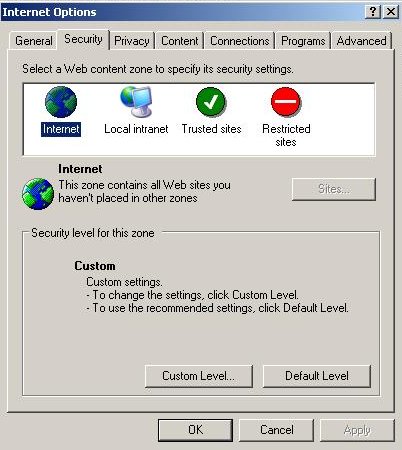
ie tools security

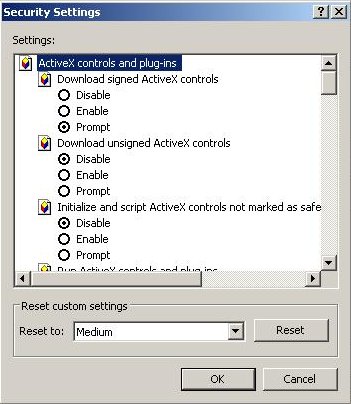
After that, you would see:

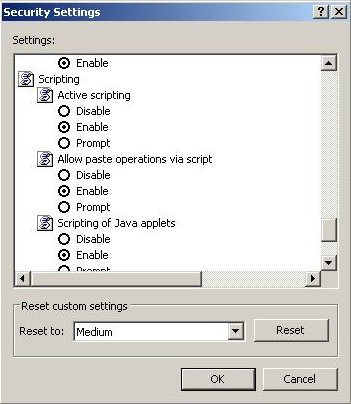
Scroll down and change Active Scripting to Disable and click “OK” button:
If you have trusted sites, then add them to the Trusted Group.

To add a trusted site, chouse”Trusted sites” and then click the “Sites” button.
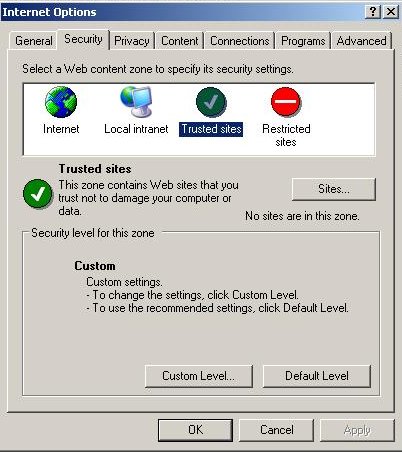
Type trusted domain name and click “Add” button.
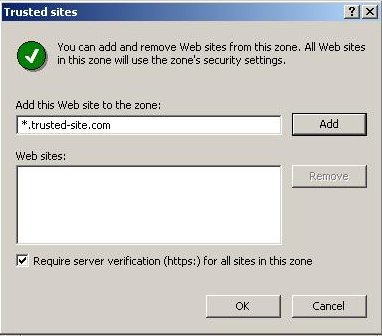
Click “Close” button and close “Internet options”.
Now your PC protected against a new exploits for the vulnerability.

Tutorials - HowTo

 Previous Post

BHO malware used IE vulnerability for install

Next Post 

SpywareQuake Automatic removal

Author: Myantispyware team

Myantispyware is an information security website created in 2004. Our content is written in collaboration with Cyber Security specialists, IT experts, under the direction of Patrik Holder and Valeri Tchmych, founders of Myantispyware.com.

Leave a Reply Cancel reply

New Guides

Android Has Detected A Wiretap On Your Phone Pop-Up Scam Exposed
Remove Probe-portal.com Redirect: Chrome, Edge, Firefox
scam alert
American Express “Account Limited” Scam Alert: A Phishing Email to Avoid
MetaMask – Incoming Transaction Failure Scam Alert: A Phishing Email to Avoid
scam alert
Hypstichly.co.in Virus Removal Guide

Follow Us

Search

Useful Guides

DNSChanger
How to remove DNSChanger malware virus [Updated Apr. 2018]
Iphone Calendar virus spam
Iphone Calendar Virus/Spam 2022 (Removal guide)
Managed by your organization chrome virus
Chrome Managed by your organization malware removal guide
How to reset Internet Explorer settings to default
This setting is enforced by your administrator (Removal guide)

Recent Guides

BHO malware used IE vulnerability for install
How to remove SpywareQuake
New rogue anti spyware Spyware Quake
100 confirmed sites now using the IE vulnerability
RealNetworks Products Multiple Buffer Overflow Vulnerabilities

Myantispyware.com

Myantispyware has been a trusted source for computer security and technology advice since 2004. Our mission is to provide reliable tech guidance and expert, practical solutions to help you stay safe online and protect your digital life.

Social Links

Pages

About Us
Contact Us
Privacy Policy

Copyright © 2004 - 2024 MASW - Myantispyware.com.