Do you have pop-ups or your computer infected with trojan or spyware ? Learn how to ask us for help, click here!

How to remove AV Security Suite (Removal guide)

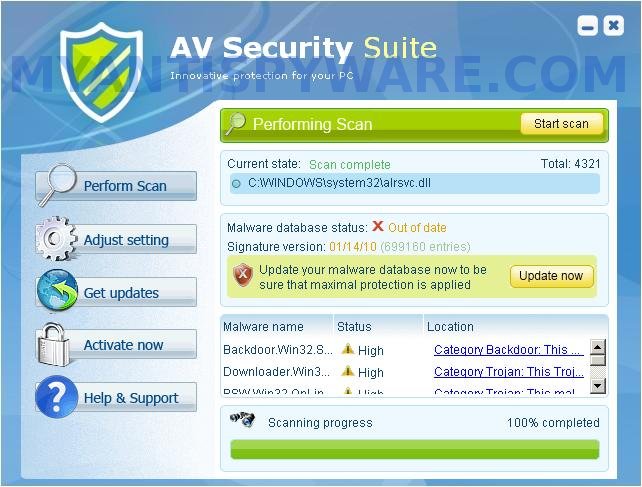
AV Security Suite is a rogue antispyware program from the same family of rogues as previously published Antispyware Soft, Antivirus Suite, Antivirus Soft, Antivirus Live, etc. This program classified as rogue antispyware because it reports false infections, displays various fake security alerts, hijacks an Internet browser as a method to force you to believe that your computer is infected. Like other similar malicious programs, AV Security Suite distributed through the use of trojans that come from various misleading websites or a malware that pretend to be flash player updates or even video codecs required to watch a video online.

When the rogue is started, it will register itself in the Windows registry to run automatically when you login to Windows. Further AV Security Suite will start an imitation of system scan. Once finished, it will state that your computer is infected with trojans, adware or malware and that you should purchase the full version of the program to remove these infections. Important to know, the malicious program is unable to find the infections, as well as will not protect you from possible infection in the future. So, do not trust the scan results, simply ignore them.

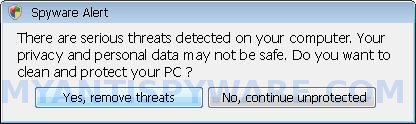
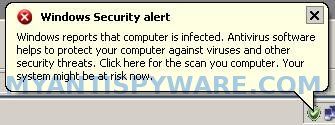
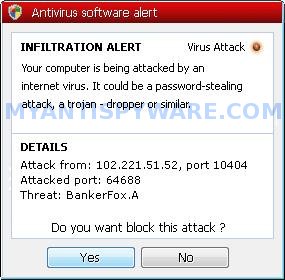
As method, to create the fully illusion that your computer is heavy infected, AV Security Suite will display numerous warnings, fake security alert and notifications from Windows task bar. Some of the alerts:

Windows Security alert
Windows reports that computer is infected. Antivirus software
helps to protect your computer against viruses and other
security threats. Click here for the scan your computer. Your
system might be at risk now.

Spyware alert
Application cannot be executed. The file rundll32.exe is
infected.
Do you want to activate your antivirus software now?

Antivirus software alert
INFILTRATION ALERT
Your computer is being attacked by an
internet virus. It could be a password-stealing
attack, a trojan-dropper or similar.

However, like the scan results, all these alerts, screens and pop-ups are a fake, so you can safely ignore them!

In addition to the above-described, while AV Security Suite is installed, it will hijack an Internet Browser by configuring it to use a malicious proxy server so, it will randomly show a warning page that stats “This website has been reported as unsafe”. Last but not least, the rogue can block most legitimate Windows applications, so that they will not even start. If you try to run a program, your computer will display a warning that stats:

Application cannot be executed. The file notepad.exe is infected.
Do you want to activate your antivirus software now.

Do not trust the warnings, like false scan results, AV Security Suite uses them to scare you into thinking that your computer is infected with viruses and malware.

As you can see, AV Security Suite is scam and designed only for one – to force you into thinking that your computer is heavy infected as a method to trick you into buying the software. If you find that your computer is infected with this malware, then be quick and take effort to uninstall it immediately. Use the removal guide below to remove AV Security Suite from your computer for free.

More screen shoots of AV Security Suite
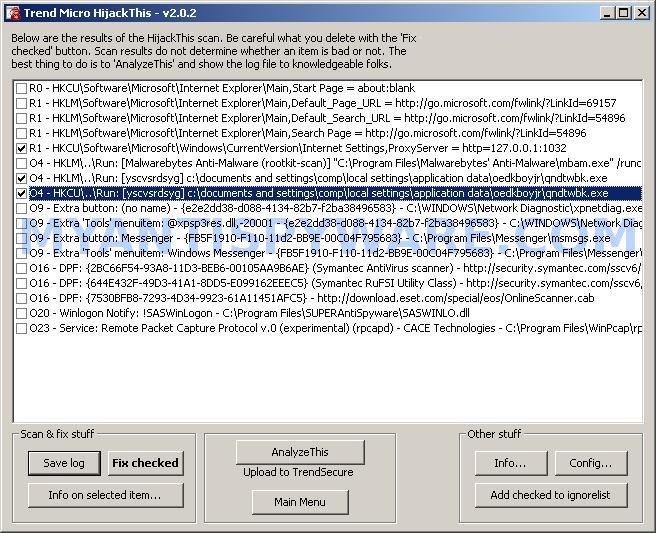
Symptoms in a HijackThis Log

R1 – HKCU\Software\Microsoft\Windows\CurrentVersion\Internet Settings,ProxyServer = http=127.0.0.1
O4 – HKLM\..\Run: [{RANDOM}] %UserProfile%\Local Settings\Application Data\{RANDOM}\{RANDOM}.exe
O4 – HKCU\..\Run: [{RANDOM}] %UserProfile%\Local Settings\Application Data\{RANDOM}\{RANDOM}.exe

Use the following instructions to remove AV Security Suite (Uninstall instructions)

Step 1.

Run Internet Explorer, Click Tools -> Internet Options as as shown in the screen below.
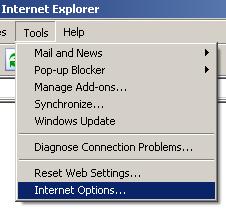

Internet Explorer – Tools menu

You will see window similar to the one below.
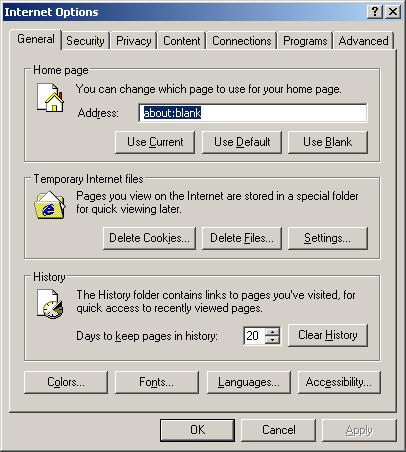

Internet Explorer – Internet options

Select Connections Tab and click to Lan Settings button. You will see an image similar as shown below.


Internet Explorer – Lan settings

Click Advanced button to open Proxy settings. Copy and paste the following text into “Do not use proxy server for addresses beginning with:”

www.myantispyware.com;myantispyware.com;www.malwarebytes.org;go.trendmicro.com;

When you finished, you will see a screen similar below:
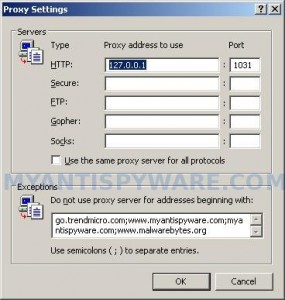

Internet Explorer – Proxy settings

Click OK to save Proxy settings, then Click OK to close Lan Settings and Click OK to close Internet Explorer settings.

Step 2.

Download HijackThis from here. Once Save dialog opens, you need first to rename hijackthis.exe to iexplore.exe. Further click Save button to save it to desktop. If you are using the Firefox, then you need right click to the above link to open a Save dialog. If you still can not download the program, the repeat first step above.

Doubleclick on the iexplore.exe on your desktop for run HijackThis. HijackThis main menu opens.

Click “Do a system scan only” button. Place a checkmark against each of lines that looks like:

R1 – HKCU\Software\Microsoft\Windows\CurrentVersion\Internet Settings,ProxyServer = http=127.0.0.1
O4 – HKLM\..\Run: [abgsckfg] c:\documents and settings\user\local settings\application data\cupilnt\drciln.exe
O4 – HKCU\..\Run: [abgsckfg] c:\documents and settings\user\local settings\application data\cupilnt\drciln.exe

Once finished you will see a screen similar to the one below.
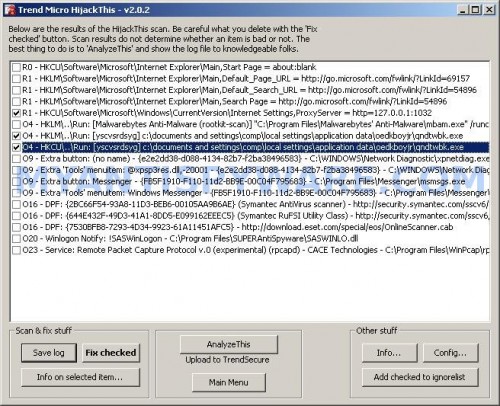

HijackThis

Note: list of infected items may be different. Template of the malicious entry is: [{random string 1}] C:\Documents and Settings\user\Local Settings\Application Data\{random string 2}\{random string 3}.exe, look for examples above. If you unsure, check them in Google.

Please be very careful, do NOT check any other boxes!. Once you have selected all entries, close all running programs then click once on the “Fix checked” button. Close HijackThis.

Run Internet Explorer, Click Tools -> Internet Options. Select Connections Tab and click to Lan Settings button. Uncheck “Use a proxy server” box. Click OK. Click OK.

Step 3.

Download MalwareBytes Anti-malware (MBAM). Close all programs and Windows on your computer.

Double Click mbam-setup.exe to install the application. When the installation begins, keep following the prompts in order to continue with the installation process. Do not make any changes to default settings and when the program has finished installing, make sure a checkmark is placed next to Update Malwarebytes’ Anti-Malware and Launch Malwarebytes’ Anti-Malware, then click Finish.

If an update is found, it will download and install the latest version.

Once the program has loaded you will see window similar to the one below.

malwarebytes-antimalware1
Malwarebytes Anti-Malware Window

Select Perform Quick Scan, then click Scan, it will start scanning your computer for AV Security Suite infection. This procedure can take some time, so please be patient.

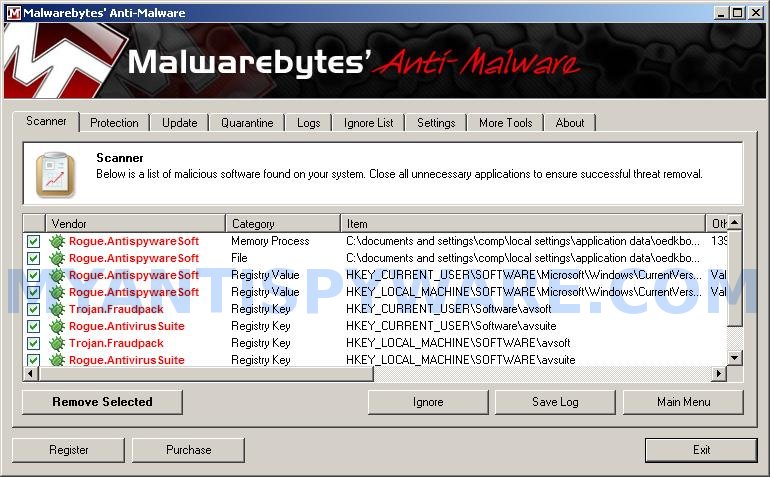
When the scan is complete, click OK, then Show Results to view the results. You will see a list of infected items similar as shown below. Note: list of infected items may be different than what is shown in the image below.
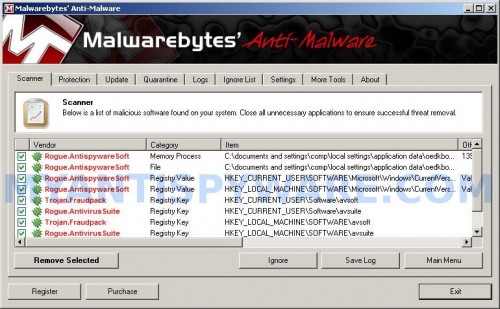

Malwarebytes Anti-malware, list of infected items

Make sure that everything is checked, and click Remove Selected for start AV Security Suite removal process. When disinfection is completed, a log will open in Notepad and you may be prompted to Restart.

Note 1: if you can not download, install, run or update Malwarebytes Anti-malware, then follow the steps: Malwarebytes won`t install, run or update – How to fix it.

Note 2: if you need help with the instructions, then post your questions in our Spyware Removal forum.

Note 3: your current antispyware and antivirus software let the infection through ? Then you may want to consider purchasing the FULL version of MalwareBytes Anti-malware to protect your computer in the future.

AV Security Suite creates the following files and folders

%UserProfile%\Local Settings\Application Data\{RANDOM}
%UserProfile%\Local Settings\Application Data\{RANDOM}\{RANDOM}.exe

AV Security Suite creates the following registry keys and values

HKEY_CURRENT_USER\Software\avsoft
HKEY_CURRENT_USER\Software\avsuite
HKEY_LOCAL_MACHINE\SOFTWARE\avsoft
HKEY_LOCAL_MACHINE\SOFTWARE\avsuite
HKEY_CURRENT_USER\Software\Microsoft\Windows\CurrentVersion\Run\{RANDOM}
HKEY_LOCAL_MACHINE\SOFTWARE\Microsoft\Windows\CurrentVersion\Run\{RANDOM}
HKEY_CURRENT_USER\Software\Microsoft\Windows\CurrentVersion\Internet Settings | ProxyEnable=”1″

AV Security Suite removal – Video guide

Share and Enjoy:

  • Print
  • Digg
  • Sphinn
  • del.icio.us
  • Facebook
  • Mixx
  • Google Bookmarks
  • Slashdot
  • Twitter
June 3, 2010 on 2:16 pm | In Malware removal, Rogue Anti Spyware | 195 Comments |


195 Comments »

RSS feed for comments on this post.

  1. The virus has gotten so clever to where it recognizes the virus protection programs listed above, denies task manager and regedit.

    Comment by Victim — June 4, 2010 #

  2. Victim, please begin a new topic in our Spyware removal forum. I will help you.

    Comment by Patrik — June 5, 2010 #

  3. Thank you for your AV virus removal article! You have made my PC very happy again!

    Comment by Chris — June 9, 2010 #

  4. I tried every solution on the web. Everyone has a different suggestion that always ends with Malwarebytes. The exact sequence above was the only process to take out AV Security Suite for me. HijackThis must have been the key. Thank you so much!!!

    Comment by This Actually Worked!!! — June 9, 2010 #

  5. Great, The combination of malwarebytes and Hijackthis worked. Thanks

    Comment by jon — June 9, 2010 #

  6. Hey Patrick,
    I need help. I got this virus about 4 days ago, and have been stuck using safe mode since.
    I too am having problems still even after following these steps multiple times.
    I tried to register on on the forums, but I never get an activation email, it’s been 3 day. I even tried resending the conformation email, and still no luck. I am sure that the email I provided is correct, it is the same one used on here if you can see it. Can you help me at all?
    thanks, Joe

    Comment by Joe — June 10, 2010 #

  7. Patrick
    I am having trouble registering at the forums. Can you help me? I am not recieving an email confirmation after waiting a few day

    Comment by joe — June 10, 2010 #

  8. I did the removal for this but when i go to google to search stuff and right click a site to another tab i get this weird website, traffic-incidents.com
    and then sometimes it will redirect me to another website… whats going on?

    Also, i dont get the av suite popups anymore but i still have something called animalware doctor on my programs (startmenu). It says uninstall but wont. HELP!!

    Comment by Harry — June 10, 2010 #

  9. joe, try open a new one or post here your username, I will activate you manually.

    Comment by Patrik — June 11, 2010 #

  10. Harry, looks like your PC is infected with TDSS trojan. Try the instructions. Also you can open a new topic in our Spyware removal forum. I will help you.

    Comment by Patrik — June 11, 2010 #

  11. I have tried several anti-malwares. Your method was the only one that worked! Thanks a lot!!!

    Comment by Grad student — June 12, 2010 #

  12. Okay but what do I do when I’m looking at the Hijacks boxes (Step 2) and I can’t find the \Documents and Settings\ O4 boxes. I’ve looked with my glasses on and without them and I still can’t find thoes two boxes!

    Please help me!

    Comment by Anna — June 14, 2010 #

  13. Anna, open a new topic in our Spyware removal forum. I will help you.

    Comment by Patrik — June 14, 2010 #

  14. i need help i did evey thing nd i get stuk on da part wer u look 4 da codes, i cant seem 2 find them,(am on vista)

    Comment by heman — June 16, 2010 #

  15. is it in safe mode

    Comment by heman — June 16, 2010 #

  16. I tried it but when I tried loading the Malwarebyte Anti-Malware it says it is infected and unable to load it…stupid virus.

    Comment by Amanda — June 16, 2010 #

  17. heman, please start a new topic in our Spyware removal forum. I will help you.

    Comment by Patrik — June 17, 2010 #

  18. Amanda, you have completed the firsts two steps ?

    Comment by Patrik — June 17, 2010 #

  19. THANKS A LOT !!! the virus was pretty vicious.

    Comment by klue — June 18, 2010 #

  20. Uhh, it disabled my malwarebytes

    Comment by Disabled — June 18, 2010 #

  21. Disabled, do first step before malwarebytes.

    Comment by Patrik — June 19, 2010 #

  22. Hi Patrik,

    I’ve got this virus too and tried to follow step 1 but unfortunately can’t get into IE – a pop-up window says my antivirus is out of date. I use Avast, which has been bombarding me with Trojan Horse warnings that seem to multiply. Is it possible to follow these steps via Firefox?

    Thanks,
    Michael

    Comment by Michael — June 19, 2010 #

  23. how can i download the hijackthis file if the damn virus doesn’t allow me to use the internet with that “visitng this web site may harm your computer” crap? I have tried running my computer on safe mode but it doesn’t go through, i just get a screen that says “sorry for the inconvenience but windows was unable to start” or something like that and it gives me the boot options again. quite a tough virus to get rid of…

    Comment by markk — June 19, 2010 #

  24. The instructions worked great. Though somehow during the time I got infected I also got the Tidserv and TDSS virus since when I used Google I got redirected. Again followed the instuctions and it looks like everything went great. Should I now delete some of these downloads that Myantispyware recommended. Also, is there more than one Patrik? This guy answers everything.

    Comment by Notredan — June 19, 2010 #

  25. Michael, yes you can use Firefox. To open the proxy settings, run Firefox, click Tools menu, Options. Select Advanced tab, then Network. Click Settings button. Select “No proxy” option. Click OK, then Click OK. If this malware blocks “no proxy” option, then add to “Not proxy for” field following string:
    ,www.myantispyware.com,www.malwarebytes.org,go.trendmicro.com
    Click Ok and OK again.

    Comment by Patrik — June 19, 2010 #

  26. markk, before downloading you need complete the first step above.

    Comment by Patrik — June 19, 2010 #

  27. patrik,

    i already followed step 1 and made the changes on internet options. Am i able to download the hijackthis and mbam on another computer and then install them on my infected computer with a flash drive?

    Comment by markk — June 19, 2010 #

  28. markk, yes you can move both programs through flash drive. Don`t forget to rename HijackThis.exe to iexplore.exe before running.

    Comment by Patrik — June 19, 2010 #

  29. thanks, i’ll give it a shot, i’ll come back if i encounter any more problems

    Comment by markk — June 19, 2010 #

  30. Patrik, sorry to be a pain but I’m not 100% sure if I can delete a file that includes the string 04 – HKCU…Run:[Google Update]. Otherwise it looks exactly like your example. Please advise. Many thanks,

    Michael

    Comment by Michael — June 20, 2010 #

  31. Actually, the full string is: 04 – HKCU…Run:[Google Update]/”C:Documents and settings/comp/Local Settings/Application Data/Google/Update/GoogleUpdate.exe/c”. The R1 file only has a different proxy server.

    Michael

    Comment by Michael — June 20, 2010 #

  32. Is there any way of repeating the first step using google chrome? I’ve tried scanning the computer with AVG in safe mode but the virus appears to have locked the folders its in.
    -Luke

    Comment by Luke — June 20, 2010 #

  33. Problem sorted now this site was incredibly useful, thank you.

    Comment by Luke — June 20, 2010 #

  34. Michael, GoogleUpdate.exe is legitimate program. If you need a help, please start a new topic in our Spyware removal forum. I will help you.

    Comment by Patrik — June 20, 2010 #

  35. Do i follow the above steps in Safe mode? Will the hijackthis and malware program run properly and find and fix stuff when run in safe mode? Please let me know since my laptop is also infected badly with this.
    Thanks

    Comment by RP — June 22, 2010 #

  36. I am on my home computer right now because this virus will not let me use internet on my laptop. I got the first step done but how am I supposed to complete step 2 if my laptop can’t access the internet?
    -Kimberly

    Comment by Kimberly — June 22, 2010 #

  37. Thanks a lot!!! You rescued my computer and I’m very greatful for it!

    Comment by monessa — June 22, 2010 #

  38. RP, yes you can use Safe mode.

    Comment by Patrik — June 23, 2010 #

  39. Kimberly, save both suggested programs above to a flash drive or cd disk and move them to your infected computer.

    Comment by Patrik — June 23, 2010 #

  40. Patrik, thanks so much for all your help. I haven’t noticed any more pop-ups and everything seems to be working fine now. You’re a star!

    Comment by Michael — June 23, 2010 #

  41. Hiya, I got this virus yesterday after a supposedly blocked(avast, I thought we were best mates :C) trojan attempt and appeared to have killed it after running similar steps (rkill and malwarebytes, luckily I already had the installer files for MB), it didn’t pop up or change any proxy settings after the last restart.

    So today I boot up and all seems clear, I have task manager open straight away just in case and AV suite did start up after a while, fff, so glad I got that task manager up.

    It seems like it’s reinstalling, which is a bugger. I’ve just now d/l’d and run hijack this(fixed the proxy stuff and a [randomcharacters]tssd file, unsure if I got all the related stuff but I had a thorough look) and now MB is running another full scan.
    Two questions: will hijack this need to be ran again if AV is still on my machine after MB reboots it? Is it better to run in safe mode? I’ve not needed to reboot yet, got in ahead of AV.

    I’ll have to make a thread if it doesn’t work this time around, just bummed because it appeared to be fixed, I’ve not been surfing online since the infection either, just gaming on steam.

    Comment by luh — June 23, 2010 #

  42. Help! I can’t even get to the safe mode option now. Tried to reboot and follow directions and I can’t even get past my black screen. I’m using another PC. Is there something I can download on this PC and boot up to on the other PC with a disk or something?
    Any help appreciated.

    Comment by Gina — June 24, 2010 #

  43. luh, updated version of Malwarebytes should remove this malware w/o any problems. If it still reinstalls itself after reboot or some hours, then probably your computer infected with a trojan-downloader, then start a new topic in our Spyware removal forum. I will check your PC.

    Comment by Patrik — June 24, 2010 #

  44. Gina, you can follow the steps above in Normal mode too.

    Comment by Patrik — June 24, 2010 #

  45. thank you. it really helped me.

    Comment by victim — June 24, 2010 #

  46. OMG! Thank you sooooo much, Patrik! My pc finally booted up completely and after some initial trouble (that virus works FAST to disable new windows opened), I was able to finish the whole thing and get rid of it. You are a life saver!

    Interested note: I saw that my auto updates for Windows were turned off, which I know I didn’t do. I can only assume this was done by the virus. Just a reminder to check all your settings after you clean this badboy up.

    Thanks Again!

    Comment by Gina — June 24, 2010 #

  47. Worked great. I did everything in safe mode with networking.

    Comment by Alex — June 24, 2010 #

  48. Hi!
    I had the AV Security Suite virus. I thought it was finally removed but I kept on getting redirected on my search. I didn’t know I was so obsesive compulsive but this is driving me crazy… I ran the Malwarebyte’s antimalware which seem to help. I also ran the hijack this (i didn’t change the name though). It continued to redirect and AV started to pop up. I ran Malwarebytes. Now instead of one virus I had 4. I had to run and remove on safe mode. I just ran the SDfix.exe. I continue to get redirected. At this point I don’t know if it’s bc of the original AVSuite, a different virus, spyware or what. Pls Pls…Help!! I’m about to put my notebook in the oven :( …..oh! I tried to follow the above instructions but there is no address on the proxy server (?!)

    Comment by Claudia — June 25, 2010 #

  49. Claudia, please open a new topic in our Spyware removal forum. I will help you.

    Comment by Patrik — June 25, 2010 #

  50. thanks for this. I dont see how some people are having problems with the instructions you are giving out. If everyone follows it CORRECTLY then these steps will fix it. trust me. Thanks again

    Comment by Paula — June 26, 2010 #

  51. Patrik’s AWESOME

    Comment by Nest — June 26, 2010 #

  52. I don’t know how to download Hijackthis because it won’t let me use the internet so I have no way to get to the link. I’m looking on here using my other computer. So now, I have no way to get rid of it. It also won’t let me go into safe mode.

    Comment by Anny — June 26, 2010 #

  53. Hi Patrick!!!

    I just wanted you to know that you are the BEST!!!! Your instructions helped me in getting rid of the AV Security Suite virus. You were able to help me when Norton that I have on my computer was of no help!! Thank you, and thank you, again!!!

    Comment by Barbara McGary — June 27, 2010 #

  54. Okay, so, let me start off by saying I’ve tried almost every solution I could find to removing this virus, and none of them have worked. But I tried this one, and so far everything seems to be back to normal.

    I only had to do a few downloads and then wait for 20 minutes, and restart my computer.

    Thank you very much!

    Comment by MLE — June 27, 2010 #

  55. Anny, you have completed the first step above ?

    Comment by Patrik — June 27, 2010 #

  56. Oh, please help! My notebook has this idntical problem – and I did what you said to do for step one – but I cannot get past their AV Security Suite to get to step 2. Please help. It wants me to buy their software and i cannot get around it at all. Please, please help! Thank you so very much in advance.

    Cindy

    Comment by cindy — June 27, 2010 #

  57. cindy, you have done the first step above, but still can`t download HijackThis ?

    Comment by Patrik — June 27, 2010 #

  58. i signed on in safe mode – and i just got online from the computer – and it doesnt show the virus – should i still continue with the next steps?? I am so sorry to sound so computer pathetic -but I am seriously trying – and I really thank you for helping!

    Comment by cindy — June 27, 2010 #

  59. i did step one but it wouldnt let me sign on the web so I logged off and signed in on safe mode – no problems – now should i do the rest of the steps? I am so thankful for your help!!

    cindy

    Comment by cindy — June 27, 2010 #

  60. cindy, minimum you need complete the latest step (Malwarebytes). You need scan your PC with malwarebytes or another good antispyware tool to remove any associated malware.

    Comment by Patrik — June 27, 2010 #

  61. Patrick – I am doing that now – you are awesome. I have no clue what I would have done had I not had your help. It is still running – and I am sure it has a few minutes to go but feel confident it will work. I THANK YOU so much!!

    Cindy

    Comment by cindy — June 27, 2010 #

  62. It wont let me do any of this someone please help me I have a lot of work to do!!!!!!!

    Comment by Jordan — June 27, 2010 #

  63. Jordan, you have completed the first step above ?

    Comment by Patrik — June 28, 2010 #

  64. I am so relieved right now I feel like crying…I wish I could give you a hug!! I was sure I wouldn’t be able to fix this on my own, that I’d have to pay someone, but your instructions were easy to understand and actually worked. Thank you so, so much!!!

    Comment by Kat — June 28, 2010 #

  65. So, what happens if I went into a page and got this virus? I didn’t download anything, I just went into a page and it just popped up. What happens if I don’t act right away? Will it still be there, or will it go away in time? Antivirus or not, I’m afraid to download anything now.

    Comment by Lynn — June 28, 2010 #

  66. Thanks for you concern I just deleted the whole profile because it wouldnt allow me to anything but my question now is if I put “www.myantispyware.com;myantispyware.com;www.malwarebytes.org;go.trendmicro.com” in the correct spot will it stop it from happening again??? Liek what can pre vent it since i deleted the profile

    Comment by Jordan — June 28, 2010 #

  67. Jordan, if you have removed AV Security Suite malware, then you can open the proxy settings and clear “Do not use proxy server for addresses beginning with:”. Anyway the string is unable to protect you from possible infection in the future.
    To protect your PC you need use:
    - good antivirus
    - an antispyware with autoprotection
    - an alternate browser

    Comment by Patrik — June 28, 2010 #

  68. Thanks! This worked like a charm.

    Comment by Giovanna — June 29, 2010 #

  69. I used the free version of Malwarebytes to automatically remove this nasty malware. Worked like a charm.

    You can check out the legitimacy of Malwarebytes on CNET
    http://www.cnet.com/1770-5_1-0.html?query=malwarebytes&tag=srch
    It’s been downloaded over 44 MILLION times by users, and and gets excellent ratings by both CNET and users.

    The only problem I had was downloading it, as the AV malware blocks such downloads. So I downloaded the install file to another computer, and then sent it to the bad computer via email attachment. From there, it went smoothly. The program installed easily, and found and deleted the bad AV files.

    I’m back up and running.Still a minor problem or two. Internet Explorer no longer works because AV somehow threw off my settings for Internet access for that program, and I’m too ignorant to know how to fix that. So I switched to Foxfire (which I prefer anyway) and bypassed that remaining glitch. Probably reinstalling Internet Explorer would work as well, but not sure.

    Comment by Richard Rider — June 29, 2010 #

  70. Internet Explorer no longer works

    Do you reseted browser`s proxy settings ?

    Comment by Patrik — June 29, 2010 #

  71. Worked like a charm, from “safe mode – networking”
    used a second computer for instructions…

    Thanks, thanks, thanks…

    Comment by pjacobs51 — June 29, 2010 #

  72. how am i supposed to get hijack this from here.. if i cant get on the internet im using a different computer to view this webpage right now on my computer with the av sec.scam i cant view internet either i dont understand something or i dunno.

    Comment by here? — June 29, 2010 #

  73. here?, you have completed the first step ?

    Comment by Patrik — June 29, 2010 #

  74. yes i have completed first step but that is all i dont have any idea of how to get any further? am i supposed to be in safe mode?

    Comment by here? — June 29, 2010 #

  75. i have completed first step

    but still can`t download HijackThis and Malwarebytes ?

    Comment by Patrik — June 29, 2010 #

  76. ok soo right now my computer with the problem is in the other room im looking at steps threw this computer when i do first step nothing happens it still wont let me on any other site but the front page with the security its trying to sell…

    Comment by here? — June 29, 2010 #

  77. also now avg says it has found a faketrojan horse and is asking me to move to vault should i do so?

    Comment by here? — June 29, 2010 #

  78. can u please hurry with replys i need to fix asap!!! sorry for the rush though..=\

    Comment by here? — June 29, 2010 #

  79. Have you tried to download HijackThis and Malwarebytes ? You need follow the steps above EXACTLY (complete first step, go to second, …). Look the removal video instructions above.

    Comment by Patrik — June 29, 2010 #

  80. it wont allow me to connect to anything at all how am i supposed to use the internet on the computer thats infected?

    Comment by here? — June 29, 2010 #

  81. here?, if you have completed the first step above exactly, then it will allow you connect to http://www.myantispyware.com, myantispyware.com, http://www.malwarebytes.org and go.trendmicro.com.
    And i repeat my question, HAVE you tried download HijackThis and Malwarebytes ?

    Comment by Patrik — June 29, 2010 #

  82. 1 question before i retry step one do i do this in safe mode networking or normal mode with the av seecurity suite running..?

    Comment by here? — June 29, 2010 #

  83. I have used Normal mode.

    Comment by Patrik — June 29, 2010 #

  84. i just restarted my computer doing no steps above and theres no more pop ups should i still download the software and scan just incase?

    Comment by here? — June 29, 2010 #

  85. Probably your antivirus has removed this malware, but anyway scan your computer with Malwarebytes Anti-malware to sure that your PC is clean.

    Comment by Patrik — June 29, 2010 #

  86. thnks for the attempt of helping me then but yeah thats cool that avg caught it ill download malware then thanks for the help :)

    Comment by here? — June 29, 2010 #

  87. Glad to help you :) Safe surfing!

    Comment by Patrik — June 29, 2010 #

  88. Thank you very much for your instructions – spent a good few hours trying to remove this virus before I came across your article. Thanks again.

    Comment by Sat — June 30, 2010 #

  89. Help Please! I used Malwarebytes to remove it and it worked but the AV virus keeps coming back. How can I prevent it.

    Thanks in advance.

    Comment by Marc — June 30, 2010 #

  90. Okay, I have been trying to get this virus off my computer for the last week. I cannot manage to get my computer to run in safe mode so I’ve been running it in normal mode. I cannot connect to the network no matter what I try….I have followed the steps through Hijack this. When it tried to open spyware doctor it needs an internet connection to continue and does not allow me to go on. I get stuck. All my anti-virus programs I’ve run, amg.com, malwarebytes, and trend do not see the virus. Please help. I’m at my wits end!

    Comment by Laura — June 30, 2010 #

  91. It keeps requiring me to do a smart update and because I do not have internet I get stopped there. Please please help me….

    Comment by Laura — June 30, 2010 #

  92. Marc, probably your computer infected with a trojan that reinstalls the rogue. Begin a new topic in our Spyware removal forum, I will check your PC.

    Comment by Patrik — June 30, 2010 #

  93. Laura, you have completed the firsts two steps ?

    Comment by Patrik — June 30, 2010 #

  94. I’m working on step two again…now working on Malwarebytes again. I will keep you posted if I have further questions…Thanks.

    Comment by Laura — July 1, 2010 #

  95. Wellm I did steps one and two again. Restarted the computer and still no internet. Trying it all one more time. If it doesn’t work, any other suggestions…I searched and found a website that guided me more in which files to check for hijack this but it is so difficult to truly understand which ones to keep and delete. I saved a logfile of them this time in case I delete too much. Malware found 7 infected files this last time which was nice to know since it found none every other time. Crossing my fingers that i can get it to work this time…

    Comment by Laura — July 1, 2010 #

  96. hey everyone. this rouge virus infiltrated my pc and well not i just have a blank white screen… :( the program wouldnt let me uninstall any programs and it wouldnt let me start task manager. then eventually it to my start bar away. maybe i have an advanced version of this virus but my attempts to save my computer were unsuccessful. But this is a very informative Forum.

    Comment by Marie — July 2, 2010 #

  97. Marie, ask for help in our Spyware removal forum.

    Comment by Patrik — July 2, 2010 #

  98. When I try to run Hijack I get the following message “This file does not have a program associated with it for performing this action. Create an association in the folder options control panel.”

    Comment by amanda — July 2, 2010 #

  99. amanda, right click to HijackThis and select Open or Run as…

    Comment by Patrik — July 3, 2010 #

  100. I found another way for people, including people who can’t use Task Manager

    Do a search for taskmgr.exe
    Copy to your desktop
    Rename to iexplore.exe
    Open it
    In Applications, look for AV Security Suite demo
    Right-click, Go to Process
    Search for the name of it on C:/
    End Process in Task Manager
    Shift-Delete the file.

    Comment by Found another way... — July 3, 2010 #

  101. thank you! this was great.

    by the way, for those whom are lost…
    after i booted safe mode, it made more sense… so here:

    1. restart comp
    2. before windows is booted continuously press F8
    – select “safe mode with networking”
    3. open internet… then follow the directions here!

    (i had 46 trojan viruses…haha…. thank you!)

    Comment by jane — July 3, 2010 #

  102. I tried doing this on firefox, but it won’t work.I downloaded the Hijack scan, but when I open it, the stuff I’m supposed to delete isn’t there.

    Comment by bianca — July 3, 2010 #

  103. Patrik (Sorry about the mispell of your name in the forums) you are a life saver! Thank you, man! I don’t know how else I can express my gratitude to you! Just…THANK YOU SO MUCH!

    Comment by Anna — July 4, 2010 #

  104. HI i have down loaded software above and installed hijack this and followed teh instructions, unfortunately the anti vir will not allow me to run it? the window pops up and quickly dissappears cany you help??

    Comment by jhro — July 4, 2010 #

  105. jhro, open a new topic in our Spyware removal forum. I will help you.

    Comment by Patrik — July 4, 2010 #

  106. Hey all,
    This works great, helped me remove some of the files I missed on my own.

    Here is a HUGE TIP:

    Restart your PC, as soon as you logon,

    hit CTRL ALT DELETE to launch task manager.

    If you do this before the AVSuite loads, taskmanager will stay open.

    I also had time to open Regedit and MSCONFIG.

    With taskmanager open, you can kill the .exe, mine was dygawiutssd.exe (random string), and then proceed with the removal process.

    I was able to delete everything using Regedit and MSConfig, and this webpage to direct me to what files and reg entries to modify.

    Goodluck.

    Comment by Adam — July 4, 2010 #

  107. I’ve been having this problem ever since this morning, but VC Security Suite is only infecting one of accounts I have on this computer. I’m currently using a friend’s account(who made herself the main account). I downloaded HiJackthis and I couldn’t check off these;

    O4 – HKLM\..\Run: [abgsckfg] c:\documents and settings\user\local settings\application data\cupilnt\drciln.exe
    O4 – HKCU\..\Run: [abgsckfg] c:\documents and settings\user\local settings\application data\cupilnt\drciln.exe

    Comment by Jani — July 5, 2010 #

  108. Hi Patrik,

    Got similar problem, would love to try your fix however my laptop is still stuck on the boot up mode, with just the blank screen, not even glimpse of the boot up function key options?

    Any ideas how can get around this? Canot get to safe mode or anything!
    Tried puttng my HP restore disc in but nothing happens, drive runs a bi but then nothing….

    Comment by Schoob2 — July 5, 2010 #

  109. Just to say….Muchas Gracias/ Thank you very much. It really worked

    Comment by Carlos — July 5, 2010 #

  110. Jani, open a new topic in our Spyware removal forum and post your HijackThis log into it. I will help you.

    Comment by Patrik — July 6, 2010 #

  111. Schoob2, if you cannot boot from the CDROM, this is probably due to the boot order of your devices being incorrect. You can change this in the BIOS.
    You can enter to the BIOS from the first screen you see when you turn your computer on. To enter your BIOS,you need press the DEL key. Most Dell, Toshiba, Gateway, Sony & HP systems will press F2. Compaq users will usually have to press F10. IBM typically uses F1 or F2.
    Whats your Windows version ?

    Comment by Patrik — July 6, 2010 #

  112. Hi Patrik,

    Running Windows Vista, the only thing with changing the boot order is that when I am re-booting I get nothing on screen, just blank and the HDD runs, no visible options come up like on a usual boot.
    I will try when I get home to boot up and hit F2 to see if this works, but failing that is it a case of a lost HDD?

    Comment by Schoob2 — July 6, 2010 #

  113. hi mate i have this problem with av antivirus thing. it is on my laptop but my internet wont let me open because it says there may be malware on your computer or something.

    so if i downloaded these programs put them on a usb and transferred them over to my laptop which is in safe mode would this process still work?

    Comment by Tom — July 7, 2010 #

  114. Schoob2, check the disk at another PC.

    Comment by Patrik — July 7, 2010 #

  115. Tom, yes you can process the steps above in Safe mode.

    Comment by Patrik — July 7, 2010 #

  116. Thanks – WORKED 100% I HATE THIS SHIT

    Comment by wembely — July 7, 2010 #

  117. you guys are so lucky. i cant even get to the login screen. after i got the av security suite virus, i continued by restarting my computer. bad idea. now i cant get to the login screen. when i turn on my computer it shows the asus logo then it goes to a black screen with a blinking “_” then the “_” dissapears and the screen stays black until i restart again. any ideas how to bypass it? f8 just brings me to a blue screen where i can choose to boot from my computer or cd.

    Comment by Khris — July 7, 2010 #

  118. F8 just brings me to a blue screen where i can choose to boot from my computer or cd.

    Press F8 again and you will see the Advanced boot menu.
    Try boot your PC in Safe mode or Last good configuration mode.

    Comment by Patrik — July 7, 2010 #

  119. i have taken the steps shown above as well as used the hijack this but am unable to identify any of the files shown & have already used malwarebytes to quarantine the virus but i am still affwcted by this virus, any suggestions would be greatly appreciated.

    Comment by jim/g — July 7, 2010 #

  120. thanks for the response but when i press f8 when in the blue wndow, the window quickly flickers once and returns to the blue window.

    Comment by Khris — July 7, 2010 #

  121. Thanks Patrik, Worked like a charm in regular mode…Didn’t even have to go into safe mode!

    Comment by James — July 7, 2010 #

  122. pressing f8 just makes the blue screen quickly flicker once and then return back to the blue screen.

    Comment by Khris — July 7, 2010 #

  123. I am like you Khris from July 7, I restarted thinking I might be able to restore. Since restart my computer only shows windows starting and then goes to a blank screen, with no menus no desktop and stays black until I restart and repeats the same pattern. I am stuck as to what I should do next.

    Comment by Christina — July 7, 2010 #

  124. jim/g, open a new topic in our Spyware removal forum. I will check your PC.

    Comment by Patrik — July 7, 2010 #

  125. Khris, in the boot menu select your harddisk and press Enter, after that immediately press F8.

    Comment by Patrik — July 7, 2010 #

  126. Christina, try boot your computer in Safe mode or Last Good Configuration.

    Comment by Patrik — July 7, 2010 #

  127. Thank you Patrick.

    Comment by another victim — July 8, 2010 #

  128. Wow!!! THis was the only site i could get to remover the AV virus suite!!!! tried 2 or 3 websites. Easy to follow instructions!!! Removed it right off and removed registry keys!!! thanks!!!

    Comment by Michelle — July 9, 2010 #

  129. Thanks for the help in removing AV Security Suite from my computer. This malware was a real pain to remove even with your guideance. I had to rename the malware remover to iexplore.exe before I could get it to run. The LAN proxy server setting would not reset, etc. A lot of perseverance is definately needed but pays off in the long run. Keep trying – this definately works.
    Thanks Again

    Comment by David — July 9, 2010 #

  130. Thanks for the help. I followed all the steps, but when I ran MalwareBytes Anti-Malware, it didn’t find any infected files. Is that normal?

    Comment by Melinda — July 9, 2010 #

  131. From bad to worse!!!
    I purchased and installed the spyware doctor software, ran the scan, and followed the prompts to fix the problems. Rebooted and now I get the blue screen of death! I can’t go into safe mode any more no matter which option I choose. No safe mode option gets me past the “SESSION3_INITIALIZATION_FAILED” blue screen. What do I do now?

    Comment by Dennis — July 9, 2010 #

  132. Patrick, I tried several times to do both. What happens is the computer appears to run through a series of executeable files for a short time I would say approximately ten or so. And then it just hangs there and can not get past. This happened with every option that I selected from the f8 menu. Except that some options the executeable files were not listed but there was a progress bar at the bottom of the screen, the same thing happened it appears to work to a certain point and then it just hangs there. I left it for several minutes and it never got past the point. Any ideas? I have been stuck at this point since, just can’t seem to get beyond it.

    Comment by Christina — July 9, 2010 #

  133. oops apologies I see I spelled your name incorrectly. sorry for that.

    Comment by Christina — July 9, 2010 #

  134. Patrik = love

    Comment by Rachel — July 9, 2010 #

  135. Melinda, try update Malwarebytes and perform a fresh scan.

    Comment by Patrik — July 10, 2010 #

  136. Dennis, you have tried “Last good configuration” option ?

    Comment by Patrik — July 10, 2010 #

  137. Christina, open a new topic in our Spyware removal forum.

    Comment by Patrik — July 10, 2010 #

  138. Thanks for the help. This worked great and removed everything easily (for the most part).

    Comment by Larry — July 10, 2010 #

  139. worked a treat, thank you so much – follow the instructions carefully mind, no problems now its all gone within an hour!

    Comment by neil — July 12, 2010 #

  140. hi my cmputer won’t open taqsk manger and the ie8 says tha’t all my dsites are unsafe. when i go into safe mode the internet goes away .all of the appps and proogramS EXCEPT INTERNET EXPLORER don’t work.i at first it wuz on just oneuser so i tried to delete that user from my other one… it didn’t work it just spread it. help please. oh and can you by any chance still use usb ports to ghet prograqms in. thnx :)

    Comment by OMGmycomputerwuzhacked — July 14, 2010 #

  141. OMGmycomputerwuzhacked, you have completed the steps above exactly ?

    Comment by Patrik — July 14, 2010 #

  142. i got stuck at step two, trying to install Hijack.
    warning pops up: administrator settings
    do not allow this procedure, or something close to that.
    any ideas?
    thanks a lot,
    Ross

    Comment by Ross — July 14, 2010 #

  143. This simple solution actually works!

    Start computer in safe mode (F8 for Vista, check the web for other op systems). Start restore in the command prompt, this is explaned by microsoft in help. A window will allow you to go back and the monster will be gone after the computer restarts. Pick the oldest restore date you can.
    You can buy or try all these spyware programs, but there is no assurance that they will always work. Good luck.

    Comment by Mark 52 — July 14, 2010 #

  144. Patrik, I posted to the forum but wasn’t sure if you would see it. Thank you so much for your help my computer is up and running again. There is no way that I would have been able to do that without you. You are a gem, what you do here is truly inspiring and I am enternally thankful for all of your help!

    Comment by Christina — July 15, 2010 #

  145. Ross, ask for help in our Spyware removal forum.

    Comment by Patrik — July 16, 2010 #

  146. This somehow occurred w/my new laptop. does this virus damage my hard drive and what programs do u recommend to prevent such disasters again?

    Comment by bdawg — July 18, 2010 #

  147. A well protected computer should have at least an antivirus and firewall, an antispyware is also great addition to your computers security.

    A few good and free antivirus apps: AVG, Avast, Avira.

    Install Spybot – Search and Destroy.This will provide real-time spyware & hijacker protection on your computer alongside your virus protection. You should also scan your computer with program on a regular basis just as you would an anti virus software.

    You should use a firewall. Without a firewall your computer is susceptible to being hacked and taken over. Simply using a Firewall in its default configuration can lower your risk greatly.

    Many of the exploits are directed to users of Internet Explorer. Use only an alternate browser – Firefox or Opera.

    Comment by Patrik — July 18, 2010 #

  148. Patrick I’ve completed step 1 but every time i try opening my hijackthis program(renamed to iexplorer) I get a security warning saying the application cannot be executed because it’s infected. haaallpp!

    Comment by JW — July 28, 2010 #

  149. JW, you have made a mistake. You need remove HijackThis.exe to iexplore.exe. It`s very important.

    Comment by Patrik — July 28, 2010 #

  150. i’ve renamed the Hijackthis.exe to iexplorer.exe like you said to but it’s still getting blocked. anything else i can try?

    Comment by JW — July 28, 2010 #

  151. JW, please compare
    iexplore.exe – you should use
    iexplorer.exe – you have used

    Comment by Patrik — July 28, 2010 #

  152. i can’t believe i missed that. thank you.

    Comment by JW — July 29, 2010 #

  153. hi patrik
    thanks a lot for your instructions
    the only right one i find on web

    Comment by gino121 — August 11, 2010 #

  154. THANKYOU THANKYOU THANKYOU!!!!!!!!!!!!!!!!!!!!!!!!!!!!!!!!!!!

    Comment by Renata — August 12, 2010 #

  155. It has been 3 long hours of visiting forums with my backup PC to try and find a procedure to fix this damned rogue. I used some
    kill + combofix app. It fixed the issue once, but when I restarted the PC, it came back and even more painful as rkill could not be executed any longer. And then I followed your process with all traps that the other wen through and worked around, and now it is safe, even after a reboot.
    Patrick : THANK YOU SO MUCH !!

    Comment by loconico — August 12, 2010 #

  156. Your instructions worked perfectly to remove this beast from my computer. I was able to read and follow them thru Firefox. Thousands thanks for your help … you saved me from lot of grief.

    Comment by Thien — August 13, 2010 #

  157. Hi all ,

    Security Suite Nighmare

    I have read through all the comments above however I am not having any luck with this blasted virus . The main problem is that as soon as I log in ( Ive tried the safe mode) , I get a pop up stating that my computer will automatically restart in one minute , this gives me little or no time to do anything.
    I can get onto Task manager and had a go at deletig the iffy exe but this hasnt helped.
    I can get to system restore but by the time it loads up my 60 secs are up.

    This is driving me mad , Im not a techy person at all so any help would be appreciated..

    Nicola

    Comment by Nicola — August 14, 2010 #

  158. Nicola, you have tried to follow the above instructions in Normal mode ?

    Comment by Patrik — August 14, 2010 #

  159. We are having such a problem with the Security Suite. I cannot get do step 2 because it won’t let me access anything on the internet. I am looking at this through a different computer. I cannot run any removal programs. What can I do? Thank you, Laura

    Comment by Laura — August 14, 2010 #

  160. I cannot download hijack this because I don’t have access the Internet because the scam won’t let any websites work?

    Comment by Ste — August 15, 2010 #

  161. Hiya. I’ve had this virus for a few days now & it’s really starting to get me annoyed. I get up to Step 1 but no further. It won’t let me onto the internet on both normal and safe mode (even though my connection is working fine). Any help?

    Comment by Gareth — August 16, 2010 #

  162. I’m using my brother’s computer by the way to read these steps.

    Comment by Gareth — August 16, 2010 #

  163. I have safari on my computer, and the security suite virus came up…I have gone to another computer and downloaded a way to get rid of it, and I saved it to a jump drive. However, when I put the jump drive into the infected computer, it wont let me open the application to get rid of it. It also brings up random porn sites, please help.

    Comment by Tucker Barnes — August 16, 2010 #

  164. I also do not have access to the internet, so I do not know what to do, so if you would help me as soon as possible, I will be eternally grateful.

    Comment by Tucker Barnes — August 16, 2010 #

  165. Patrick,

    Thanks for all the help-

    I have a question: I did the malwarebytes program on safe mode, found the trojan agents and hijackers (4 of them), and removed them. I restarted and went back to normal mode, but the problem presisted. Then I did a search to find out with malwarebyte didn’t work, and I came upon your page.

    I did the hijackthis, removed ONLY one file (that’s all I could find that looked like the template), and then did malwarebyes again (it was already installed and this time i was able to open it in normal mode because of the hijackthis fix).

    Because I had already done malwarebye before i found your hijackthis suggestion, when i ran malwarebye again, i found nothing. am i safe? did it work even though i did it in reverse?

    **for those of you who can’t get go to any other website because of the stupid popups and all, you can still go to the tools section, enter the myantispyware.com;blahblahblah stuff in manually, instead of copying (assuming you’re reading it off of an uninfected computer like i was while fixing my infected laptop). do the same for the website address on your infected computer to download the hijackthis program and the malwarebytes program AFTER you have messed with the tools section on explorer. it worked for me.

    Comment by Oscar — August 17, 2010 #

  166. Laura, try the steps (Method 1).

    Comment by Patrik — August 22, 2010 #

  167. Ste, boot your computer in Safe mode with networking, reset browser proxy settings and download and run Malwarebytes Anti-malware.

    Comment by Patrik — August 22, 2010 #

  168. Gareth, you have exactly completed the first step above ?

    Comment by Patrik — August 22, 2010 #

  169. Tucker, reboot your computer in Safe mode and try run Malwarebytes once again.

    Comment by Patrik — August 22, 2010 #

  170. Hi there, this just happened to me tonight. I couldn’t access task manager so I just turned the power off. When I went to re-boot my computer, I received an error message of Session3_Initiation_Failed. When I press F8 to reboot in safe or normal mode, it always takes me to the blue screen. Any suggestions? I have important photo files for work on my hard drive so I don’t want to restore the computer to manufacturer default. I’m a bit panicked and would appreciate any help. Thanks.

    Comment by alice — August 24, 2010 #

  171. alice, you have tried “Last good configuration” option ?

    Comment by Patrik — August 24, 2010 #

  172. Hello, i’m having problems with this. Firstly I do not see the correct files using Hijackthis search. However, if I continue, checking two boxes that are appropriate, and then continue, the antimalware software is blocked by the virus. My question is , how I can I stop the antimalware from getting blocked and/or how do I know which are appropritae files to check on Hijackthis when they are clearly different to those described above.
    thanks!

    Comment by Leon — August 26, 2010 #

  173. THANK YOU!!!!! i follwed the directions exactly and now my laptop is clean!! thanks again!!!

    Comment by Jenn — August 28, 2010 #

  174. OMG THANK YOU SOOO MUCH!!! i have been trying to get rid of it everyway possible and i was about ready to just wipe my whole computer which i really didnt want to do, followed everything on here n no more virus deff saving this page incase it happens again =)

    Comment by brittany — August 28, 2010 #

  175. This thing is not letting me go to internet options and I cannot boot in Safe Mode I keep getting stuck on system32\drivers\mfehidk.sys

    Comment by Hacked Off — August 29, 2010 #

  176. Then you need to download the suggested programs above to another PC, and move them to your computer using a flash or cd disk.

    Comment by Patrik — August 31, 2010 #

  177. Hi all,

    I seem to have stumbled across the same problem with this security suite virus, i followed the steps above and tried to restart my computer on safemode but unfortunately now all my computer does it turn on, shows my blue HP startup screen with options ‘esc’ ‘F1′ and ‘F10. I have pressed both ESC and F1 which lead me to the boot screen and setup but after which no matter what i do leads to a black screen with a _ and if i try to push F10 it doesnt respond and continues to the black screen with the _

    I am at a loss of what to do… Could someone please assist me.

    Thanks

    Comment by Adam — August 31, 2010 #

  178. Adam, you have tried to boot your computer in Last good configuration ?

    Comment by Patrik — September 3, 2010 #

  179. Hey,

    i have recieved this virus recently and was attempting to remove so i resstarted my computer upon restarting i can no longer get past the windows xp start up screen i have tried all 5 startup options ot no avail i have tried it with a netowrk cord plugged in and i am unable to get in. i could really use some help because if i can just get in i can kill this thing but i have no idea how to get in at this point i have tried safe mode safe mode with networking safe mode with command prompt last known good and normal startup :/ nothing anyone have a solution?

    Comment by alex — September 5, 2010 #

  180. Hi Patrik,

    Thanks for the guide. I followed all the steps and seemed to have removed security suite, but everytime I reboot my computer I get a blue screen of death, I can only run my computer in safe mode. Any hints?
    Much appreciated.

    Comment by Julian — September 5, 2010 #

  181. alex, what is Windows (version) you using ?

    Comment by Patrik — September 5, 2010 #

  182. Julian, please open a new topic in our Spyware removal forum. I will help you.

    Comment by Patrik — September 5, 2010 #

  183. Windows XP

    Comment by alex — September 5, 2010 #

  184. creating a new boot sector has not worked either

    Comment by alex — September 5, 2010 #

  185. Alex, try the following steps:
    http://myantispyware.com/forum/can-t-reboot-in-safe-mode-after-av-infection-t3732.html#p21700

    Comment by Patrik — September 6, 2010 #

  186. BEWARE! The latest version of security suite blocks attempts to boot into safe mode. DO NOT make changes to the boot.ini file. This fix is no longer valid.

    Comment by Troy — September 6, 2010 #

  187. it sorta worked but i cant figure out how to fix the boot order :( im about to fucking format the thing i go tin temporarily in safe mode and dowload hijack this and malwarebytes and ran them both i deleted two file in hijack this and all of the infecte dobject in malwarebytes however i am now unable to get in again

    Comment by alex — September 6, 2010 #

  188. i just formatted it the virus is gone :) thanks for the help though patrik just glad i had nothing important on my labtop

    Comment by alex — September 6, 2010 #

  189. Worked first time! Thank you so much… so glad sites like this exist. Greatly appreciated!

    Comment by Dean — September 8, 2010 #

  190. Please help. I have opened in safe mode. Did step one and my internet is still not working. So i can not dl anything or update my malware bytes program. What to do now?? From phone

    Comment by joey — September 13, 2010 #

  191. Worked first time! Thank you so much… clear and direct instruccions THX MAN… :)

    Comment by Wilmer — September 13, 2010 #

  192. Thank you so much for this article. It really worked and got the program off my computer.

    Comment by Ap — September 15, 2010 #

  193. Nothing has worked so far and the program has blocked me from opening in safe mode. I wish a painful death to whoever is responsible for this program.

    Comment by Ed — September 15, 2010 #

  194. joey, try reset proxy settings once again.

    Comment by Patrik — September 15, 2010 #

  195. Absolutely brilliant site, this removed 850 viruses from my computer, many thanks xx

    Comment by Lucy Thorpe — October 5, 2010 #

Leave a comment

XHTML: <a href="" title=""> <abbr title=""> <acronym title=""> <b> <blockquote cite=""> <cite> <code> <del datetime=""> <em> <i> <q cite=""> <strike> <strong>


My Anti Spyware - Free antispyware programs and Spyware Removal Instructions.