Do you have pop-ups or your computer infected with trojan or spyware ? Learn how to ask us for help, click here!

Remove Worm.Win32.Netsky Fake Spyware Alert (winhelper86.dll, winupdate86.exe, winlogon86.exe trojans)

If you are seeing a Spyware Alert box that stats that Worm.Win32.Netsky detected on your machine, then you have become infected with a trojan that uses this Spyware Alert to trick you into purchasing Advanced Virus Remover, Antivirus 2009 or another rogue antispyware program. Once running, the trojan will display a fake Security alert as shown below:

Security alert
Security Warning!
Worm.Win32.Netsky detected on your machine.
This virus is distributed via the Internet through email and Active-x
objects.
The worm has its own smtp engine which means it gathers
emails from your local computer and re-distributes itself.
In worst cases this worm can allow attachers to access your
computer, stealing passwords and personal data.
Viruses can damage your confidential data and work on your
computer.
Continue working in unprotected mode is very dangerous.

Recommendation: It is necessary to perform a system scan.
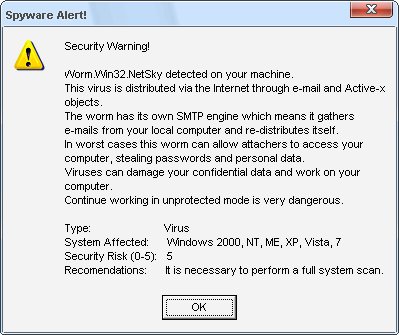
Worm_Win32_Netsky_detected
Worm.Win32.Netsky detected on your machine – Fake Spyware Alert

What is more, the troajn will also display a lot of popups, disable Windows Task Manager and change a desktop background to blue with a black window saying that you have a serious infection and need to run a spyware removal tool. However, all of these warnings are fake and supposed to scare you into thinking your computer is in danger. Use the removal guide below to remove this infections and Worm.Win32.Netsky Fake Spyware Alert from your computer for free.

Symptoms in a HijackThis Log

F2 – REG:system.ini: Shell=Explorer.exe logon.exe
F2 – REG:system.ini: UserInit=C:\WINDOWS\system32\winlogon86.exe
O4 – HKLM\..\Run: [winupdate86.exe] C:\WINDOWS\system32\winupdate86.exe
O10 – Unknown file in Winsock LSP: c:\windows\system32\winhelper86.dll

Use the following instructions to remove Worm.Win32.Netsky Fake Spyware Alert

Step 1.

Download HijackThis from here and save it to your Desktop.
If you cannot run HijackThis, then re-download it, but before saving HijackThis.exe, rename it first to explorer.exe and click Save button to save it to desktop.

Run HijackThis. Click “Do a system scan only” button. Now select the following entries by placing a tick in the left hand check box, if present:

F2 – REG:system.ini: Shell=Explorer.exe logon.exe
F2 – REG:system.ini: UserInit=C:\WINDOWS\system32\winlogon86.exe
O4 – HKLM\..\Run: [winupdate86.exe] C:\WINDOWS\system32\winupdate86.exe

Place a checkmark against each of them. Once you have selected all entries, close all running programs then click once on the “fix checked” button. Close HijackThis.

Step 2.

Download LSPFix from here and unzip it to your Desktop.

Run LSPFix. Place a tick in the “I know what i`m doing”.

In the KEEP box select winhelper86.dll and press “>>” button.

Press Finish>> button. When LSPFix is done removing the LSP you will see a summary box. Press OK.

Step 3.

Download MalwareBytes Anti-malware (MBAM). Close all programs and Windows on your computer.

Double Click mbam-setup.exe to install the application. When the installation begins, keep following the prompts in order to continue with the installation process. Do not make any changes to default settings and when the program has finished installing, make sure a checkmark is placed next to Update Malwarebytes’ Anti-Malware and Launch Malwarebytes’ Anti-Malware, then click Finish.

If an update is found, it will download and install the latest version.

Once the program has loaded you will see window similar to the one below.

malwarebytes-antimalware1
Malwarebytes Anti-Malware Window

Select Perform Quick Scan, then click Scan, it will start scanning your computer. This procedure can take some time, so please be patient.

When the scan is complete, click OK, then Show Results to view the results. You will see a list of infected items similar as shown below. Note: list of infected items may be different than what is shown in the image below.
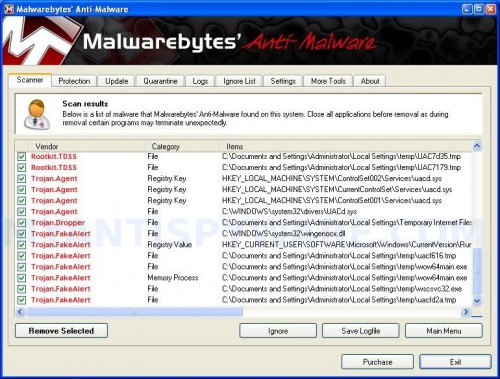
mbam
Malwarebytes Anti-malware, list of infected items

Make sure that everything is checked, and click Remove Selected for start removal process. When disinfection is completed, a log will open in Notepad and you may be prompted to Restart.

Note: if you need help with the instructions, then post your questions in our Spyware Removal forum.

The infection creates the following files and folders

c:\windows\system32\AVR10.exe
c:\windows\system32\critical_warning.html
c:\windows\system32\winhelper86.dll
c:\windows\system32\winupdate86.exe
c:\windows\system32\winlogon86.exe

The infection creates the following registry keys and values

HKEY_LOCAL_MACHINE\SOFTWARE\Microsoft\Windows\CurrentVersion\Run\winupdate86.exe

Share and Enjoy:

  • Print
  • Digg
  • Sphinn
  • del.icio.us
  • Facebook
  • Mixx
  • Google Bookmarks
  • Slashdot
  • Twitter
December 2, 2009 on 8:50 am | In Trojan, Tutorials - HowTo | 212 Comments |


212 Comments »

RSS feed for comments on this post. TrackBack URI

  1. Thank you for this – after repeatedly running AVG and Spybot on a co-worker’s computer who got the Netsky worm, THIS was what finally fixed the problem.

    Now, if you just have a solution for co-workers who click on stupid *&^% in their spam folders…

    Comment by Kirsten — December 10, 2009 #

  2. I think that the trojan programmers for this worm have developed a new trick since this last posting. They are very fast. But I see in a posting on a different site that at least one other person has the same problem as me.

    With a couple of variations, your above instructions worked for me up until:
    \

    Comment by Bridget — December 12, 2009 #

  3. “Once the program has loaded you will see window similar to the one below.”

    I did not get the image that you have at that point. (I printed the instructions on the printer at work.)

    Then I got
    Setup
    “Unable to execute file: c:\ProgramFiles\Malwarebytes’Anti-Malware\mbam.exe”

    “CreateProcess failed; code 2.
    The system cannot find the file specified.”

    I will continue to search.

    Help ?!?

    Comment by Bridget — December 12, 2009 #

  4. Muy buena informacion, logre reparar el problema de mi maquina, intente quitar pormedio de nod 32 pero no resulto.
    Gracias!!!

    Comment by Isra — December 15, 2009 #

  5. your guide worked ! your the best ! Thanks.

    Cj

    Comment by Cj Raff — December 17, 2009 #

  6. This thing REALLY did a number to my system. Did anyone else have to actually run Windows XP repair from their CD?

    While I’m certain I have this infection, I think this may just be one amongst others I picked up last night.

    Biggest nightmare I’ve had with a personal system in almost 10 years (IT background… actually previously managed system security for over 1000 employee agency in the past).

    Thanks for this help!

    Comment by Gary — December 17, 2009 #

  7. Thank you for the guide to remove this annoying and potentially destructive mal-ware. Yr guide was the most recent and clearest procedure I could find. Well done for publishing your solution.

    Comment by Robert — December 17, 2009 #

  8. THANK YOU SO MUUUUCh!! You’re Genius!

    Comment by Shadd & Kij! — December 18, 2009 #

  9. Дякую за допомогу. Все супер.
    thank you very much for help!!!

    Comment by Paul.S — December 18, 2009 #

  10. THANK YOU SO MUCH..I DEAL WITH THIS VIRUS ALL THE DAY..norton,mcafee,avira,kaspersky can do nothing..bullshit with them..you re the best !!

    Comment by lee — December 19, 2009 #

  11. Thank you so much.. It worked well for me after trying several tricks from the internet…

    Comment by Arnold — December 21, 2009 #

  12. “CreateProcess failed; code 2.”

    Bridget, this was a fault with Malwarebytes update! Not what you want when we are fighting such a problem. Manually updating the database to the very latest version solves this problem.

    Comment by Kevin — December 21, 2009 #

  13. You are god! I was seriously worried, the comp has some real important files in it that i was worried we were gonna lose if we formatted, a six star rating to your solution!!

    Comment by Subhash Rajeev — December 24, 2009 #

  14. Super… it worked like charm. Thanks again. Before trying this method I tried numerous, none worked & this was the quickest. Thanks a million

    Comment by Josh — December 24, 2009 #

  15. Thank you so much worked great. After scanning with avast i decided to try this because avast came up with nothing, I got this from a torrent (just saying)

    Comment by Joseph — December 24, 2009 #

  16. Thank you so much. I tried to remove this shit and fix my system 2 days (comodo, ad-aware, S&D, SpyHunter3, SpyWare doctor, atc.). But just this guide definitelly helped me.

    Comment by Lojza — December 26, 2009 #

  17. Thank you, thank you, thank you!!!!!! Very easy step by step. I thumbs up’d you on StumbleUpon.

    Comment by Mike — December 26, 2009 #

  18. Your guide is so clear and helpful. Thank you so much for sharing knowledge.

    Comment by Hoa — December 26, 2009 #

  19. Thank you so much! I thought my computer was doomed. I had been downloading some stuff off a site that kept giving me popups when my anti-virus totally freaked out with warnings windows security manager started to flash warnings with a red X saying my fire wall was off. My background was changed and I couldn’t get task manager. I was certain my computer and all my precious 3D models I create were doomed to a reformat and to be lost forever. But you saved me! Thank you so much for the easy step by step guide. I will NEVER go there again.

    Comment by William — December 28, 2009 #

  20. I too became infected by the NetSky virus (XP Media Home). After much searching and trying things on my computer I was able to get to the McAfee site and update my AV software. After running the updated scan it seemed to catch the viruses and quarentine them. However, my wallpaper and sound was gone. I did a reboot but am stuck at the Login screen. As soon as I click logon to an account, it clocks for about 10 seconds then logs me off. I tried rebooting in Safe Mode, but I get a wierd blue screen with a warning message telling me to restart and run a virus scan! No other reboot method works either. Help, I’m locked in a loop!

    Comment by Mike — December 28, 2009 #

  21. Mike, looks like your AV is removed infected files, but did not repair Windows registry.
    Boot your in Recovery console mode using installation disk. Then copy userinit.exe to winlogon86.exe, then reboot your computer.

    Comment by Patrik — December 29, 2009 #

  22. Just got this virus yesterday. At first Windows would not boot at all, went into bios and set to start up as last good working config. It now starts up in Windows XP, is very slow but eventually shows me a bright green desktop with VIRUS WARNING screen.

    So I’d love to follow all the steps above to remove, but the virus won’t allow me to access the web. So I downloaded each file from another PC and burned them to CD. But its so slow I can’t access the my computer to get to the drive.

    Any suggestions? I set the bios to boot CD drive first, but thats not working either and it won’t let me start in Safe Mode.

    Any help is very appreciated…

    Comment by Josh — December 29, 2009 #

  23. Just a quick question – I’m really nervous about running the LSPfix as the winhelper86.dll does not appear in my Keep box. There is something called winrnr.dll – should I get rid of that?

    Comment by tara — December 29, 2009 #

  24. Thanks removed the worm flawlessy. Still can’t get IE to work but all system programs are now running.

    Comment by Zachary Fisk — December 29, 2009 #

  25. IT’s now gone, but if I boot into anything but a variation of safe mode, windows explorer stops working, and I can’t load up my toolbar, plus my icons do NOT show up and my desktop backgroung is still the black one. HELP, safe mode SUCKS!

    Comment by nick — December 30, 2009 #

  26. Josh, try run Windows registry editor and restore HKEY_LOCAL_MACHINE\SOFTWARE\MICROSOFT\Windows NT\CurrentVersion\Winlogon, UserInit
    to “c:\windows\system32\userinit.exe,”
    Then reboot your computer.

    Comment by Patrik — December 30, 2009 #

  27. tara, winrnr.dll is legit Windows file. But anyway you can scan it in Virustotal site.

    Comment by Patrik — December 30, 2009 #

  28. nick, when Windows loaded, press CTRL + ALT + DEL. Once TaskManager opens, CLick File, New Task, type explorer.exe and press Enter.

    Comment by Patrik — December 30, 2009 #

  29. help!, I can’t find F2 – REG:system.ini: Shell=Explorer.exe logon.exe on hijackthis :(

    Comment by pat — December 31, 2009 #

  30. I followed your steps with these results:
    Hijackthis only found the bottom 2. I checked those clicked “fix checked”. LSPFix did not display winhelper86.dll so I moved on, Malwarebytes ran for 21 hours 51 minutes 48 seconds. It claimed to have scanned 3727008 objects, yet it stopped displaying different file names when it got to its own file (mbam.exe) within the first few minutes of the scan. I canceled scans and rebooted. The computer still has the virus.

    Comment by Kurt — December 31, 2009 #

  31. Patrik,
    It took me a while to find the installation disk, but I followed your instructions and everything seems to be back to normal! It was a little scary to watch it re-install Windows thinking I would lose evrything, but it just overlayed what was already there. Thanks again.

    Comment by Mike — December 31, 2009 #

  32. Thank you so much, after spending 6 hours and various programs your solution was the only one that worked!! THANK YOU!! :OD

    Comment by Kelly — January 1, 2010 #

  33. pat and Kurt, please ask for help in our Spyware removal forum.

    Comment by Patrik — January 1, 2010 #

  34. Hi Bridget!

    No sure if you are still looking to resolve this. I know the issue you are having. This fake alert virus immediately starts up its own .exe files on reboot. What you need to do is, ASAP once the system reboots, start the task manager ( better to right click on the Taskbar than go from Start>run>taskmgr.exe) ..

    1. click on “processes”
    2. sort by image name
    3. terminate anything which looks like winlogon86.exe, winupdate86.exe, winupdate.exe and anything ending with sysguard.exe ( be quick on this one .. the longer you take, the chances are that your task manager and registry files access would be rendered ineffective and the alerts would start popping up)

    Once these are rendered quiet, you can start up MalwareBytes and scan up. In the meantime you may go into your registry files, and C:\Windows to clean up/ delete the malicious files.

    Comment by Deep — January 2, 2010 #

  35. well tenks for the reply though! :D happy holidays :D

    Comment by pat — January 2, 2010 #

  36. Thanks alot guys , I just followed these instructions and managed to clear my virus , cant thank you enough guys

    Comment by syed — January 2, 2010 #

  37. Ok, I finally was able to burn all these steps to CD and load them onto the infected laptop. Ran hijack & removed problems. Ran LSP but it didnt show I had any of the listed problem files. Ran malwarebytes (updated on the 1st) and removed 19 affected files.

    Laptops no longer displays virus warning messages but still is so slow it is unusable, and still won’t let me connect to internet or start in safe mode. Any ideas ?

    Comment by Josh — January 2, 2010 #

  38. I the above and it has worked. However, my internet explorer is still not working (I’m typing from another computer). Any suggestions how to get this working again?

    Many thanks in advance.

    Comment by Craig — January 2, 2010 #

  39. Josh, probably you`re still infected. Make a new topic in our Spyware removal forum. I will help you.

    Comment by Patrik — January 3, 2010 #

  40. Craig, you have used LSPFix ? It should fix trouble with Internet access.

    Comment by Patrik — January 3, 2010 #

  41. thanks very much for this. I did not run HijackThis or LSPFix because I could not connect to the internet on this computer, but I was able to locate and delete the infected files by running regedit, fixing the value for DisableTaskMgr from 1 to 0, then running taskmgr and ending the winupdate86 process. After that, I removed the files and folders listed in your fix, then ran MalwareBytes, which found and deleted 22 infected files/keys/values. I restarted, was able to connect to the internet, downloaded HijackThis, ran it, but didn’t find any associated entries, so hopefully this means I am clear of this nasty virus. Hope this helps those who can’t connect to the internet to download fixes. Time to renew my internet security, I certainly won’t delay renewing again.

    Comment by Nate — January 3, 2010 #

  42. I have, yes, although the internet is still acting up. Perhaps I possibly used the LSPFix incorrectly?

    Comment by Craig — January 3, 2010 #

  43. Followed literally every signle step.
    Doesn’t work. Go back to school ;)

    Comment by Emils — January 3, 2010 #

  44. SO I TRIEDD ALL THE STEPS HERE. AND THOUGH I AM NOT GETTING THE POP-UPS ANYMORE, I STILL CANT SEEM TO OPEN UP MY TASK MANAGER….. SOMEONE HELLLP MEE!!!!

    Comment by Alvin — January 3, 2010 #

  45. Thank you guys, the worm was successfully removed from my infected PC.

    Comment by Kumar — January 3, 2010 #

  46. Thank you for this contribution. It seems as though it might be the only true fix I have encountered and I have been reading and researching for about six hours.

    I still have it but a nastier form than what has been posted. I have this on a laptop with Verizon VZAccess. I knew there was a problem but not as bad until my usage increased at a rate I have not yet used. My browser is hijacked. I attempted a copy of the hijack and the and malware to a thumb drive only to find the error of “could not create directory”. I’m on another laptop, any input as how I can get this over to my other system? If I got to the internet on the infected lap, I go anywhere but where I direct the browser.

    Thank you.

    Comment by JJ McKenzie — January 3, 2010 #

  47. http://www.symantec.com/connect/forums/wormwin32netsky

    The last comment of recent is interesting relative to the hijacking of the browser.

    (Notice the site help symantec is offering, zilch).

    Comment by JJ McKenzie — January 3, 2010 #

  48. All I have is blue screen. I can’t access the internet. I have downloaded hijackthis to a cd. I then attempted to run hijackthis using task manager. I got a popup saying that I should save hijackthis to my desktop. Unfortunately, I can’t do that using task manager. When I tried to run hijack this without saving it to desktop it froze up and wanted me to switch tasks. Any suggestions? thanks

    Comment by keith — January 3, 2010 #

  49. Have been working on trying to clean my daughter’s laptop since Christmas Day. God bless you for your help. It appears that every single problem is fixed. Only wish I had tried this sooner. Thank you!

    Comment by judi — January 4, 2010 #

  50. all you have to do is run a different task manager kill the winupdate86.exe then delete the 5 files reboot with a recovery disk in and repair startup back too normal

    Comment by justin — January 4, 2010 #

  51. Thank you.
    Thank you.
    Thank you.
    Thank you.

    Running Windows Vista Home Basic, and picked up the “Internet Security 2010″ variant of this nasty little bugger. After several days battling this sucker on and off, and fearing the outright destruction of every file I had or indeed having to format my hard drive with every digital photo we had of me, my wife, and our baby daughter, I finally came across these pages. This worked, top to tail. One small tip, though, that might help for other Windows Vista users, if not other versions: if this particular variant of the spyware puts up an error message that regedit can’t be run in safe mode, try clicking on regedit again while that error message is still on the screen. The second time, for me at least, regedit actually did run, which got me onto the first step of enabling the Task Manager again. From there, the steps as described in this guide kicked the malware’s butt. And thereby proved 100% superior than Norton Antivirus 2010 which I desperately bought trying to get rid of this annoying little toad.

    Comment by Michael — January 4, 2010 #

  52. Thanks a lot! Very clear and helpful. And it works! :-)

    Comment by Alex — January 4, 2010 #

  53. I had to reset the internet explorer to defaults

    Comment by Keithunder internet options advanced tab — January 4, 2010 #

  54. Craig, try run WinSock XP Fix.

    Comment by Patrik — January 4, 2010 #

  55. JJ McKenzie, try move HijackThis, LSPFix and Malwarebytes Anti-malware to infected PC using a CD or DVD disk.

    Comment by Patrik — January 4, 2010 #

  56. keith, you can copy any file to you computer using the following:
    Open task manager, new task, type cmd and press Enter.
    Command console opens.
    Type:
    copy e:\hijackthis.exe c:\
    It will copy hijackthis.exe from disk e (use your CD disk name) to root of disk C.
    Run Task manager, new task, type c:\hijackthis.exe and press Enter.

    Comment by Patrik — January 4, 2010 #

  57. Worked like a charm. Quick and simple. A few tips for readers about to employ this fix.

    When I ran ‘HijackThis’ REG:system.ini: Shell=Explorer.exe logon.exe did not display but the 2 other files did.

    When I ran LSPFix winhelper86.dll was not there, so I did nothing.

    I already had MalwareBytes (MBAM) installed but downloaded it again. Be sure to update, looks like something was added in late December.

    My comp is clean now, no doubt whatsoever. Thanks so much for your article.

    Comment by Martin — January 5, 2010 #

  58. hello
    when i loaded hijack.this,(im in safe mode)
    F2 – REG:system.ini: Shell=Explorer.exe logon.exe
    wasn’t there! the other two were.
    i continued anyway with the lspfix, and winhelper86.dll was there, but when i run malwarebytes i still get the message
    unable to execute file “CreateProcess failed; code 2. message. please help!! i dont know what to do. i think someone else had the same problem and you told them to ask for help but i cant find the page.
    (i wanna shoot whoever made this stupid bug!) >:(

    Comment by alyssa — January 5, 2010 #

  59. oh yeah, i actually got internet to work (kinda, it still blocks some websites)
    and i can open task manager.
    i STILL can’t get malwarebytes to run because of the code 2 message.

    Comment by alyssa — January 5, 2010 #

  60. Patrik,

    I am experiencing the following:
    Whenever I log in, i get imediately logged out (all users, all boot modes)

    I cannot manage to log in and thus I am unable to get to RegEdit to restore the HKEY_LOCAL_MACHINE\SOFTWARE\MICROSOFT\Windows NT\CurrentVersion\Winlogon, UserInit
    to “c:\windows\system32\userinit.exe,”

    Is there anything you know of that can be done?

    Sincere thanks in advance!

    Comment by Jimmy K — January 6, 2010 #

  61. I’m in the process of doing the final scan, but had the same findings as martin so I’m expecting this to work. Assuming it does, thanks heaps!

    Comment by Harry — January 6, 2010 #

  62. alyssa, looks like a trojan has removed a core part of Malwarebytes Anti-malware. Reinstall malwarebytes and run it once again.

    Comment by Patrik — January 6, 2010 #

  63. thank you so much!
    i spent hours doing this before, then your help it did it in seconds!
    thank you

    Comment by G P — January 6, 2010 #

  64. Jimmy, looks like you have removed winlogon86.exe.
    Boot your PC in the Recovery console (use Windows installation disk).
    Once loaded, go to system32 folder and copy userinit.exe to winlogon86.exe
    Real also the instruction: How to use Recovery console.

    Comment by Patrik — January 6, 2010 #

  65. Patrik,

    Thanks so so so so much!!!!!
    Really sincerely appreciated.

    I got logged back on (thanks to your help) and ran HTJ, LDPFix, and Malwarebytes and it took care of everything. Again, so many thanks!

    FYI: My laptop was the infected drive and since it didn’t come with WIN install disks I had to purchase a SATA to USB connector ($15) and connect the drive to my desktop. This was a very useful way to preliminarily virus scan, eliminate the DL problems, edit the registry, and get the drive bootable to run all the software mentioned above.

    MANY THANKS!!!!!!!!!!!!!!!!!!!!!!!!

    Comment by Jimmy K — January 6, 2010 #

  66. ONE LAST THING

    When i try to launch System Restore, i get a message saying: “System Restore has been turned off by group policy. To turn on System Restore, contact your domain Administrator.”
    My guess is that the malware did this. Any help regarding reactivating System Restore.

    MANY THANKS

    Comment by Jimmy K — January 6, 2010 #

  67. Hi Patrik

    My Dad’s PC had had this issue, ive followed your steps and was looking good until i was unable to log onto any user(as described above) i tried to user the Recovery Console to the best of my ability, but after a reboot it still wasnt working, are you able to write on here what i should follow, from what i understood i used “Copy c:\windows\system32\userinit.exe winlogon86.exe” this obviously isnt correct as i still have the issue, are you able to advise?

    Thanks for all your help so far

    Comment by Steven — January 6, 2010 #

  68. I cannot thank you enough! I spent all day on this. Thank You!

    Comment by Mike — January 6, 2010 #

  69. Patrick, i am kinda having the same issue as jimmy. i can log in but i cannot get to the RegEdit because i see the virus pop up but when i exit out it just gives my a black screen. i would like to keep some of my pictures that i have saved on my computer. is there anything i can do to recover my computer and still keep my pics?

    Comment by david — January 6, 2010 #

  70. Jimmy, try following:
    Click Start->Run, type regedit.exe and press Enter.
    Navigate to the following key by expanding the + at left of each key at left::
    HKEY_LOCAL_MACHINE\Software\Policies\Microsoft\Windows NT\SystemRestore

    In the right-panel:
    Right click to DisableConfig and select Delete. Click OK to confirm it.
    Right click to the value DisableSR and select Delete. Click OK to confirm it.
    Close regedit and reboot your computer.

    Try make a new Restore point.

    Comment by Patrik — January 6, 2010 #

  71. Steven, read comments here.

    Comment by Patrik — January 6, 2010 #

  72. David, also try repair Windows registry default values using Recovery console. Use the link from my previous comment.

    Comment by Patrik — January 6, 2010 #

  73. Thanks for that Patrik, i copied what U8MYR!CE posted but the same thing still happens, I tried to complete the steps again but just incase i had completed them inncorrectly, but it asked me to over right the file, so i can assume i did it correctly the first time. Can you think of anything else that might cause me not to be able to log on?

    Thanks again

    Comment by Steven — January 7, 2010 #

  74. My Home PC has been hit with this, and when I start with the Hijack this, I don’t see any of the listed three files…the closest one I have is:

    F2 – REG:system.ini: UserInit=C:\WINDOWS\system32\winlogon32.exe

    What should I do?

    Comment by Dean — January 7, 2010 #

  75. I suck…I just found the correct message board for that version of the bug, but I still don’t have all the listed files in the Hijack this. Should I just tag the ones I have and keep going?

    Yes, I’m clearly a noob.

    Comment by Dean — January 7, 2010 #

  76. My Dell didn’t come with any Windows CDs and I am stuck in the logon loop. Do you have any suggestions?

    Comment by AEH — January 7, 2010 #

  77. if you are having problems this is one of the best articles I have seen for repairing stuff like this, EXCELLENT!

    Comment by Jason — January 7, 2010 #

  78. Hi Patrick, I ran Hijack This but the only file I found that was similar to the 3 you mentioned was F2-REG:system.ini: UserInit=C:\WINDOWS\system32\winlogon32.exe. Should I still tick the box even though it doesn’t end in 86? If I follow the rest of the steps will it still get rid of the problem?
    Thanks for the help.

    Comment by Heather — January 7, 2010 #

  79. Never mind Patrick, I just found what I needed after searching your site a bit more… wish me luck!

    Comment by Heather — January 7, 2010 #

  80. Steven, try copy userinit.exe to logon.exe and winlogon32.exe.

    Comment by Patrik — January 7, 2010 #

  81. Dean, fix the line using HijackThis.

    Comment by Patrik — January 7, 2010 #

  82. AEH, attach your hardisk to another computer. Then copy userinit.exe from your Windows/System32 folder to winlogon86.exe.
    Attach the disk to your computer and boot it.

    Comment by Patrik — January 7, 2010 #

  83. I have copied the solution to a dvd disc but does open up, is there another way of opening it. This is just crazy. I am going to have long hard look at my security software

    Comment by felix — January 8, 2010 #

  84. felix, try a flash disk (usb drive).

    Comment by Patrik — January 8, 2010 #

  85. i tried that and it would not open them

    Comment by felix — January 8, 2010 #

  86. I’ve gotten to Winstock 2 Repair Utility, but the files I have are only:

    mswsock.dll, winrnr.dll, mdnsNSP.dll, helper32.dll, and rsvpsp.dll

    Which of those is the one I need to remove?

    Comment by Sarah — January 8, 2010 #

  87. I got my programs transferred over on a thumb drive finally, TY. I no longer get the error that I cannot run my registry editor, it’s infected, I now get the original symptom to it being disabled by administrator. I feel 1000% better about this situation, but could something still be lingering based on this?

    Thank you.

    Comment by JJ McKenzie — January 8, 2010 #

  88. Felix,

    I got a $6.00 Kingston 2GB DataTraveler and it worked like a charm.

    Comment by JJ McKenzie — January 8, 2010 #

  89. Update: regedit fixed, netstat -a at command prompt is probably as scary as it gets. :(

    Comment by JJ McKenzie — January 8, 2010 #

  90. Sarah, remove helper32.dll

    Comment by Patrik — January 8, 2010 #

  91. You are a genius! Thankyou so much for your help!
    After trying a load of other sites, this was the one that worked for vista!
    You need to get paid more for your work.

    Comment by Chris — January 9, 2010 #

  92. Thanks for the help. I did not see winhelper86.dll in the LSPfix in step 2 but i moved on anyway and all is good now just the same, great job. Mcafee enterprise could not fix the problem, go figure. You restored my faith in 3rd part malware apps. You da man!

    Comment by Darren Forcier — January 10, 2010 #

  93. Hi, I too have this virus, my background has been replaced with a virus message, i cannot open internet explorer, and when i try to open any file on my desktop(including Hijakthis which I saved on a usb stick and tried to transfer over) i get an error message saying file explorer.exe is infected. Please can you help, my laptop won’t start in safe mode either and my task manager has been disabled. i have no idea what i’m doing so i can’t follow some of your suggestions above! thank you.

    Comment by Emma — January 10, 2010 #

  94. I had same problem.The use of MBAM helped.

    When I installed MBAM, I received the “CreateProcess failed; code 2.” message.What you need to do is get the file downloaded in another system and rename it and copy it to execute it.

    Otherwise you can use this link to download
    http://mbam.malwarebytes.org/program/random.php

    Just executing the MBAM helped. I did not do the first two steps because I did not see those problem.

    Great help from this site.Appreciate this.

    Comment by Paul — January 10, 2010 #

  95. the Malwarebytes program worked! thank you SOO much!

    Comment by Nate — January 10, 2010 #

  96. Emma, try re-download it. You need rename HijackThis.exe to explorer.exe in Save dialog!

    Comment by Patrik — January 11, 2010 #

  97. I have tried renaming it but I still can’t open it on the infected laptop as I can’t open any folder or file without the virus message blocker coming up (ie. i can open control panel but no folder within it) Is there anything else I can do? Thank you for your help.

    Comment by Emma — January 11, 2010 #

  98. Hi Patrik, thanks for the advice, gotten around to trying it today after a busy weekend. I fear i have made the problem worse, i copied the userinit.exe file to Winlogon.exe and winlogon86.exe by mistake and agreeing to over write the existing fies in these locations, but i have also copies them to logon.exe and winlogon32.exe. after exiting the Recovery Console the PC reboots to the black screen advising that Windows didnt start correctly due to a recent hardware or software change. when i try any of the options but it just freezes. I am unable to use safe mode or last known good configuration.

    Thanks in advance, should do this while not being half asleep!

    Thanks
    Steven

    Comment by Steven — January 11, 2010 #

  99. Steven, looks like you have rewritten winlogon.exe – important system file.
    You need restore it from Windows installation disk.
    Boot your computer in Recovery console mode.
    Type
    expand e:\i386\winlogon.ex_ c:\windows\system32\
    Press Enter.
    Where “e” – is your CDROM drive.
    Note If you have to verify the source and destination drive letters, type Map, and then press ENTER.

    Comment by Patrik — January 11, 2010 #

  100. Hey Patrik,
    I followed your instructions and it worked like a charm!

    I then had the same issue Steven had on Jan 6 where I couldn’t login to windows, and then your advice for him on Jan 7 (Steven, try copy userinit.exe to logon.exe and winlogon32.exe.) worked for me as well.

    Now that I was able to login to windows once again, I ran virus scans, adware scans, malware scans, and registry cleaners to make sure everything is clean, but after 5-10 minutes of activity, depending on the amount of activity, my computer freezes up and I have to force a restart. Is this a registry issue? The virus scan took two hours, but I just let the computer sit there so it was able to finish. It seems like the more active on the computer I am, the quicker it freezes up.

    Comment by Sam — January 11, 2010 #

  101. Hi Patrik, i dont want to make it any worse by not completely understanding what to enter into the recovery console. are you able to confirm that i still need to go

    1(enter)
    Enter through password
    cd system 32
    expand e:\i386\winlogon.ex_ c:\windows\system32\

    where e: is replace with d: as thats my CDROM drive, sorry to be a pain, just dont want to make this worse :)

    Thank

    Comment by Steven — January 12, 2010 #

  102. Hi Patrik

    I followed the blog and it seems to have allowed me to access my task manager again and the warning messages are gone, however under TCPIP view it is still hijacking my email and sending out spam. Do you have any ideas as to what I can do further?

    Thanks

    Comment by Celestine — January 12, 2010 #

  103. Should also mention that running Zonealarm has helped by blocking its use of my email, however this isnt ideal as I would like to get rid of the problem entirely.
    Thanks

    Comment by Celestine — January 12, 2010 #

  104. I did the first two steps and found nothing of thoe you listed and am having trouble getting MBAM to work, I have the code 2 issue when I download it normally and hte random name link gives me error 707 (3,0).

    Comment by Clymos — January 12, 2010 #

  105. Dear Patrick,

    Thank you thank you thank you so much for your help in cleaning thi up. Even though my computer remained operational the whole time (I have Symantec Anti-Virus that helped control the virus, but it couldn’t remove it completley), non of the patches I installed were able to fix the issue, until I found this.

    THANK YOU THANK YOU THANK YOU!!!!!

    Comment by Nieves — January 13, 2010 #

  106. Sam, probably yes (no 100%). Check your PC also using Kaspersky Online Scanner.

    Comment by Patrik — January 13, 2010 #

  107. Steven, then you should use:
    expand d:\i386\winlogon.ex_ c:\windows\system32\

    Comment by Patrik — January 13, 2010 #

  108. Celestine, looks like your computer is infected with another trojan. Ask for help in our Spyware removal forum (link at top of the page).

    Comment by Patrik — January 13, 2010 #

  109. Clymos, open a new topic in our Spyware removal forum.

    Comment by Patrik — January 13, 2010 #

  110. Hey Patrik,
    It turned out that I also had a Master Boot Record infection which took some time to detect! Luckily, I was able to clear that up as well. Thanks a lot for your help!

    Comment by Sam — January 13, 2010 #

  111. I OWE YOU MY LIFE!!! MY GIRLFRIEND WOULD KILL ME IF SHE FOUND OUT I SCREWED HER BELOVED WORK PC UP! THANK YOU THANK YOU THANK YOU! I know that All Caps is annoying but I cannot stress how much you just saved my arse!!!!

    Comment by Seth — January 13, 2010 #

  112. Hi Patrik, i completed the steps, but it asked me to overwrite winlogon.exe and gave me the options of Yes/No/All/Quit. as i overwrite the files in the first place i selected Y for yes? was this the correct selection, as if it was the same issue is happening where my PC wont boot up past the “Windows failed to start correctly”

    Cheers

    Comment by Steven — January 13, 2010 #

  113. Steven, run Recovery console once again.
    Type chkdsk /r, and then press ENTER.
    Once finished, type exit, and then press ENTER to restart your computer.

    If this procedure does not work, repeat it and use the fixboot command instead of the chkdsk /r command.

    Comment by Patrik — January 14, 2010 #

  114. Just finished doing that Patrik, it loads further but only the white bar at the bottom of the screen when i try and load it up

    i did

    1

    chkdsk r

    didnt work, so i did

    1

    Fixboot c:

    did i execute it correctly?

    Thanks
    Steven

    Comment by Steven — January 14, 2010 #

  115. Hi Patrik, i thought i put in here a reply earlier but it seems to have gone, so ill type it again :) prob me forgetting to submit comment :)

    i did what you suggested above, and while its a little better, the bar loads up about 10%-15% through, it still doesnt boot. what i did was, 1, chkdsk /r, Exit once finished.

    i think tried, 1, , fixboot c: then Exit which didnt work either. any other ideas?

    Thanks

    Comment by Steven — January 14, 2010 #

  116. not it shows, sorry about double post

    Comment by Steven — January 14, 2010 #

  117. Thank you.

    At first, i scan with Esset Smart Security 3.0, and found one file. i deleted it but the pop up still there. Thaen, i found this helpful site from google.

    Step 1. I didn’t find the 3 files, so i move to the next step.

    Step 2. I also didn’t find the winhelper86.dll, move to final step.

    Step 3. I install mbam successfully, but can’t update (error 732, 12007). I scan it anyway. Found 45 files, remove, restart.

    Finally the pop up stopped.

    So, thank you, very much.

    Comment by jules — January 14, 2010 #

  118. Steven, looks like the trojan has removed/damaged a few system files.
    You have tried to boot your PC in Safe or last good configuration modes ?

    Comment by Patrik — January 15, 2010 #

  119. Hi Patrik, i have tried all Safe Modes, when i try this, a few files from System32 scroll at the bottom of the screen, and then just stops, when i tried Last good configuration the screen went black and nothing else happened

    Thanks

    Comment by Steven — January 15, 2010 #

  120. I followed the instructions and thought I was successful but several hours later it reappeared. Any suggestions?

    Comment by Yana — January 16, 2010 #

  121. Had the same problem – the above fixed it but task manager still won’t run – seems damaged, any ideas? Thanks.

    Comment by steve — January 16, 2010 #

  122. Hi i have this bug to and cant use any of the fles you say to download to get rid of it, i save them to the desk top but when i try to run them i get error messages ending ‘MSVBVM60.DLL was not found’….any ideas??
    thanks

    Comment by Susie — January 16, 2010 #

  123. My wife’s computer got infected by this nasty, vicious worm, and I did all kinds of things before hitting the tech sites. Not only did these steps fix her problem (XP OS), but I am delighted by the Malwarebytes anti-malware program and am going to purchase it for both our computers.

    I cannot thank you enough. All appears to be normal and running smoothly again. I feared the worst and was prepared for a re-format of the infected drive.

    Comment by Bob B. — January 16, 2010 #

  124. I have downloaded hijackthis to my usb, reboot in safe mode, the virus warning popup as usual. I renamed hijack to explorer.exe and copy to desktop, but I still can not run the program. Looks like the virus also run on safe mode. What can I do? Please help.

    Comment by lawrence — January 16, 2010 #

  125. Hey Patrik,
    so I downloaded HijackThis, then did the scan only button, and these entries don’t come up. One of them did, but these below two did not. Please help! Thank you

    F2 – REG:system.ini: Shell=Explorer.exe logon.exe
    O4 – HKLM\..\Run: [winupdate86.exe] C:\WINDOWS\system32\winupdate86.exe

    Comment by Richie Bradshaw — January 16, 2010 #

  126. Help, I’m in the contin. loop of logon/log off.
    I used spyware.

    Any help will be appreciated.

    Thanks!

    Comment by Andrea — January 16, 2010 #

  127. Sorry, I used spybot and when I rebooted I got stuck in the log on/log off mode. I can’t go any where from here.

    Comment by Andrea — January 16, 2010 #

  128. thank you so much. seriously. but i skipped the 2nd step, on running the file in the .zip since the trojan/fake virus disabled my winrar.

    anyway the thing’s gone now. thx again

    Comment by azlil — January 16, 2010 #

  129. Thank you for the excellent help.

    There’s just one more thing that would be really useful – to find the ass who wrote the Internet 2010 stuff and put him out of his misery.

    People like this don’t belong in society.

    Comment by Rich — January 16, 2010 #

  130. Again…. Good prevails over Evil!! This is the BEST site for the Netsky worm. Apparently, there are different affects/flavors of it and this site helped the most. I had to run mbam 2 times to completely remove trojan and backdoorbot crap. The comments section on this site helped as well. Bravo and THANK YOU!!

    Comment by geigerguy — January 16, 2010 #

  131. Steven, the you have two variants:
    1. reinstall Windows
    2. restore windows installation (all system files and windows registry)

    Comment by Patrik — January 17, 2010 #

  132. Yana, looks like your computer is infected with a trojan that reinstalls the malware. Ask for help in our Spyware removal forum.

    Comment by Patrik — January 17, 2010 #

  133. Steve, Malwarebytes should fix the trouble. If you still having blocked TaskManager, then ask for help in our Spyware removal forum.

    Comment by Patrik — January 17, 2010 #

  134. Susie, please download the following MS run-time installer which will install the missing file and allow you to use Malwarebytes Anti-malware without any problems: http://www.microsoft.com/downloads/details.aspx?FamilyId=7B9BA261-7A9C-43E7-9117-F673077FFB3C

    Comment by Patrik — January 17, 2010 #

  135. lawrence, you can remove core components of trojan using Recovery console.

    Boot with the windows installation disk.
    At “Welcome to setup screen” Press R.
    Select the appropriate path for windows and press Enter.
    If it asks you for the administrator password, type the administrator password and press Enter or just hit Enter.
    You will now see the Prompt c:\windows>

    Type cd system32 and press Enter.
    Type copy userinit.exe winlogon86.exe and press Enter.
    Type copy userinit.exe winlogon32.exe and press Enter.
    Type del winupdate86.exe and press Enter.
    Type del smss32.exe and press Enter.
    Type del critical_warning.html and press Enter.
    Type exit and press Enter.

    Reboot your computer and run Malwarebytes Anti-malware.

    Comment by Patrik — January 17, 2010 #

  136. Andrea, read my previous comment.

    Comment by Patrik — January 17, 2010 #

  137. I have all the symptoms of this Win32.Netsky fake virus alert. However, when I run Hijack This, I do not have the following entries: F2 – REG:system.ini: Shell=Explorer.exe logon.exe
    F2 – REG:system.ini: UserInit=C:\WINDOWS\system32\winlogon86.exe
    O4 – HKLM\..\Run: [winupdate86.exe] C:\WINDOWS\system32\winupdate86.exe
    Why is this? Should I continue with the other steps?

    Comment by Bryan Montgomery — January 17, 2010 #

  138. I would like to attach this to the previous post.
    When I run Hijack This, the only entries I have starting with O10 are these:
    O10 – Unknown file in Winsock LSP: c:\windows\system32\winhelper32.dll
    O10 – Unknown file in Winsock LSP: c:\windows\system32\winhelper32.dll

    The only entry I have starting with F2 is this:
    F2 – REG:system.ini: UserInit=C:\WINDOWS\system32\winlogon32.exe

    I don’t have the others, but are these part of the fake spyware alert?

    Comment by Bryan Montgomery — January 17, 2010 #

  139. Bryan, you have infected with a new version of the trojan. Use these removal instructions.

    Comment by Patrik — January 17, 2010 #

  140. Patrik,

    I do not have any disks. I do not know how to get into the console because of the loop of the log on.

    Thanks!

    Comment by Andrea — January 17, 2010 #

  141. Same problem!!!! and i have version 1.44.0.0
    HELP!!!!

    “Once the program has loaded you will see window similar to the one below.”

    I did not get the image that you have at that point. (I printed the instructions on the printer at work.)

    Then I got
    Setup
    “Unable to execute file: c:\ProgramFiles\Malwarebytes’Anti-Malware\mbam.exe”

    “CreateProcess failed; code 2.
    The system cannot find the file specified.”

    I will continue to search.

    Help ?!?

    Comment by Bridget — December 12, 2009

    Comment by Ray — January 17, 2010 #

  142. nevermind, i got it, worked like a charm after i installed it about 10 times! thanks

    Comment by Ray — January 17, 2010 #

  143. Hi,
    I read the previous post
    “You will now see the Prompt c:\windows>

    Type cd system32 and press Enter.
    Type copy userinit.exe winlogon86.exe and press Enter.
    Type copy userinit.exe winlogon32.exe and press Enter.
    Type del winupdate86.exe and press Enter.
    Type del smss32.exe and press Enter.
    Type del critical_warning.html and press Enter.
    Type exit and press Enter.

    Reboot your computer and run Malwarebytes Anti-malware.”

    When I get to the del winupdate86.exe and del critical, it says that there are no matching files.
    i still have the contin. loop of log on.
    It did get the disk from my friend.
    what do I have to do now?

    Thank you

    Comment by Andrea — January 17, 2010 #

  144. I also thank you for this web My Anti Spyware page. It also help me remove the annoying Worm.Win32.NetSky popup during bootup.

    Comment by Cecil Sudbrack — January 17, 2010 #

  145. Ray, dpwnload this file.
    Save the file to C:\program files\Malwarebytes’ Anti-Malware\ .
    Run it.

    Comment by Patrik — January 18, 2010 #

  146. Andrea, then you have two variants:
    1. reinstall Windows
    2. restore windows installation (all system files and windows registry)

    Comment by Patrik — January 18, 2010 #

  147. This same problem hit me on January 2nd. It started with the ‘svchost generic error’. After running windows defender and being told my system was ‘clean’ the next reboot gave me the Spyware alert window as shown at the beginning of this thread, the blue/green background wallpaper (unable to change it), cntrl+alt+del to open taskmanager gave either a warning the file was infected or that task manager has been disabled by the administrator. I opened internet explorer but I would be directed to random sites, (many times yellowpages.com).
    This solution seemed too easy but it worked for me: I pulled my cable modem, and did a System Restore to a date far previous to the first time I recieved the error message. On reboot, everything worked normally. I reconnect my modem, (turned off windows auto update), did a re-install/full update of my anti-virus software (McAfee), disconnected the modem again and ran a full scan. It found and quarantined what was labeled as a trojan in the system32 folder (i forget the exact name, it was a long day fighting this thing). I rebooted and it has been running normally since Saturday night with several shut-down/start-ups to verify the issue is gone.

    Note: I have not yet turned Windows auto-update back on. I did my last update manually through the windows web-site. The issue may not be truly ‘solved’ but my computer is no longer a paperweight. If anyone has any constructive feedback, let me know.

    Comment by DC — January 18, 2010 #

  148. DC, try run Malwarebytes Anti-malware.

    Comment by Patrik — January 19, 2010 #

  149. worked like a charm… thanks !!!!

    Comment by Bubba — January 19, 2010 #

  150. Yay!!! :) Following these instructions exactly fixed my computer. It took about 30 minutes but thanks so much for the help. With HiJack This, I selected a file associated with Internet Security 2010 to delete.

    Comment by Justin — January 19, 2010 #

  151. hey i cnt rum malwarebytes on my pc what to do ……

    Comment by shivam — January 19, 2010 #

  152. I’ll run it tonight and let you know of any findings. As of yesterday evening, everything booted and ran as normal and a search for the telltale files (see below) came up negative.

    C:\WINDOWS\system32\helper32.dll
    C:\WINDOWS\system32\smss32.exe
    C:\WINDOWS\system32\winlogon32.exe
    C:\WINDOWS\system32\41.exe
    C:\WINDOWS\system32\warning.html

    I’m feeling optimistic, but based on the absence of the files listed above and the performance being back to normal I hope I’m in the clear. I will run malwarebytes and report what I find.

    Comment by DC — January 19, 2010 #

  153. Help please! my uncle got this virus on his laptop and usally im able to fix most viruses with malwarebytes but not this time. i cannot access taskmgr.exe or regedit :( . mbam doesnt not find any infected objects and when i scan with hijackthis i dont have ANY of the known symptoms…. i cannot access the internet and ive tried running things in safe mode also. no luck. it is running Vista. on another note, gues its from the virus but the laptop also blue screens quite a bit. any ideas besides reformating ?

    Comment by jason — January 19, 2010 #

  154. Jason, make a new topic in our Spyware removal forum and post your HijackThis log.

    Comment by Patrik — January 19, 2010 #

  155. I followed the steps. In steps 1 and 2 I didn’t see any of the files listed. So I proceeded onto step #3. Malwarebytes found 346 infected objects. I rebooted and all seems well, except I still have the blue screen with the black warning box. Do I still have an infection?

    Thank you,

    Tim

    Comment by Tim — January 19, 2010 #

  156. worked like a charm!!! thank you so much!!!!

    Comment by wens88 — January 20, 2010 #

  157. Update – Thought I was in the clear, but stupidly ran windows auto-update before running malwarebytes. The netsky symptoms have been long gone, but Mcafee found (and quarantined) E.exe and Smss32.exe trojans.
    Running Malwarebytes tonight. My fault for assuming I was clear, and not actually checking.

    One question: will Malwarebytes find and remove the winupdate.exe trojan/virus program and clear it from the registry? Or do I have to manually remove the registry entries? Thanks!

    Comment by DC — January 20, 2010 #

  158. Tim, open desktop settings and try to change desktop background.

    Comment by Patrik — January 20, 2010 #

  159. DC, yes, Malwarebytes should fix it.

    Comment by Patrik — January 20, 2010 #

  160. I was having a hard time with this virus I couldn’t run regedit taskmanager I renamed hijackthis and nothing I got regedit to work by allowing all the pop ups to come when I typed regedit I got a error pop up I didn’t close it or hit ok I just dragged it to the bottom corner of my screen then i went to regedit again and it worked in regedit I hit edit then find and typed DisableTaskMgr when it found it I right clicked on the DisableTaskMgr hit modify then changed the default to 0 as stated by someone here I still didn’t click the pop ups I downloaded hijackthis and that worked then I was able to open task manager I hit process and found nothing with win I did find something that said i2010 or something like that just look for whatever says 2010 in the name I stopped that process then and only then could I follow the instructions above I went online and types lspfix and it would redirect me to a fake website I had to go to this webpage the myantispyware.com same one your reading this on and click on the blue lspfix download link then I was able to run lspfix for malwarebytes I couldn’t find it with this website I went to cnet.com then I did a search for malwarbytes and downloaded it from there just do what the instructions say and it should work I’m providing my experience because nothing else worked and I spent hours trying to figure this out sorry for making it this long but I know some of us need a lot of details like me hope this helps

    Comment by jose — January 20, 2010 #

  161. Ran Malwarebytes last night: The quick scan found the remnants of the FakeAlert trojan, the d.exe Dropper trojan (McAfee missed both of these) and 2 altered registry files (disabling Anti-Virus and Windows Firewall in Windows Security at start-up). It fixed those and I did a second quick scan and then a full scan after a reboot, both came up clean.

    From Malwarebytes Log:
    Registry Data Items Infected:
    HKEY_LOCAL_MACHINE\SOFTWARE\Microsoft\Security Center\AntiVirusDisableNotify (Disabled.SecurityCenter) -> Bad: (1) Good: (0) -> Quarantined and deleted successfully.
    HKEY_LOCAL_MACHINE\SOFTWARE\Microsoft\Security Center\FirewallDisableNotify (Disabled.SecurityCenter) -> Bad: (1) Good: (0) -> Quarantined and deleted successfully.

    Files Infected:
    C:\WINDOWS\Temp\d.exe (Trojan.Dropper) -> Quarantined and deleted successfully.
    C:\WINDOWS\system32\warning.html (Trojan.FakeAlert) -> Quarantined and deleted successfully.

    Thank you!

    Comment by DC — January 21, 2010 #

  162. SEVEN HOURS of total frustration……. I printed out these directions and followed them and THANK YOU sooooo much!!!! I have my laptop back and can get on with my school work!

    Comment by Dorrie — January 24, 2010 #

  163. Wow!!!

    Thanks so much! Worked like a charm!

    Thanks!!

    Comment by Ben — January 25, 2010 #

  164. please be aware, malwarebytes fixed MOST of the problem for me however I checked network connections and found I was still sending out many smtp requests.

    running “netstat -a” should tell you of this. It will either list just the normal connections (assuming you have IE etc closed) or many sites

    Up to now I still havent managed to fix this – however thought i would share as I am concerned other people may have thought they have also cleared it, but havent.

    Comment by stephen — January 26, 2010 #

  165. I’ve got versions of this virus twice – both with slightly different files than those you’ve listed – but this guide has helped me get it clean both times

    thank you

    Comment by THANK YOU — January 26, 2010 #

  166. Unfortunately though my laptop is infected, HijackThis did not list these specific symptoms, and LSPFix did not list the winhelper86.dll.

    Comment by Kevin Hunsicker — January 26, 2010 #

  167. Followed the instructions to the letter and it worked like a CHAMP. Thank You!

    Comment by TR — January 26, 2010 #

  168. Kevin, probably your PC is infected with a new variant of the trojan. Try the guide.

    Comment by Patrik — January 27, 2010 #

  169. Hi all – I’m trying to remove the worm..netsky fake spyware alert trojan; but even with a boot into safe mode, the alert appears and disables task manager, so with no other obvious way to install and run mbam and highjackthis (I was hoping on doing this from a flash drive), I’m dead in the water. Holding down the Shift key during windows boot (rec from our ITA guy) to stop programs from autoinstalling didn’t seem to do anything. Unless someone has a way to end-run the virus, my next step is to yank the hard drive and link it as a slave drive on a clean machine and do the scanning/cleansing from there.

    Comment by Ira Fischler — January 27, 2010 #

  170. After two days of suffering through incessant pop-ups and blocked sites from this virus along with weird behavior on the desk top, Malwarebites got rid of the nasty virus on the first try. Such freedom to get my laptop back!

    All the while Kaspersky keeps crashing the laptop while trying to remove the virus.

    Malwarebites 1, Kaspersky 0.

    Thank you so much Malwarebites. You are indeed the best!

    Comment by Daniel — January 28, 2010 #

  171. Thank you for this great info. Your guide worked like a dream and laptop is now free and clean. Keep up the great work. It much appreciated.

    Comment by Prue — January 28, 2010 #

  172. I don’t generally post on sites like this, but I feel obligated to in this case. I downloaded Hijack and the other program for the 1st two steps and I was worried because I didnt see any of the files i saw here. Then I installed Malwarebytes, restarted my computer, and all was good in the world! I had the Worm.Win32.Netsky virus/work and it really really sucked. Does anyone know what sites, or where this could have come from? Also-why cant Norton or the other major programs (that you have to pay for by the way) detect this worm? I think I’ll send them an email or something. Thank you malwarebytes…do you all think I should send them a thank you chocolate basket?

    Comment by Matt — January 29, 2010 #

  173. Matt, you can purchase the full version of Malwarebytes Anti-malware. Its good for them and protect you from future threats.

    Comment by Patrik — January 29, 2010 #

  174. Just like Matt, why is it other major pay AV programs can’t find and fix this trojan?
    I’m about to try this fix (SmitFraudFix didn’t work for me)…I hope it works. Do I have to be in Safe Mode? Wish me luck!

    Comment by Sierra — January 29, 2010 #

  175. Unfortunately, it didn’t work. Previously ran McAfee and SmitFraudFix.

    Ran Hijaack, didn’t find the entries mentioned, assumed they were taken care of by previous fixes, continued to LSPFix, again, no entries, made same assumption.
    Ran MBAM, flashlight looking for mbam.exe came on. turned laptop off to move to other computer for answers, now that I’ve turned the laptop back on I’m stuck in the “logon” loop that Matt wrote of on Dec. 28, 2009:

    “I did a reboot but am stuck at the Login screen. As soon as I click logon to an account, it clocks for about 10 seconds then logs me off……Help, I’m locked in a loop!

    Comment by Mike — December 28, 2009 #

    I’m trying this fix you posted:
    “Mike, looks like your AV is removed infected files, but did not repair Windows registry.
    Boot your in Recovery console mode using installation disk. Then copy userinit.exe to winlogon86.exe, then reboot your computer.”

    I’m trying to boot using the Recovery disk but even though the CD sounds like it’s running, the computer only boots up to the same login screen. Am I using the right disk? Is there another way?

    Comment by Sierra — January 30, 2010 #

  176. Sierra, you need boot into Recovery console as i have posted above (Comment by Patrik — January 17, 2010).
    Probably you need set your CD/DVD disk as first boot device in BIOS.

    Comment by Patrik — January 30, 2010 #

  177. Patrik, you’re right. Sorry for being such a newbie. Unfortunately, Toshiba gave me their W98 recovery disk (not a good thing to find out 4 years after you purchase a laptop). On to search for an XP one.

    Comment by Sierra — January 30, 2010 #

  178. Thank you so much!! You saved my laptop and my life!!

    Comment by Esther — January 30, 2010 #

  179. Hi,

    After executing Step 1, I do not see any of the listed registry enteries. I have a windows xp professional as OS.

    The only entry for F2 is

    F2 – Reg:System.ini: UserInit=C:\Windows\system32\winlogon32.exe.

    Do I need to delete this?

    For Step 2:
    Execute LspFix.exe
    I do not see any winhelper86.exe

    How do I go about removing this.

    Thanks
    Rahul

    Comment by Rahul — January 31, 2010 #

  180. Hello to all, instructions worked very well, thanks alot, only issue i had was running MBAM, if anybody runs into this issue, installing MBAM on a removeable drive, allows you to run it, and them remove everything. Thanx again

    Comment by CJ Henriquez — January 31, 2010 #

  181. Rahul, you have infected witn a new variant of the trojan. Follow the steps.

    Comment by Patrik — February 1, 2010 #

  182. Hey thanks for making the process clear and simple, but I still have one problem.
    The fake AV alerts are gone and my desktop doesnt get hijacked, but when I search stuff on google, I still get redirected to some other site.
    I dunno if it’s because of my computer’s version, but its XP.
    Sorry if I’m a bother

    Comment by Micah — February 1, 2010 #

  183. Micah, probably your PC also infected with TDSS trojan. Ask for help in our Spyware removal forum.

    Comment by Patrik — February 1, 2010 #

  184. Many thanks too. Norton found nothing. one lost day and you fixed it in 4 hours including scan.
    When money is there I will buy your software to support your work.

    Comment by Stephan — February 2, 2010 #

  185. Thank You! I did not have any of the files listed in step 1 or step 2 but step 3 sure did fix the problem. Thanks for sharing your knowledge and resources.

    Comment by jumpy — February 3, 2010 #

  186. Patrik,

    Got back on track and almost there..trying to fix System Restore by following your advice on Jan 6.

    “Right click to DisableConfig and select Delete. Click OK to confirm it.”
    - There’s no DisableConfig…Can I ignore?

    “Right click to the value DisableSR and select Delete. Click OK to confirm it.”
    - There is a DisableSR but not sure what the ‘value’ is and how to delete. If it’s under the “TYPE” or “DATA” column, there is no Delete option. Only the DisableSR has a Delete option and I don’t think that’s what you mean.

    Is there a different fix?

    Comment by Sierra Amber — February 4, 2010 #

  187. got the virus and killed but AVG. then couldn’t logon. thanks to your info. you save my laptop!!!!

    Comment by tazan — February 4, 2010 #

  188. i’m getting that spyware alert message when windows first opens, but for some reason i can’t access the internet on the infected computer. also:

    *my desktop background has been changed to a message telling me “your system is infected”
    *my computer has slowed down considerably
    *my task manager has been disabled
    *the task bar is displayed but nothing on it is clickable including access to the start menu

    any help from this point would be appreciated.

    Comment by jim — February 4, 2010 #

  189. I had a similar issue where when I tried to run Malwarebytes’ Anti-Malware, it said that the program could not be found. I was so frustrated, but I realized what was happening. I happened to look in the folder that the program was being installed to, and about 2 seconds after it was installed, the MBAM file erased itself. I have to imagine that the virus was doing this.

    I got around this by quickly copy/pasting the MBAM.exe file. This “copy of mbam.exe” file was not erased, and I was still able to run it. Hopefully that helps anyone else who ran into this trap.

    Comment by Bobby — February 4, 2010 #

  190. Jim, if above guide does not help you, then probably you have infected with another variant of the trojan. Read the instructions.

    Comment by Patrik — February 5, 2010 #

  191. Sierra Amber, right click to “DisableSR” and select delete.

    Comment by Patrik — February 5, 2010 #

  192. Thank you!

    Comment by Nick — February 5, 2010 #

  193. I think that did it and thanks for your help. Unfortunately, I think I have the TDSS as well. Will start something on the forum.

    Comment by Sierra — February 5, 2010 #

  194. Just to say thanks – of all the sites proposing a remedy and after many hours of tryingto get rid of this thing, this worked.

    Comment by Steve — February 6, 2010 #

  195. Thank you. This worked perfectly for me.

    Comment by Jerome — February 8, 2010 #

  196. I think i love you man :-)

    Comment by charles — February 9, 2010 #

  197. I completed steps 1 and 2. Now I can’t get onto the internet but downloaded the Malware file onto a USB stick but it won’t run. I double click on it but nothing happens. Help!

    Comment by Mona — February 10, 2010 #

  198. Mona, try Safe mode with networking. Read the instructions.

    Comment by Patrik — February 11, 2010 #

  199. Thank you Patrik. When I boot in Safe Mode, a Control center screen (virus) opens and I can’t close it or get past it. Now when I boot in Safe mode or non safe mode the Control center screen opens and I can’t do anything. I’ve tried turning my PC off and on but now it appears the virus has completely locked me out! Any advice?

    Comment by Mona — February 11, 2010 #

  200. You are amazing! Worked like a charm! Thank soooo much :-)

    Comment by Helen — February 11, 2010 #

  201. Mona, try boot your PC in Safe mode with Command prompt. Once computer loaded, command console opens.
    Type explorer.exe and press Enter. It should display your desktop icons and task bar. Run Malwarebytes and perform a scan.

    Comment by Patrik — February 12, 2010 #

  202. Hi Patrik, I am so sorry to keep posting my questions – here is one more though. I booted in safe mode with command prompt and opened the desktop with icons after typing explorer.exe. When I double click on Malwarebytes (shortcut) or click on it in my programs list, nothing happens. I get the hour glass for a couple of seconds and then nothing happens. I tried to go back and reboot with networking to reinstall the Malwarebytes but I get the control center screen where I can’t go anywhere. Am I stuck?

    Comment by Mona — February 12, 2010 #

  203. Mona, run computer in Safe mode with command console. Once command console opens, type regedit and press Enter.
    Registry editor opens.
    Navigate to the following keys by expanding the + at left of each key at left:
    HKEY_CURRENT_USER
    Software
    Microsoft
    Windows NT
    CurrentVersion
    Winlogon

    In right part of window, double click to Shell.
    In the open window remove all text and type:
    explorer.exe
    Press OK.
    Close regedit.
    Reboot computer in normal mode.

    Comment by Patrik — February 13, 2010 #

  204. Hi Patrik, it’s me Mona again. Your latest help worked, and I reinstalled Malwarebytes. When it finishes installing, nothing happens. I have tried double clicking the application file, the shortcut on the desktop and even running it from the start menu. Nothing happens. I have installed it 3 times and each time nothing happens. I can see the mbam.exe file. This is very frustrating. Any help would be greatly appreciated!

    Comment by Mona — February 13, 2010 #

  205. Mona, ask for help in our Spyware removal forum.

    Comment by Patrik — February 14, 2010 #

  206. Sorry for repeating but I go another copy of this on another computer and thought again I had safely removed it with Malewarebytes. However my internet connection was slow and netstat revealed many connections (worm is generating lots of connections). netstat and tcpview now cause a BSOD.

    Can anyone either help or run netstat on their “cleaned” computer to verify they also havent cleaned this problem.

    To be clear it all looks fine and virus checkers return positive but netstat reveals another problem

    thanks for help

    Comment by steve — February 18, 2010 #

  207. This guide was truly a life saver. However, I am still suffering from the possible after effects of the virus?

    My system is now running very slow. At times, it has begun to freeze after a bit and a loud alarm-like sound has been emitting from the speakers. Other times, it just runs very slow. I’m not sure what is going on.

    Any suggestions?

    Comment by Brian — February 18, 2010 #

  208. Steve, just checked netstat on my test PC, works fine. Try run WinSock XP Fix.

    Comment by Patrik — February 19, 2010 #

  209. Brian, probably your PC still infected. Open a new topic in our Spyware removal forum.

    Comment by Patrik — February 19, 2010 #

  210. Patrik, thanks for the advice. I finally cleared it by booting into safe mode, reinstalling the TCP/IP stack and then rerunning Malewarebytes. This had the effect of removing the remaining problem and stopped it from coming back.

    Dont know if this was the real fix or something else I had done – you know how it is you finally get it working and then try to work out which of your attempts worked and which were red herrings :-)

    regards

    Steve

    Comment by steve — February 22, 2010 #

  211. I cant even get onto the internet to do this. There are no icons and task manager doesnt work. I cant get into safe mode either. Please help!

    Comment by Christian — February 27, 2010 #

  212. Christian, once Windows loaded, press CTRL + ALT + DEL. TaskManager opens. Click File, New task. Type explorer.exe and press Enter. It should back your icons and task bar. Then follow the steps above.

    Comment by Patrik — February 28, 2010 #

Leave a comment

XHTML: <a href="" title=""> <abbr title=""> <acronym title=""> <b> <blockquote cite=""> <cite> <code> <del datetime=""> <em> <i> <q cite=""> <strike> <strong>


My Anti Spyware - Free antispyware programs and Spyware Removal Instructions.
