MSIVXserv.sys trojan is a new hidden trojan/rootkit from DNSChanger trojan family. The trojan uses rootkit-specific techniques designed to hide the software presence in the system. Once infected it blocks user access to security websites, blocks Spybot, AdAware, AVG, Superantispyware and Malwarebytes Anti-malware. Search results in Google, Yahoo, MSN and other redirects you to other non related sites.
Also msivxserv.sys trojan changes the DNS server options to the following fixed IPs: 85.255.112.95, 85.255.112.171, 85.255.112.204, 85.255.112.90.
Use the free instructions below to remove msivxserv.sys trojan and any associated malware from your computer.
Symptoms in a HijackThis Log
O17 – HKLM\System\CCS\Services\Tcpip\..\{2AFAF5CA-6B22-40A6-9642-D179DC3ADF8F}: NameServer = 85.255.112.95,85.255.112.171
O17 – HKLM\System\CCS\Services\Tcpip\..\{824A5446-77BF-4995-9F06-5B29F5E80614}: NameServer = 85.255.112.95,85.255.112.171
O17 – HKLM\System\CS2\Services\Tcpip\Parameters: NameServer = 85.255.112.204,85.255.112.90
O17 – HKLM\System\CS2\Services\Tcpip\..\{2AFAF5CA-6B22-40A6-9642-D179DC3ADF8F}: NameServer = 85.255.112.204,85.255.112.90
O17 – HKLM\System\CS3\Services\Tcpip\Parameters: NameServer = 85.255.112.95,85.255.112.171
O17 – HKLM\System\CS3\Services\Tcpip\..\{2AFAF5CA-6B22-40A6-9642-D179DC3ADF8F}: NameServer = 85.255.112.95,85.255.112.171
O17 – HKLM\System\CS4\Services\Tcpip\Parameters: NameServer = 85.255.112.95,85.255.112.171
O17 – HKLM\System\CS4\Services\Tcpip\..\{2AFAF5CA-6B22-40A6-9642-D179DC3ADF8F}: NameServer = 85.255.112.95,85.255.112.171
O17 – HKLM\System\CCS\Services\Tcpip\Parameters: NameServer = 85.255.112.95,85.255.112.171
Use the following instructions to remove msivxserv.sys trojan
Step 1: Remove msivxserv.sys trojan hidden driver.
Download Avenger from here and unzip to your desktop.
Run Avenger, copy,then paste the following text in Input script Box:
Drivers to delete:

msivxserv.sys
Click on ‘Execute’. You will be asked Are you sure you want to execute the current script?. Click Yes.
You will now be asked First step completed — The Avenger has been successfully set up to run on next boot. Reboot now?. Click Yes.
Your PC will now be rebooted.
Step 2: Remove msivxserv.sys trojan files and any associated malware
Download MalwareBytes Anti-malware (MBAM). Close all programs and Windows on your computer.
Double Click mbam-setup.exe to install the application. When the installation begins, keep following the prompts in order to continue with the installation process. Do not make any changes to default settings and when the program has finished installing, make sure a checkmark is placed next to Update Malwarebytes’ Anti-Malware and Launch Malwarebytes’ Anti-Malware, then click Finish.
If an update is found, it will download and install the latest version.
Once the program has loaded you will see window similar to the one below.

Malwarebytes Anti-Malware Window
Select “Perform Quick Scan”, then click Scan. The scan may take some time to finish,so please be patient.
When the scan is complete, click OK, then Show Results to view the results. You will see a list of infected items similar as shown below. Note: list of infected items may be different than what is shown in the image below.
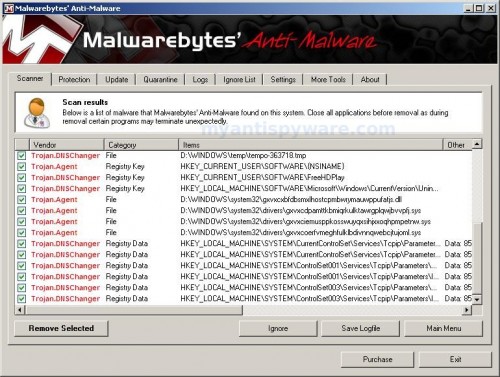
Malwarebytes Anti-malware, list of infected items
Make sure that everything is checked, and click Remove Selected. When disinfection is completed, a log will open in Notepad and you may be prompted to Restart.
Note: if you need help with the instructions, then post your questions in our Spyware Removal forum.





Avenger executed MSIVXserv.sys
and everything work back to normal
i was able to install and run malwarebytes’ and 16 were detected…
thnx alot for the instrucions…:)
Thank you for posting this. I have been looking for a solution to this for over a week. My next step was to format.
Worked like a charm!
Thanks again.
I’ve done EVERYTHING on this website and I STILL have the redirect google virus… so frustrated!
Christin, then ask for help at our Spyware removal forum.
I don’t like google and I want to know how to get out of Total Security Anti-Spyware and PC Anti Spyware and the rest of the fake
Hello,
I followed these instructions after trying many other solutions and it worked!!!
Apparent success! I had the Google redirect problem, which my McAfee couldn’t find.
The avenger didn’t find msivxserv.sys, but I went ahead with the MBAM. That found a number of items and once removed, no more Google redirect!
Thanks!
IT WORKED! it really did! it was pretty easy too, just took a while (like 30min.)
After hours of hard research work, I came across a different solution because MalWarebytes (MBAM)didn’t work for me. Try HitMan Pro (ver 3.5 is the latest as of this writing) fixed my Google & Yahoo Redirect Virus. The file culprit was named 7n8001.sys and was located in the Drivers sub-directory under C:\Windows\System32.
It took several hours of research and experimentation before I came upon this solution. I found the software on CNet. Looks like it’s free for 30 days. It’s a cloud computing solution. If you try deleting or renaming the virus yourself, it regenerates itself. It’s nasty and persistent.
As of today, 1/20/2010, the latest updates for AVG, Malwarebytes, Spybot Search & Destroy, and AdAware could not fix it. XDELBox found it but couldn’t fix it (couldn’t write to the HOSTS file in C:\Windows\System32\Drivers\ETC.)
Excellent worked a treat, thank you very much!!
G
Neither of those options worked for me. The first one didn’t remove the virus so I tried the second one – MalwareBytes – and it downloaded to my computer but wouldn’t run and didn’t show any of the screens this website said it should. My computer still has the redirect virus and it’s getting pop-ups now too.
Jeni, download TDSSKiller from here and unzip to your desktop.
Open TDSSKiller folder and double click the TDSSKiller icon. Follow the prompts.
Thx Larry HitMan Pro fixed me after 4 evenings wasted trying to resolve this redirect virus!
The Hitman Pro fixed on the first try. Have been through avenger, unhackme, and malwarebytes along with other anti virus programs. but the hitman worked.
THANKS DUDE THIS FIXED MY COMP.. THANK YOUuu!!
This didn’t work for me, but Hitman Pro 3 did.
It saved me a lot of frustration. Thanks. 🙂
HITMAN 3 has a lot of haters at cnet. most say to completely avoid this program. will not uninstall
don’t know why some one try to spam it at this site.
TDSSkiller, i’ve read some good things about it, i might try it. but will avoid hitman. go to cnet if you want to see all the complaints about hitman.
I am in safe mode and your advenger program will not open in safe and normal. UGH I have been fighting this google bug for a week now, all my scans find it and delete it then somehow it pops right back up.