If you’ve recently received an Instagram password reset email out of the blue, you’re not alone—and it’s time to pay attention. Over the past week, millions of Instagram users were hit with unsolicited password reset requests, coinciding with the sudden appearance of a massive data dump allegedly containing info on about 17 million accounts being sold on the Dark Web. This stolen data includes usernames, email addresses, phone numbers, and other personal details—but not passwords.
Instagram insists the two events aren’t connected and says they patched a glitch that allowed outsiders to trigger these reset emails. But cybersecurity experts warn the leaked data is likely a patchwork from multiple older breaches, and some shady actors may still be probing for vulnerabilities. Whether these incidents stem from one breach or several, scammers are already exploiting the fear factor—sending fake emails designed to trick you into handing over your login info. The bottom line? Don’t click any links in unexpected emails. Reset your password directly through the official Instagram app and turn on two-factor authentication to keep your account locked down tight. Stay alert, because when it comes to social media hacks, the real threat is often hidden in the details.
📩 Received an Instagram “Reset your password” Email? What You Need to Know
Last week, numerous Instagram users reported receiving unexpected password reset emails from the platform warning of a request to change their passwords.
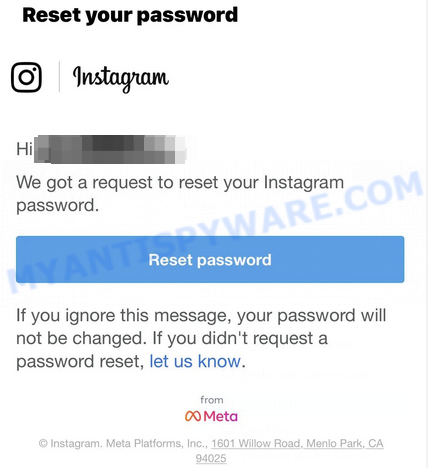
The email read:
Subject: Reset your password
“Hi {username},
We got a request to reset your Instagram password.
If you ignore this message, your password will not be changed. If you didn’t request a password reset, let us know.”
Around the same time, a cybercriminal using the alias “Solonik” offered a dataset purportedly containing information on approximately 17 million Instagram users on a Dark Web forum. This data allegedly includes:
- Usernames
- Full names
- User IDs
- Email addresses
- Phone numbers
- Countries
- Partial locations
Importantly, no passwords were found in the leaked data.
Despite the timing, Instagram has denied any connection between the password reset emails and the data leak. On X, Instagram acknowledged fixing a vulnerability that allowed third parties to trigger password reset emails for some accounts.
What Does This Mean?
Security experts suggest the leaked dataset may be a compilation from multiple, older Instagram breaches rather than a single recent incident. Additionally, some earliest password reset requests predate the public leak, indicating the data may have circulated privately before posting.
Another explanation is that a separate issue involving credential stuffing or account enumeration attacks (“spraying”) may have prompted the reset emails, which Instagram’s fix aims to address. However, no concrete links have been confirmed between the two events.
Beware of Scams
Regardless of whether these incidents are related, scammers may exploit the situation by sending fake password reset emails containing malicious links.
To stay safe:
- Do not click links in unexpected password reset emails. Instead, open the Instagram app or website directly to verify and manage your account security.
- If you want to reset your password, use the official Instagram app or website only.
- Enable two-factor authentication (2FA) on your Instagram account for added protection; with 2FA enabled, it is generally safe to ignore unsolicited reset emails.
- Review your recent logins and active sessions on Instagram, Facebook, and WhatsApp (if linked) and log out of any unknown devices or locations.
Because the leaked data involves metadata that may overlap with Facebook and WhatsApp accounts, it’s wise to check all linked accounts for suspicious activity.
How to Check If Your Data Was Leaked
To find out if your Instagram data or other accounts were included in breaches, consider using a free Digital Footprint scan. This tool can help identify compromised information and guide you on next steps.
Summary: Recent Instagram password reset emails coincide with a dataset leak affecting millions of users. Instagram has addressed a vulnerability to prevent unauthorized reset requests, but phishing scams remain a threat. Always reset passwords directly through official channels, enable 2FA, and monitor account activity closely to stay secure.
🔍 How to Spot a Phishing Email
Phishing emails often share common characteristics; they are designed to trick victims into clicking on a phishing link or opening a malicious attachment. By recognizing these signs, you can detect phishing emails and prevent identity theft:
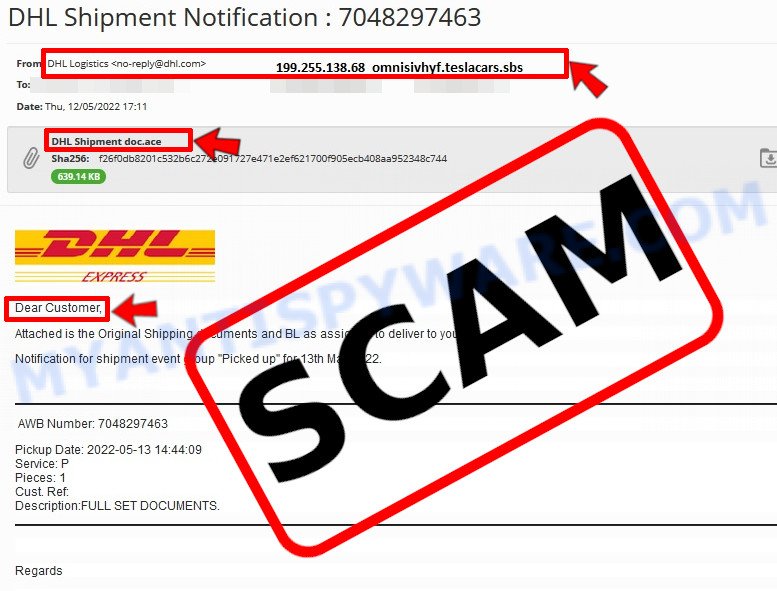
💡 Here Are Some Ways to Recognize a Phishing Email
- ✉️ Inconsistencies in Email Addresses: The most obvious way to spot a scam email is by finding inconsistencies in email addresses and domain names. If the email claims to be from a reputable company, like Amazon or PayPal, but is sent from a public email domain such as “gmail.com”, it’s probably a scam.
- 🔠 Misspelled Domain Names: Look carefully for any subtle misspellings in the domain name, such as “arnazon.com” where the “m” is replaced by “rn,” or “paypa1.com,” where the “l” is replaced by “1.” These are common tricks used by scammers.
- 👋 Generic Greetings: If the email starts with a generic “Dear Customer”, “Dear Sir”, or “Dear Madam”, it may not be from your actual shopping site or bank.
- 🔗 Suspicious Links: If you suspect an email may be a scam, do not click on any links. Instead, hover over the link without clicking to see the actual URL in a small popup. This works for both image links and text links.
- 📎 Unexpected Attachments: Email attachments should always be verified before opening. Scan any attachments for viruses, especially if they have unfamiliar extensions or are commonly associated with malware (e.g., .zip, .exe, .scr).
- ⏰ Sense of Urgency: Creating a false sense of urgency is a common tactic in phishing emails. Be wary of emails that claim you must act immediately by calling, opening an attachment, or clicking a link.
- 📝 Spelling and Grammar Errors: Many phishing emails contain spelling mistakes or grammatical errors. Professional companies usually proofread their communications carefully.
- 🔒 Requests for Sensitive Information: Legitimate organizations typically do not ask for sensitive information (like passwords or Social Security numbers) via email.
Conclusion
The recent Instagram password reset emails and the data leak involving alleged information of 17 million users highlight significant security concerns but do not indicate a direct password compromise. Instagram has addressed the issue causing unsolicited password reset requests and denies a relation between this and the dark web data dump.
However, scammers are exploiting the situation by sending fake emails designed to trick users into revealing their credentials. It’s crucial to stay vigilant and avoid clicking on links in suspicious emails. Instead, users should reset their passwords only through the official Instagram app and ensure two-factor authentication (2FA) is enabled for added security.
Bottom Line: Do not panic or respond to unsolicited password reset emails without verifying their authenticity directly in the app. Always keep your login information secure by changing passwords safely and monitoring your account’s active sessions across Instagram, Facebook, and WhatsApp. Use trusted tools, like a Digital Footprint scan, to check whether your data has been part of any breach and take necessary steps to protect your accounts.





