• Downloads
  • Threats
    • Adware
    • Browser Hijacking
    • Phishing
    • Ransomware
  • Questions and Answers
  • Recover Encrypted Files
  • Free Malware Removal Tools

MyAntiSpyware

Menu
  • Downloads
  • Threats
    • Adware
    • Browser Hijacking
    • Phishing
    • Ransomware
  • Questions and Answers
  • Recover Encrypted Files
  • Free Malware Removal Tools

RakhniDecryptor settings

Myantispyware team June 14, 2016    

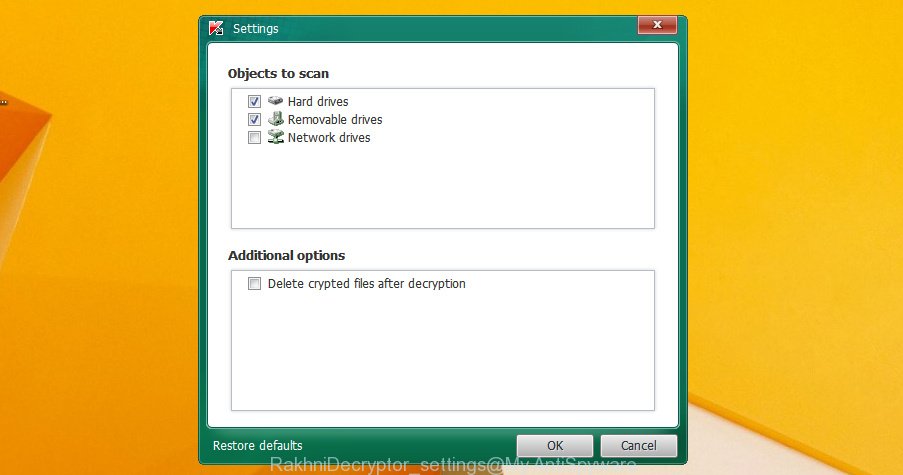
RakhniDecryptor settings window. Select the objects to scan (hard drives / removable drives / network drives).
Select the checkbox Delete crypted files after decryption (the utility will be deleting copies of original files with the .locked, .kraken and .darkness extensions).

Author: Myantispyware team

Myantispyware is an information security website created in 2004. Our content is written in collaboration with Cyber Security specialists, IT experts, under the direction of Patrik Holder and Valeri Tchmych, founders of Myantispyware.com.

Leave a Reply Cancel reply

New Guides

Derma Muse Reviews, Korean Color-Changing Foundation Stick or Scam?
MounjaBoost Reviews, “Real Pink Salt Trick” Scam & Fake Oprah Winfrey endorsements!
Unaxieck.co.in Virus Removal Guide
scam alert
Tendingum.com Virus Removal Guide
scam alert
Quenxnero.co.in Virus Removal Guide

Follow Us

Search

Useful Guides

How to reset Mozilla Firefox (Updated Apr. 2018)
remove chrome extension
How to remove Chrome extensions installed by enterprise policy
ads by adware
How to remove Adware from Windows 10 (Virus removal guide)
Smart Captcha Virus redirect
What is a Virus that Redirects Web Pages? A Comprehensive Guide
This setting is enforced by your administrator (Removal guide)

Recent Guides

Remove giraffetraffic.com pop-up ads (Instructions)
Remove hotgame4you.online pop-up ads (Instructions)
Remove stamplive.com pop-up ads (Instructions)
Remove computererror4145.in pop-up warnings (Instructions)
Remove Localhost by SaferBrowser (Instructions)

Myantispyware.com

Myantispyware has been a trusted source for computer security and technology advice since 2004. Our mission is to provide reliable tech guidance and expert, practical solutions to help you stay safe online and protect your digital life.

Social Links

Pages

About Us
Contact Us
Privacy Policy

Copyright © 2004 - 2024 MASW - Myantispyware.com.
