XP Police Antivirus is a new rogue antivirus/antispyware software that uses security warnings from your Windows taskbar and a fake Windows Security Center popups to trick you into thinking your computer is infected.
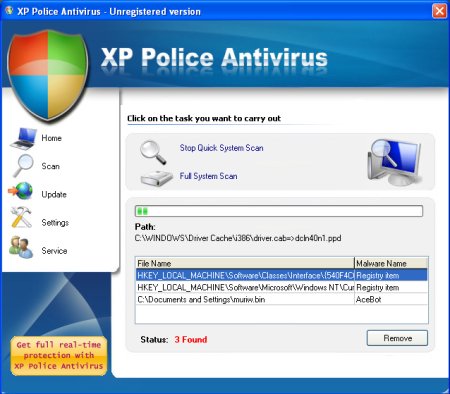
During installation, XP Police Antivirus configures itself to run automatically every time, when you start your computer. Once running, XP Police Antivirus will scan your computer and reports false or exaggerated system security threats on the PC to trick you to buy the paid version of the rogue, in order to remove the potential and reported threats.
While the XP Police Antivirus is running you may see false security alerts such as the following.
Trojan Detected!
A piece of malicious code was found in your system which can replicate itself if no action is taken. Click here to have your system cleaned by XP Police Antivirus.
These fake alerts may drastically slow the performance of your computer. Please ignore these alerts. Use the free instructions below to remove XP Police Antivirus and any associated malware from your computer.
Symptoms in a HijackThis Log.
O2 – BHO: WinSafe Class – {b6b571fb-b71d-449c-ad70-82e966328795} – C:\WINDOWS\iehost.dll
O4 – HKCU\..\Run: [PoliceAV] C:\Program Files\XPPoliceAntivirus\xppolice.exe
Use the following instructions to remove XP Police Antivirus (Uninstall instructions).
1. Remove XP Police Antivirus registry entries and files.
- Download Avenger from here and unzip to your desktop.
- Run Avenger, copy,then paste the following text in Input script Box:
Registry keys to delete:

HKEY_LOCAL_MACHINE\SOFTWARE\Microsoft\Windows\CurrentVersion\Explorer\Browser Helper Objects\{b6b571fb-b71d-449c-ad70-82e966328795}
Files to delete:
%windir%\iehost.dll
%windir%\system32\iehelper.dllFolders to delete:
%programfiles%\XPPoliceAntivirusThen click on ‘Execute’.
- You will be asked Are you sure you want to execute the current script?. Click Yes.
- You will now be asked First step completed — The Avenger has been successfully set up to run on next boot. Reboot now?. Click Yes.
- Your PC will now be rebooted.
2. Remove XP Police Antivirus associated malware.
- Download MalwareBytes Anti-malware (MBAM). Close all programs and Windows on your computer.
- Double Click mbam-setup.exe to install the application. When the installation begins, keep following the prompts in order to continue with the installation process. Do not make any changes to default settings and when the program has finished installing, make sure a checkmark is placed next to Update Malwarebytes’ Anti-Malware and Launch Malwarebytes’ Anti-Malware, then click Finish.
- If an update is found, it will download and install the latest version.
- Once the program has loaded, select “Perform Quick Scan”, then click Scan.
- The scan may take some time to finish,so please be patient.
- When the scan is complete, click OK, then Show Results to view the results.
- Make sure that everything is checked, and click Remove Selected.
- When disinfection is completed, a log will open in Notepad and you may be prompted to Restart.
Note: If you need help with the instructions, then post your questions in our Spyware Removal forum.
XP Police Antivirus creates the following files and folders.
%UserProfile%\Desktop\XP Police Antivirus.LNK
%UserProfile%\Start Menu\XP Police Antivirus.LNK
%ProgramFiles%\XPPoliceAntivirus
%ProgramFiles%\XPPoliceAntivirus\AVCoreFn.dll
%ProgramFiles%\XPPoliceAntivirus\bdconf.cfg
%ProgramFiles%\XPPoliceAntivirus\Core.dll
%ProgramFiles%\XPPoliceAntivirus\setup.dat
%ProgramFiles%\XPPoliceAntivirus\xppolice.exe
%ProgramFiles%\XPPoliceAntivirus\Plugins
%ProgramFiles%\XPPoliceAntivirus\Plugins\ceva_dll.cvd
%ProgramFiles%\XPPoliceAntivirus\Plugins\ceva_emu.cvd
%ProgramFiles%\XPPoliceAntivirus\Plugins\ceva_vfs.cvd
%ProgramFiles%\XPPoliceAntivirus\Plugins\ceva_vfs.ivd
%ProgramFiles%\XPPoliceAntivirus\Plugins\cevakrnl.cvd
%ProgramFiles%\XPPoliceAntivirus\Plugins\cevakrnl.ivd
%ProgramFiles%\XPPoliceAntivirus\Plugins\cevakrnl.rvd
%ProgramFiles%\XPPoliceAntivirus\Plugins\cookie.cvd
%ProgramFiles%\XPPoliceAntivirus\Plugins\cran.cvd
%ProgramFiles%\XPPoliceAntivirus\Plugins\cran.ivd
%ProgramFiles%\XPPoliceAntivirus\Plugins\e_spyw.cvd
%ProgramFiles%\XPPoliceAntivirus\Plugins\e_spyw.ivd
%ProgramFiles%\XPPoliceAntivirus\Plugins\emalware.ivd
%ProgramFiles%\XPPoliceAntivirus\Plugins\gvmscripts.cvd
%ProgramFiles%\XPPoliceAntivirus\Plugins\hpe.cvd
%ProgramFiles%\XPPoliceAntivirus\Plugins\java.cvd
%ProgramFiles%\XPPoliceAntivirus\Plugins\mdx_97.cvd
%ProgramFiles%\XPPoliceAntivirus\Plugins\mdx_97.ivd
%ProgramFiles%\XPPoliceAntivirus\Plugins\mdx_w95.cvd
%ProgramFiles%\XPPoliceAntivirus\Plugins\mdx_x95.cvd
%ProgramFiles%\XPPoliceAntivirus\Plugins\mdx_xf.cvd
%ProgramFiles%\XPPoliceAntivirus\Plugins\mobmalware.cvd
%ProgramFiles%\XPPoliceAntivirus\Plugins\na.cvd
%ProgramFiles%\XPPoliceAntivirus\Plugins\nelf.cvd
%ProgramFiles%\XPPoliceAntivirus\Plugins\regarch.cvd
%ProgramFiles%\XPPoliceAntivirus\Plugins\regscan.cvd
%ProgramFiles%\XPPoliceAntivirus\Plugins\rup.cvd
%ProgramFiles%\XPPoliceAntivirus\Plugins\sdx.cvd
%ProgramFiles%\XPPoliceAntivirus\Plugins\sdx.ivd
%ProgramFiles%\XPPoliceAntivirus\Plugins\unpack.cvd
%ProgramFiles%\XPPoliceAntivirus\Plugins\unpack.ivd
%ProgramFiles%\XPPoliceAntivirus\Plugins\vb0.dat
%ProgramFiles%\XPPoliceAntivirus\Plugins\vb1.dat
%ProgramFiles%\XPPoliceAntivirus\Plugins\vb2.dat
%ProgramFiles%\XPPoliceAntivirus\Plugins\ve.cvd
%ProgramFiles%\XPPoliceAntivirus\Plugins\ve.ivd
%ProgramFiles%\XPPoliceAntivirus\Plugins\vedata.cvd
%ProgramFiles%\XPPoliceAntivirus\sounds
%ProgramFiles%\XPPoliceAntivirus\sounds\alert.wav
%ProgramFiles%\XPPoliceAntivirus\sounds\click.wav
%ProgramFiles%\XPPoliceAntivirus\sounds\fire.wav





hi sir plz give free xp police antivirus for trial
alokpatel, xp police antivirus is rogue antivirus program. If you need free antivirus/antispyware then clickhere.
Thank you very much for this post. I had deleted all of the programfiles files, but you helped me find that horrible BHO that kept me from being able to run my IE!
thanks for the help
thanks for the help..i thought my computer was really infected..thanks again=)