Trojan Vundo also known as VirtuMonde and Adware.VirtuMonde is a very dangerous infection. The trojan uses rootkit-specific techniques designed to hide the software presence in the system (random names, random autorun locations and random CLSIDs). Once running, trojan Vundo will displays popup advertisements and a fake security alerts, offers to install other potentially unwanted software and rogue antispyware applications.
Trojan Vundo infection symptoms.
- Popups.
- Slow computer speeds.
- Security alerts with a message stating that your computer is infected with spyware and that you must download and install a rogue (fake) antispyware.
- Your antivirus program notify you via an alert that you have a Trojan Vundo.
Symptoms in a HijackThis Log.
O2 – BHO: WTLHelper Object – {75DC57F8-D831-4AB8-86B7-4F826F4A0873} – C:\WINDOWS\system32\unnqw.dll
O2 – BHO: (no name) – {10654df0-1449-4b62-82e9-9a6f61cc2ed7} – C:\WINDOWS\system32\yehifuni.dll (file missing)
O4 – HKLM\..\Run: [risawenifa] Rundll32.exe “C:\WINDOWS\system32\lujivoni.dll”,s
O4 – HKLM\..\Run: [CPM3b906d0c] Rundll32.exe “c:\windows\system32\henemate.dll”,a
O4 – HKLM\..\Run: [38a35e90] rundll32.exe “C:\WINDOWS\system32\wavemile.dll”,b
O4 – HKLM\..\Run: [prunnet] “C:\WINDOWS\system32\prunnet.exe”
O4 – HKLM\..\Run: [jsf8j34rgfght] C:\DOCUME~1\user\LOCALS~1\Temp\winloggn.exe
O4 – HKCU\..\Run: [gadcom] “C:\Documents and Settings\user\Application Data\gadcom\gadcom.exe” 61A847B5BBF728173599284503996897C881250221C8670836AC4FA7C8833201749139
O4 – HKUS\S-1-5-19\..\Run: [risawenifa] Rundll32.exe “C:\WINDOWS\system32\lujivoni.dll”,s (User ‘LOCAL SERVICE’)
O4 – HKUS\S-1-5-20\..\Run: [risawenifa] Rundll32.exe “C:\WINDOWS\system32\lujivoni.dll”,s (User ‘NETWORK SERVICE’)
O20 – AppInit_DLLs: c:\windows\system32\kabunabo.dll c:\windows\system32\pasaruwe.dll c:\windows\system32\vinomisu.dll c:\windows\system32\zahuzihi.dll C:\WINDOWS\system32\tazeyubo.dll C:\WINDOWS\system32\wifufulu.dll c:\windows\system32\gesekise.dll c:\windows\system32\kelinepe.dll c:\windows\system32\henemate.dll
O21 – SSODL: SSODL – {EC43E3FD-5C60-46a6-97D7-E0B85DBDD6C4} – c:\windows\system32\kelinepe.dll
O22 – SharedTaskScheduler: STS – {EC43E3FD-5C60-46a6-97D7-E0B85DBDD6C4} – c:\windows\system32\kelinepe.dll
Note: Trojan Vundo uses random names, random autorun locations and random CLSIDs for hide itself.
Automated Removal Instructions for Trojan Vundo using Malwarebytes Anti-malware
Download MalwareBytes Anti-malware (MBAM). Close all programs and Windows on your computer.
Double Click mbam-setup.exe to install the application. When the installation begins, keep following the prompts in order to continue with the installation process. Do not make any changes to default settings and when the program has finished installing, make sure a checkmark is placed next to Update Malwarebytes’ Anti-Malware and Launch Malwarebytes’ Anti-Malware, then click Finish.
If an update is found, it will download and install the latest version.
Once the program has loaded you will see window similar to the one below.

Malwarebytes Anti-Malware Window
Select “Perform Quick Scan”, then click Scan. The scan may take some time to finish,so please be patient.
When the scan is complete, click OK, then Show Results to view the results. You will see a list of infected items similar as shown below. Note: list of infected items may be different than what is shown in the image below.
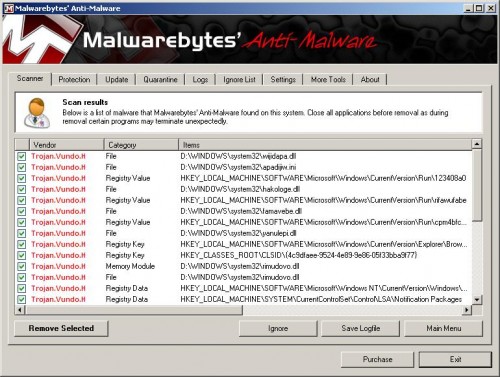
Malwarebytes Anti-malware, list of infected items
Make sure that everything is checked, and click Remove Selected. When disinfection is completed, a log will open in Notepad and you may be prompted to Restart.
Automated Removal Instructions for Trojan Vundo using VundoFix
Download VundoFix and save the file to your desktop.
Once it downloaded, double-click VundoFix.exe to run it.
Click the Scan for Vundo button.
Once it’s done scanning, click the Remove Vundo button.
You will receive a prompt asking if you want to remove the files, click YES.
Once you click yes, your desktop will go blank as it starts removing Vundo.
When completed, it will prompt that it will shutdown your computer, click OK.
Turn your computer back on.
Note: If you need help with the instructions, then post your questions in our Spyware Removal forum.





Notthing were found on VundoFix and VirtumundoBegone. what should i do?
Please follow these steps. I will help you.
What is the rason that VirtumundoBegone is going to crash you comp?