1. Been infected with spyware? Tell us about your problem.
2. Protect your PC from viruses, spyware.
3. For fast automatic spyware removal, try CounterSpy, SUPERAntiSpyware

International Computer Security Day — November 30

Here are just a few suggestions on what you can you do:

– Change your password(s) to strong passwords. At minimum, mix upper case and lower case letters, numbers, and special symbols. Thelonger the better!
– < *cough*> Remove the “sticky” from under your keyboard that has all your passwords written on it!
– Update your Anti-virus software and run a full system scan
– Check for Windows updates
– Delete unneeded files
– Back up important files
– Take a few minutes to read Anti Spyware Tips.

November 30, 2005 on 8:57 am | In Tips | No Comments |
Submit to: Digg | SlashDot | Del.icio.us

RootkitRevealer -Scan your computer for rootkit now

RootkitRevealer is an advanced patent-pending root kit detection utility. It runs on Windows NT 4 and higher and its output lists Registry and file system API discrepancies that may indicate the presence of a user-mode or kernel-mode rootkit. RootkitRevealer successfully detects all persistent rootkits published at www.rootkit.com, including AFX, Vanquish and HackerDefender (note: RootkitRevealer is not intended to detect rootkits like Fu that don’t attempt to hide their files or registry keys). If you use it to identify the presence of a rootkit please let us know!

The reason that there is no longer a command-line version is that malware authors have started targetting RootkitRevealer’s scan by using its executable name. We’ve therefore updated RootkitRevealer to execute its scan from a randomly named copy of itself that runs as a Windows service. This type of execution is not conducive to a command-line interface. Note that you can use command-line options to execute an automatic scan with results logged to a file, which is the equivalent of the command-line version’s behavior.

How RootkitRevealer Works
Since persistent rootkits work by changing API results so that a system view using APIs differs from the actual view in storage, RootkitRevealer compares the results of a system scan at the highest level with that at the lowest level. The highest level is the Windows API and the lowest level is the raw contents of a file system volume or Registry hive (a hive file is the Registry’s on-disk storage format). Thus, rootkits, whether user mode or kernel mode, that manipulate the Windows API or native API to remove their presence from a directory listing, for example, will be seen by RootkitRevealer as a discrepancy between the information returned by the Windows API and that seen in the raw scan of a FAT or NTFS volume’s file system structures.

Can a Rootkit hide from RootkitRevealer?
It is theoretically possible for a rootkit to hide from RootkitRevealer. Doing so would require intercepting RootkitRevealer’s reads of Registry hive data or file system data and changing the contents of the data such that the rootkit’s Registry data or files are not present. However, this would require a level of sophistication not seen in rootkits to date. Changes to the data would require both an intimate knowledge of the NTFS, FAT and Registry hive formats, plus the ability to change data structures such that they hide the rootkit, but do not cause inconsistent or invalid structures or side-effect discrepancies that would be flagged by RootkitRevealer.

Is there a sure-fire way to know of a rootkit’s presence?
In general, not from within a running system. A kernel-mode rootkit can control any aspect of a system’s behavior so information returned by any API, including the raw reads of Registry hive and file system data performed by RootkitRevealer, can be compromised. While comparing an on-line scan of a system and an off-line scan from a secure environment such as a boot into an CD-based operating system installation is more reliable, rootkits can target such tools to evade detection by even them.

The bottom line is that there will never be a universal rootkit scanner, but the most powerful scanners will be on-line/off-line comparison scanners that integrate with antivirus.

Using RootkitRevealer
RootkitRevealer requires that the account from which its run has assigned to it the Backup files and directories, Load drivers and Perform volume maintenance tasks (on Windows XP and higher) privileges. The Administrators group is assigned these privileges by default. In order to minimize false positives run RootkitRevealer on an idle system.

Download RootkitRevealer

November 29, 2005 on 8:50 am | In Free Software, Tips | No Comments |
Submit to: Digg | SlashDot | Del.icio.us

Autoruns - Hunt down autostart programs wherever they hide

Why does logon take so long? What are all those icons in the system tray? How do I stop programs from starting automatically? How do I get rid of that strange error that keeps cropping up during logon? You’ve probably heard these questions plenty of times, especially from Windows users who are working on new systems that came preloaded with applications or on older systems on which they’ve installed numerous programs over time. This month, I’m taking a break from writing about the tools in the Systinternals PsTools suite to discuss a free tool that can answer those questions: Sysinternals Autoruns.

Upon installation, many applications configure themselves to start automatically when you log on. Applications do this so that they can automatically check for updates, because they use system tray icons to interact with users, or because they add functionality to Windows components such as Windows Explorer. However, most such applications don’t ask permission before inserting themselves in your logon process and almost never provide an interface to let you disable their autostart functionality.

Windows Server 2003 and Windows XP include the System Configuration utility (Msconfig.exe), which is based on a similar tool in Windows Me. Msconfig features a Startup tab that lists and lets you disable certain items that run automatically when you log on. However, Msconfig has two major limitations: It displays items from only a fraction of the locations in which autostart applications can hide and it shows limited information about the items it does list. Furthermore, if you run Windows 2000 or Windows NT 4.0, you’re out of luck. Neither OS contains Msconfig or other built-in tools to report components that automatically execute at logon.

You can use Autoruns not only to identify the applications that have configured themselves to start at logon but to see all the locations where autostart applications might be configured on the system. Autoruns works on all versions of Windows, including Windows Me and Windows 9x. You can download the tool at http://www.sysinternals.com/utilities/autoruns.html.

What You See
Autoruns displays each location that contains autostart items, or images, in the order in which the locations are processed during system startup and user logon; all images in each location are listed in alphabetical order. Besides providing insight into the Windows logon process, this order can have important repercussions: Programs that launch first might be overwritten by programs that launch later.

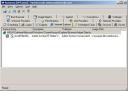
Autoruns displays more information about each image than Msconfig does. Autoruns lists each entry in the subkey, as well as a description of the entry’s corresponding image, the company that created the image, and the path to the image file. For example, Figure 2 shows the contents of the HKEY_LOCAL_MACHINE\SOFTWARE\Microsoft\Windows\CurrentVersion\Run registry subkey, which Windows Explorer processes during logon. Msconfig would report the Synchronization Manager entry but would list the entry only as mobsync and would provide the corresponding startup command. As you can see in Figure 1, however, Autoruns lists the entry as Synchronization Manager under its corresponding registry subkey, HKLM\SOFTWARE\Microsoft\Windows\CurrentVersion\Run. The tool lists a description—Microsoft Synchronization Manager—that helps identify the image as being related to offline file synchronization. You can see that the image is from Microsoft—information that can help you remove unnecessary entries created by non-Windows components. And Autoruns lists the path to the image file (C:\WINDOWS\SYSTEM32\MOBSYNC.EXE).

Autoruns obtains the description and company name from the image’s version data, which stores details that help identify the image and its purpose. You can examine the rest of an image’s version information by selecting the image and choosing Entry, Properties from Autoruns’ menu bar or by right-clicking the image and selecting Properties from the context menu.

Autoruns gives you the option to show only images that are unsigned, or not published by Microsoft; just select View, Hide Signed Microsoft Entries. An image is said to be signed when it includes a digital signature issued by a digital signing authority that the system’s security policy trusts. Unsigned images’ company names will be preceded by (Not verified) in Autoruns’ display.

Autoruns doesn’t show an image’s startup command, but you can find that information by double-clicking the entry or by selecting the entry and choosing Entry, Jump To. If the image is in the registry, Autoruns executes regedit and navigates to the appropriate subkey or entry. If the image is in the file system, which is the case for items in the Start menu’s Startup folder, Autoruns opens Windows Explorer and navigates to the directory that contains the image.

Autoruns focuses on images that execute when you log on, but many components run as Windows services and automatically execute when the system boots. For example, to toggle Autoruns’ display of autostart services, select View, Show Services; to see Windows Explorer add-ons, select View, Show Explorer Addons.

Where They Hide
Autoruns usually lists more entries than Msconfig because Msconfig is programmed to be aware of only some of the two dozen or so startup entries honored by Windows and its logon components. For example, consider the HKEY_LOCAL_MACHINE\SOFTWARE\Microsoft\Windows NT\CurrentVersion\Winlogon\Userinit registry subkey, shown in Figure 1 as HKLM\SOFTWARE\Microsoft\WindowsNT\CurrentVersion\Winlogon\Userinit. After you interactively log on to a system, the Winlogon process executes the program listed in this subkey (userinit.exe by default). Userinit.exe executes logon scripts, restores drive letter and printer mappings, and applies configured Group Policy settings. Msconfig doesn’t list this image.

The list of locations in which applications can configure themselves is astounding (see Top 10, “Windows Program Startup Locations,” December 2002, InstantDoc ID 27100 for a few examples), and nowhere does Microsoft documentation provide the entire list. Autoruns has evolved and continues to evolve over time to include more and more of these locations as Autoruns coauthor Bryce Cogswell and I learn of them. For instance, a Microsoft employee recently told us about the HKEY_LOCAL_MACHINE\Software\Microsoft\Active Setup\Installed Components subkey, a location not publicly documented by Microsoft or listed by Msconfig but known by a worm that hides its automatic activation there. To see all the locations that Autoruns knows about, select all the View menu items that begin with Show, then select View, Include Empty Locations.

What to Do
Like Msconfig, Autoruns lets you temporarily disable an entry by clearing the item’s check box. When you do so, Autoruns moves the entry into a backup location in the registry or file system. For example, if you disable an entry under the HKEY_LOCAL_MACHINE\SOFTWARE\Microsoft\Windows\CurrentVersion\Run subkey, Autoruns creates an AutorunsDisabled subkey under that registry subkey and moves the entry’s value into AutorunsDisabled. When you disable an entry in the Startup folder, Autoruns creates a subdirectory named Autorunsdisabled, into which it moves the disabled entry. When you log on, Windows Explorer opens the Autorunsdisabled folder so that you can see any disabled entries.

Autoruns also lets you permanently delete enabled or disabled entries by selecting the entry and typing Ctrl+D or by selecting Entry, Delete from the menu bar. Before you delete an item, though, you might want to save the Autoruns output to a text file for archiving purposes. To do so, choose File, Save.

Until Next Month
I recommend you run Autoruns as a general housekeeping task on all your computers and make sure you understand all the programs configured to start during logon. You might find things that have crept in over time and that you’ll want to remove. As always, please send me details of your experiences with the Sysinternals tools so that I can report about them in this column.

Mark Russinovich, Windows Power Tools, InstantDoc #44089, Windows IT Pro

November 29, 2005 on 8:38 am | In Free Software, Tips | No Comments |
Submit to: Digg | SlashDot | Del.icio.us

MVPS Hosts File - You can use a HOSTS file to block ads, banners, cookies, web bugs, and even most hijackers

You can use a HOSTS file to block ads, banners, cookies, web bugs, and even most hijackers. This is accomplished by blocking the Server that supplies these little gems. Example - the following entry 127.0.0.1 ad.doubleclick.net blocks all files supplied by the DoubleClick Server to the web page you are viewing. This also prevents the server from tracking your movements.

In many cases this can speed the loading of web pages by not having to wait for these ads, banners, hit counters, etc. to load. This also helps to protect your Privacy by blocking servers that track your viewing habits, known as “click-thru tracking”. Another feature of the HOSTS file is it’s ability to block other applications from connecting to the Internet, as long the the entry exists.

More Info: MVPS Hosts, Here’s how to use the HOST file to block ads

Donwload new host file from MVPS:
http://www.mvps.org/winhelp2002/hosts.htm
http://www.mvps.org/winhelp2002/hosts.zip
http://www.mvps.org/winhelp2002/hosts.txt

November 27, 2005 on 8:31 pm | In Free Software, Tips | No Comments |
Submit to: Digg | SlashDot | Del.icio.us

Ewido security suite 3.5 - Complement your existing protection system today

Ewido security suite offer you realtime protection against these threats:
# Hijackers and Spyware
Secure surfing in the Internet without fear of annoying changes of the start page of your browser, tracking cookies and advertising bars.
# Worms
Nobody should receive e-mails in your name with malicious files in the appendix anymore.
# Dialers
Security against all kinds of dialers. No fear when receiving the next phone bill.
# Trojans and Keyloggers
No chance for thieves to steal your bank data and personal sensitive information by tapped Internet connections, remote controlled webcams or secret keyboard recordings.

Update:

ewido anti-spyware 4.0 will now continue under the new product name AVG Anti-Spyware 7.5. AVG Anti-Spyware 7.5 contains the same ewido technology, but with some further enhanced features:

  • Highly improved cleaning
  • Lower resource usage
  • Additional languages supported

All current licenses for ewido anti-spyware 4.0 will continue to be valid, and users can change over to the new AVG Anti-Spyware 7.5 for free.

Free download now

This setup contains the free as well as the paid version of AVG Anti-Spyware. After the installation, a free 30-day trial version containing all the extensions of the full version will be activated. At the end of the trial, these extensions will be deactivated and the program will turn into a feature-limited freeware version. The purchased license code can be entered at any time.

November 27, 2005 on 8:22 pm | In Best Programs, Free Software, Spyware protection and removal | 2 Comments |
Submit to: Digg | SlashDot | Del.icio.us

MS05-051 POC Exploit

A proof of concept (PoC) exploit was released against systems vulnerable
to MS05-051. MS05-051 was released in October. The vulnerability does allow for
arbitrary code execution in systems with the Microsoft Distriuted Transaction Coordinator (MSDTC) enabled.

In order to disable MSDTC, enter the following command:

sc stop MSDTC & sc config MSDTC start= disabled

By default, port 3372 is used by the exploit. The packet send will cause a denial of service condition. At this point, we see only little activity at port 3372, likely due to the fact that this PoC exploit does not actually execute any “useful” code.

November 27, 2005 on 8:12 pm | In Exploits & Vulnerabilities | No Comments |
Submit to: Digg | SlashDot | Del.icio.us

How to detect keylogger on my computer ?

Why Keyloggers Threaten Your Privacy

1. Surveillance software is very common nowadays. A Google search on keyloggers yields 39,000+ results.
2. Software mentioned in (1) has a bunch of features to record your activity in every possible way. See some features here.
3. Due to their “good purpose”, keyloggers and other types of surveillance software are not detected by AntiVirus programs.
4. Most keyloggers are more threatening than the so-called spyware. Keyloggers can record your passwords, emails, credit card number, etc.
5. Some keyloggers can even be installed remotely. Google search here.
6. Most (if not all) keyloggers are invisible. This means you will not know if a keylogger is running on your system.
7. More and more people are using keyloggers or surveillance software. These include your friends, spouse, employer, etc.
8. The recorded keystrokes can be sent to an email address. So physical access to your computer is not necessary.
9. Public computers (e.g. public library’s) might have keyloggers installed. It is just a possibility.
10. You value your privacy, don’t you?

Use follow software for detect keylogger

1. Kldetector - small free program for detecting keyloggers
2. SnoopFree Privacy Shield - informs you when another programme is wanting to log your keystrokes

November 26, 2005 on 4:24 am | In FAQ, Free Software, Identity Theft, Tips, Tutorials - "How to" | No Comments |
Submit to: Digg | SlashDot | Del.icio.us

Update Spybot S&D Detection Rules, 11/25/2005

Dialer
+ DialerPlatform

Hijacker
+ CoolWWWSearch.SearchAssistant
+ Smitfraud-C.
+ CoolWWWSearch.Feat2Installer
+ CoolWWWSearch.Service
+ CoolWWWSearch.Feat2DLL

Keylogger
+ Phoenix

Malware
+ VirtuMonde
+ SintCorporation

PUPS
+ Download Accelerator Plus

Trojan
+ Z-Quest

Update your SpyBot now

November 26, 2005 on 4:10 am | In Free Software, Spyware protection and removal | No Comments |
Submit to: Digg | SlashDot | Del.icio.us

How to Remove Trojan Vundo / Winfixer / Virtumonde?

VirtuMonde is an adware program that downloads and displays popup advertisements. It may also hijack the browser to unwanted advertising related sites.

There is a free removal tool offered by Symantec here:
http://securityresponse.symantec.com/avcenter/venc/data/trojan.vundo.removal.tool.html

Follow the removal directions on the download page. Run the tool twice with a reboot inbetween to be sure it got everything.

Read also How to remove Trojan Vundo (VirtuMonde, WindowsUpd, Adware.VirtuMonde, TrojanDownloader.Win32.Agent.e, ADW_TARGETSOFT.A)

November 26, 2005 on 4:06 am | In Trojan, Tutorials - "How to" | No Comments |
Submit to: Digg | SlashDot | Del.icio.us

New Version of MYTOB is causing an escalation of Risk Alert

We just received notification that Trend Micro has raised the Alert for the new MYTOB virus to medium. Trend Micro has an excellent write up at:

Mytob.MX

The worm appears to be memory resident and spreads by sending a copy of itself as an attachment (account-password.zip) in an email message using its own Simple Mail Transfer Protocol (SMTP) engine. It also installs malware which Trend Micro is calling TROJ_MONURL.D. Trend Micro has removal instructions and more information about the malware at the link above.
Use extreme care when opening your email. Do not open zip files or other attachments that you are not expecting to receive or from suspicios emails.

November 24, 2005 on 8:18 pm | In Worms | No Comments |
Submit to: Digg | SlashDot | Del.icio.us

CounterSpy Protects Against New Spyware Keylogger

The spyware keylogger, named Srv.SSA-KeyLogger, secretly steals data from users’ Internet sessions, including logins and passwords from online banking sessions, eBay, PayPal, and other programs that use html forms to collect personal information. It is a new variant of existing Trojans known by a variety of names, including Troj/Dumaru-BD, Troj/Dumaru-ALTroj/Dumaru-BO, BackDoor-CCT.gen, and Backdoor.Nibu.L.

Note that all of the infections we have observed of this keylogger are on older unpatched Windows XP systems, underscoring the need to have Windows XP SP 2 installed. To protect users from this harmful keylogger, new definitions have been added to Sunbelt’s spyware threat database that powers both CounterSpy and CounterSpy Enterprise. All current customers will receive the latest definition updates.

Make sure the definitions of CounterSpy Consumer are updated to version 261 (and 256 for CounterSpy 1.0.29) by clicking on File, Check for updates and test your PC for this new spyware.

Visit the SSA-KeyLogger cleaning page (Version 21.00, updated Nov 7) to download a free utility to detect and remove the SSA-KeyLogger spyware.

If your PC is infected, and Srv.SSA-KeyLogger shows up as quarantined by CounterSpy, that means your personal information has been compromised. Make sure to warn any financial institution (Banks, PayPal, eBay, stock broker, etc) you have checked via this PC and change your passwords for these accounts immediately!

Download CounterSpy.

November 24, 2005 on 8:14 pm | In Identity Theft, Spyware protection and removal | No Comments |
Submit to: Digg | SlashDot | Del.icio.us

Spyware and adware invades your PC without your knowledge or permission!

CounterSpy is a complete spyware fighting utility. It utilizes memory-resident spyware cookie detection so that websites you visit cannot track your movements. It also allows users to schedule scans at convenient intervals. Best of all, it runs scans quickly and efficiently so that your computer’s resources are not taxed unnecessarily.

CounterSpy is able to catch more spyware than almost every other utility on the market because the CounterSpy threat database (with the signatures of every spyware and malware utility we can identify) is constantly updated. Our researchers constantly look for ways to improve our spyware searching database so that it catches all spyware that could potentially be on your system. Keyloggers, spyware cookies, remote access trojans (backdoors), and more are all identified.

Click here to download your free 15 day trial of CounterSpy

November 24, 2005 on 8:12 pm | In Spyware protection and removal | No Comments |
Submit to: Digg | SlashDot | Del.icio.us

SANS Top 20 Internet Security Vulnerabilities

This year’s SANS Top 20 Internet Security Vulnerabilities were announced this morning. Details are at http://www.sans.org/top20. You will see that the format has changed a bit this year.

Top Vulnerabilities in Windows Systems
W1. Windows Services
W2. Internet Explorer
W3. Windows Libraries
W4. Microsoft Office and Outlook Express
W5. Windows Configuration Weaknesses

Top Vulnerabilities in Cross-Platform Applications
C1. Backup Software
C2. Anti-virus Software
C3. PHP-based Applications
C4. Database Software
C5. File Sharing Applications
C6. DNS Software
C7. Media Players
C8. Instant Messaging Applications
C9. Mozilla and Firefox Browsers
C10. Other Cross-platform Applications

Top Vulnerabilities in UNIX Systems
U1. UNIX Configuration Weaknesses
U2. Mac OS X

November 23, 2005 on 5:40 am | In Exploits & Vulnerabilities | No Comments |
Submit to: Digg | SlashDot | Del.icio.us

New Sober Variants

Antivirus software does not provide any reliable protection against current threats. Viruses like Sober tend to change every few hours well in advance of AV signature updates. The fact that an attachment did not get marked is no indication that it is harmless. We do receive reports of up to date versions of AV software missing some of the recent Sober variants.
Sober is now considered the “largest virus outbreak of the year” according to F-Secure (thanks Matthias J. for pointing this out). It looks like the fake FBI e-mails are working for them.
Note from reader Marc R: Please do not have your AV software reply to viruses. All commonly seen viruses use fake ‘From:’ headers. Rumor has it that fbi.gov is having a hrad time keeping up with all the bounces in the first place.
One not of interested: We had another Sober outbreak last year in June, around the same time we had the “Download.ject”. Download.Ject (aka Berbew) used a Internet Explorer exploit to download and install a trojan. A number of well known, trusted, web sites had been compromissed and spread the trojan.
None of these does anything new or fancy. They all try to trick users into executing the attached ZIP file. The best defense at this point is probably to strip ZIP file attachments.
The subjects and the body text vary widely. Many of them suggest that the attachment was sent by some government authority (FBI, CIA) and requests that you open it in order to verify some charges brought against you. A version in German refers to the ‘BKA’ (German equivalent of FBI). Other versions claim to be sent by banks and ask you to open an attachment to verify account details.

List of links about Sober:

Symantec (Level 3 risk) W32.Sober.X@mm

http://securityresponse.symantec.com/avcenter/venc/data/w32.sober.x@mm.html

McAfee (currently Low risk) W32/Sober@MM!M681
http://vil.nai.com/vil/content/v_137072.htm

Trend Micro (Medium risk) WORM_SOBER.AG
http://www.trendmicro.com/vinfo/virusencyclo/default5.asp?VName=WORM%5FSOBER%2EAG

F-Secure (Radar Level 2) Sober.Y
http://www.f-secure.com/v-descs/sober_y.shtml

Sophos (low risk) W32/Sober-{X, Z}
http://www.sophos.com/virusinfo/analyses/w32soberx.html
http://www.sophos.com/virusinfo/analyses/w32soberz.html

Computer Associates (Medium risk) Win32.Sober.W
http://www3.ca.com/securityadvisor/virusinfo/virus.aspx?id=49473

Panda Antivirus (Medium risk) Sober.Y
http://www.pandasoftware.com/virus_info/encyclopedia/overview.aspx?IdVirus=92673&sind=0

November 23, 2005 on 5:31 am | In Virus | No Comments |
Submit to: Digg | SlashDot | Del.icio.us

How to Disable System Restore in Windows ME or Windows XP

One of the best features of Windows ME or XP is the System Restore option, however if a virus infects a computer with this operating system the virus may be accidentally backed up because of this feature. In order to completely remove a virus on these operating systems, you should disable System Restore before cleaning the system, then reenable it after the system is clean.

Disabling System Restore on Windows ME
1. Click Start, Settings, and then click Control Panel.
2. Double-click the System icon. The System Properties dialog box appears.

NOTE: If the System icon is not visible, click “View all Control Panel options” to display it.

3. Click the Performance tab, and then click File System.
4. Click the Troubleshooting tab, and then check Disable System Restore.
5. Click OK. Click Yes, when you are prompted to restart Windows.

Once you have cleaned the virus or other problem from the computer, reenable System Restore by following these directions

To enable Windows Me System Restore:

1. Click Start, point to Settings, and then click Control Panel.
2. Double-click System, and then click the Performance tab.
3. Click File System, and then click the Troubleshooting tab.
4. Uncheck Disable System Restore.
5. Click OK. Click Yes, when you are prompted to restart Windows.

Disabling System Restore on Windows XP

IMPORTANT NOTES:

* You must be logged in as an Administrator to do this. If you are not logged in as an Administrator, the System Restore tab will not be displayed.
* Turning off System Restore will clear out all previous restore points.

To turn off Windows XP System Restore:

NOTE: These instructions assume that you are using the default Windows XP Start Menu and have not changed to the Classic Start menu. To re-enable the default menu, right-click Start, click Properties, click Start menu (not Classic) and then click OK.

1. Click Start.
2. Right-click the My Computer icon, and then click Properties.
3. Click the System Restore tab.
4. Check “Turn off System Restore” or “Turn off System Restore on all drives” as shown in this illustration:
5. Click Apply.
6. When turning off System Restore, the existing restore points will be deleted. Click Yes to do this.
7. Click OK.
8. Proceed with what you need to do; for example, virus removal. When you have finished, restart the computer and follow the instructions in the next section to turn on System Restore.

To turn on Windows XP System Restore:

1. Click Start.
2. Right-click My Computer, and then click Properties.
3. Click the System Restore tab.
4. Uncheck “Turn off System Restore” or “Turn off System Restore on all drives.”
5. Click Apply, and then click OK.

Re-enabling System Restore in Windows XP via the Group Policy Editor

In some cases, System Restore is disabled via the Group Policy Editor. In these cases, System Restore does not show up as a tab under My Computer Properties in Windows XP. If it doesnt show up, the question becomes how do you turn it on in the first place. To re-enable System Restore via the Group Policy Editor, follow these directions:

1) Start the Group Policy Editor by clicking on Start, Run and typing gpedit.msc in the Run box and pressing Enter
2) In the left hand column, click on Computer Configuration, Administrative Templates, System, System Restore
3) In the right hand column, set Turn off System Restore and Turn off Configuration to Disable
4) Minimize the Group Policy Editor
5) Right click on My Computer and Select Manage
6) In the right hand column, double click on Services and Applications, then Services
7) Find the System Restore Service and double-click to open
8) On the General tab set [Startup Type] to Automatic using the drop down list
9) Click the Start button to start the service
10) Close the Computer Management console
11) Maximize the Group Policy Editor and set Turn off System Restore and Turn off Configuration to Not Configured
12) Close Group Policy Editor and reboot the system.
13) Once the system is rebooted, Click on Start, Right-click on My Computer, click on Properties and the System Restore tab should appear again.

November 22, 2005 on 11:01 am | In Tips | No Comments |
Submit to: Digg | SlashDot | Del.icio.us

The Importance of Firewalls

It is often suggested to perform regular virus and spyware scans. I couldn’t agree more to this, but in many cases the importance of having a quality firewall is not mentioned. Probably, the most important thing you could have on your computer to protect your privacy is a firewall! Another thing many people don’t realize is they need to update their firewall just like they would anti-virus software or anti-spyware software. Many firewalls do have an auto-update feature. If you don’t have a firewall, get one! If you do, make sure it’s up to date! Download Free firewall now.

November 22, 2005 on 9:37 am | In Tips | No Comments |
Submit to: Digg | SlashDot | Del.icio.us

Zone Alarm Firewall - Excellent protection against hackers and intruders

Supported Protocols for Email Protection

* POP3 (Incoming only) — available in all ZoneAlarm products
* SMTP (Outgoing only) — available in all ZoneAlarm products except free ZoneAlarm
* HTTP (Junk email filtering in conjunction with Outlook or Outlook Express) — available in ZoneAlarm Internet Security Suite only
* IMAP4 (Incoming only) - IMAP4 is not supported for virus scanning of email. — available only with ZoneAlarm Antivirus and ZoneAlarm Internet Security Suite

Support Browsers

* Internet Explorer 5.5, 6.0 SP1, 6.0 SP2
* Netscape Navigator 7.2, 8.0 Beta
* FireFox 1.00 and higher
* MSN Explorer 6.0 and higher
* AOL 9.0

Compatible IM Clients

* MSN 6.2.0205 and higher
* Windows Messenger 4.7.0.2009 and higher
* Yahoo! IM 5.5.1226 and higher
* Yahoo! Japan IM* 5.1.0.1095 and higher
* AOL IM 5.2.3292 and higher
* ICQ Pro 2003b and higher
* ICQ Lite 5.0 and higher
* Trillian (/MSN/YIM/AIM/ICQ) 0.74i and higher
* Trillian Pro (/MSN/YIM/AIM/ICQ) 1.0 and higher
* GAIM (/MSN/YIM/AIM/ICQ) 0.74 and higher
* Miranda (MSN/YIM/ICQ) 0.3.2 and higher

Download FREE ZoneAlarm® (Firewall Protection)

November 22, 2005 on 9:35 am | In Pop-Up Blockers and Firewalls, Free Software | No Comments |
Submit to: Digg | SlashDot | Del.icio.us

FREE ZoneAlarm Spyware Scanner

* Free scan instantly finds spyware, keyloggers, cookies, adware, browser help objects and other pests, at no cost to you
* Get the option to remove spyware and download ZoneAlarm after the scan is complete
Scan now

November 22, 2005 on 9:31 am | In Online Scanners | No Comments |
Submit to: Digg | SlashDot | Del.icio.us

Internet Explorer exploit

the UK group “Computer Terrorism” released a proof of concept exploit against patched versions of Internet Explorer. We verified that the code is working on a fully patched Windows XP system with default configuration.
The bug uses a problem in the javascript ‘Window()’ function, if run from ‘onload’. ‘onload’ is an argument to the HTML tag, and is used to execute javascript as the page loads.
The Javascript Window() vulnerability has been known for a few months now, but it has so far been treated as a denial of service (DoS) vulnerability. The author of this PoC figured out a way to use this older vulnerability to execute code.
Arbitrary executables may be executed without user interaction. The PoC demo as tested by us will launch the calculator (calc.exe).
In addition ot the PoC ‘Calculator’ exploit, a reader submitted a version that opens a remote shell. The PoC exploit allows for easy copy/paste of various shell code snippets.
In itself, the vulnerability will not escalate privileges. We are trying to verify other exploits at this point.
For protect, turn off javascript, or use an alternative browser (Opera, Firefox). If you happen to use Firefox: This bug is not affecting firefox.

November 22, 2005 on 6:44 am | In Exploits & Vulnerabilities | No Comments |
Submit to: Digg | SlashDot | Del.icio.us

Attention Online Shoppers: Identity Theft and Computer Security Hazards at Risk of Increasing During Holiday Season

For those who think shopping
malls are scary places during the holiday season, the threats you can’t see
while shopping on the Internet can be far more prevalent. Online shopping is
predicted to increase by 25% this holiday season, according to Forrester
Research, including 2.5 million new households that will purchase online for
the first time. As the number of online purchases increases, so do the risks
of identity theft, spyware, viruses, worms and phishing. A recent survey by
Consumer Reports showed that users have a one in three chance of suffering
computer damage, financial loss or both because of computer viruses, spyware
or hackers. Yet many home computer users fail to take steps to protect
computers and their confidential information from these serious threats.
Households without adequate computer protection
are also at greater risk for crippling computer viruses, worms, hackers and
spyware that steal their personal information and slow PC performance, and
hackers, which are growing in number. In addition, there can be a greater
level of unsupervised Internet use by children during the holidays, which puts
not just computers, but families at risk. While these threats are present all
year, they are magnified at this time of year, and can be exacerbated by
friends and family members who may be visiting and using home computers in an
unsafe way.
The next step is maintaining safe computing and online
shopping practices. We offers the following tips:
* Print copies of all online receipts to check against your credit card
bill, to prevent overcharges and duplicate charges. Also print copies
of any guarantees or warrantees for your files.

* Businesses and financial institutions will rarely send an e-mail asking
customers to reply directly with personal information. Users who
receive an official-looking e-mail requesting such information should
contact the business directly using an already established contact to
ensure that it is legitimate.

* When shopping online, the Trust-e symbol or a Better Business Bureau
online seal are good indications that the vendor has technology in place
to protect sensitive personal information.

* If a website is secure or using encryption to protect customers’
identities, it will begin with “https” instead of “http” in the browser
address field, and will display a padlock icon on the lower right hand
border of the browser window. Shoppers should make sure they are on a
secure or encrypted site before conducting a transaction online.

* Avoid using social security numbers online. See if the online vendor
can use other information; if not, submit this information to trusted
online vendors only.

* Make sure the selected online vendor has a privacy policy, to ensure
that customer information will not be sold after your transaction has
taken place.

Protect your computer now. Download and install anti-virus, spyware protection, and use Firefox :)

November 22, 2005 on 6:02 am | In Identity Theft, Tips | No Comments |
Submit to: Digg | SlashDot | Del.icio.us

Next Page »

MY ANTI SPYWARE Powered by WordPress with Pool theme design by Borja Fernandez.
Entries and comments feeds. Valid XHTML and CSS. ^Top^