Beware of a new phishing scam targeting MetaMask users with fake “wallet activity verification” emails. The scam claims your MetaMask wallet has been inactive and urges you to “verify wallet activity” via a link that leads to a malicious phishing site—metamaks.iceiy.com—designed to steal your login credentials and private keys.
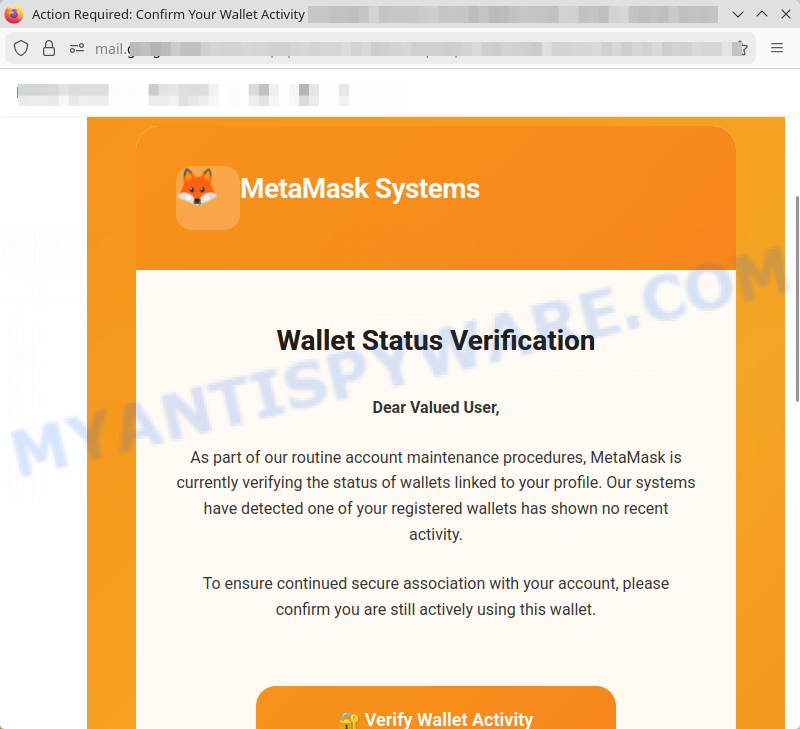
At its core, this scam exploits users’ fear of losing access to their crypto wallets by mimicking legitimate MetaMask communication and urgent security language. The link appears plausible but directs to a site flagged as dangerous by security scanners like VirusTotal.
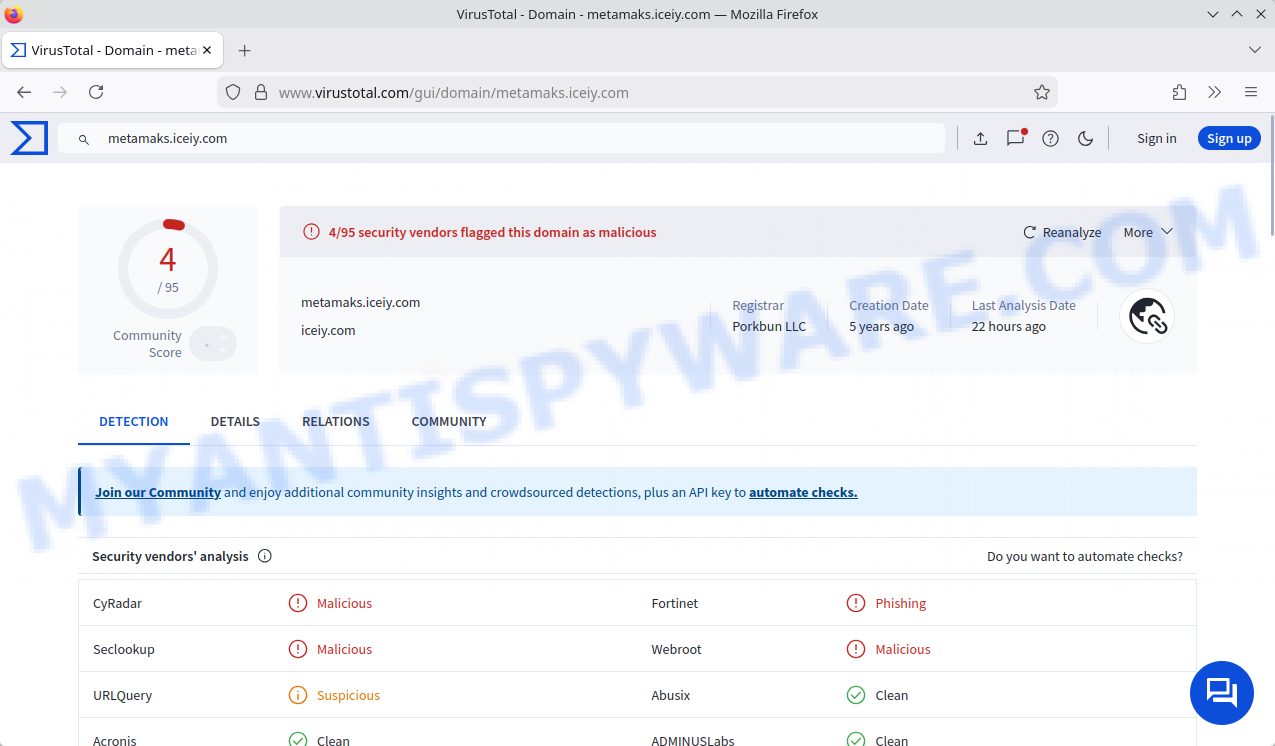
If you receive an email asking you to confirm wallet use or verify activity, don’t click any links or provide sensitive information. Real MetaMask emails won’t ask for private keys or password verification via email links. Always verify by logging in through official MetaMask apps or websites directly.
A typical “MetaMask Wallet Status Verification” scam email reads as follows:
Subject: Action Required: Confirm Your Wallet Activity
MetaMask Systems
Wallet Status VerificationDear Valued User,
As part of our routine account maintenance procedures, MetaMask is currently verifying the status of wallets linked to your profile. Our systems have detected one of your registered wallets has shown no recent activity.
To ensure continued secure association with your account, please confirm you are still actively using this wallet.
🔐 Verify Wallet Activity
ℹ️ Information: If this wallet is no longer in use, no action is required. Inactive wallets may be automatically archived during our next system update.
Thank you for your cooperation.
MetaMask Operations Team
This is an automated maintenance notification for your MetaMask account.
Contact Support | Privacy Policy | Manage Preferences
🕵️♂️ How the MetaMask Wallet Status Verification Email Scam Operates
MetaMask Wallet Status Verification Scam is a phishing fraud targeting cryptocurrency users. 🚨 It tricks users into revealing sensitive account information by pretending to be an official email from MetaMask. 🔗 Step-by-Step Breakdown of the Scam:
📧 Sending Fake Verification Emails
Scammers send emails mimicking MetaMask’s official communication, warning users about supposed inactivity on one of their wallets. These emails create a sense of urgency and prompt the user to take action to avoid account issues.
🌐 Directing to Phishing Websites
The email contains a link titled “Verify Wallet Activity” which redirects victims to a fraudulent website such as metamaks.iceiy.com. This fake site is designed to look like MetaMask’s real site but is flagged as malicious and used to steal login credentials and private keys.
📢 Using Official-Sounding Language to Build Trust
The email employs professional language, mentions routine maintenance, and references wallet activity to mimic legitimate MetaMask notifications. It also includes fake contact links such as “Contact Support” and “Manage Preferences” to appear authentic.
⚠️ Exploiting Fear of Account Loss
Users are told that inactive wallets may be archived or locked, prompting irrational urgency to “verify” their wallet usage quickly, which leads them to provide sensitive data on the phishing site.
💻 Harvesting Sensitive Information
Once on the phishing site, users are often asked to enter private keys, passwords, or seed phrases under the guise of verifying their wallet. This allows scammers to gain full control over victims’ cryptocurrency assets.
In summary, the MetaMask Wallet Status Verification Scam deceives cryptocurrency users by sending professionally crafted fake emails that prompt recipients to visit malicious websites and disclose sensitive account details. This scam uses fear tactics and counterfeit communications to exploit users’ trust. Always verify emails directly through official MetaMask channels and avoid clicking suspicious links.
Summary Table
| Name | MetaMask Wallet Status Verification Email Scam |
| Type | Phishing Email / Cryptocurrency Wallet Scam |
| Scam Vector | Phishing email with urgent call to action to verify wallet activity |
| Impersonated Entity | MetaMask (cryptocurrency wallet provider) |
| Email Subject | Action Required: Confirm Your Wallet Activity |
| Content Details | Claim of routine account maintenance, warning of inactive wallet, request to verify wallet activity through a link |
| Malicious Link | “Verify Wallet Activity” link leading to phishing site metamaks.iceiy.com (flagged malicious) |
| Goal of Scam | Steal user credentials and access to cryptocurrency wallets |
| Category | Cryptocurrency scams, Phishing |
| Tips for Readers | Verify sender email and domain carefully; avoid clicking links in unsolicited emails; always access MetaMask via official website or app; enable 2FA and use hardware wallets for extra security |
📧 What to Do When You Receive the “MetaMask Wallet Status Verification” Scam Email
We advise everyone who receives this email to follow the simple steps below to protect yourself from potential scams:
- ❌ Do not believe this email.
- 🔒 NEVER share your personal information and login credentials.
- 📎 Do not open unverified email attachments.
- 🚫 If there’s a link in the scam email, do not click it.
- 🔍 Do not enter your login credentials before examining the URL.
- 📣 Report the scam email to the FTC at www.ftc.gov.
If you accidentally click a phishing link or button in the “MetaMask Wallet Status Verification” Email, suspect that your computer is infected with malware, or simply want to scan your computer for threats, use one of the free malware removal tools. Additionally, consider taking the following steps:
- 🔑 Change your passwords: Update passwords for your email, banking, and other important accounts.
- 🛡️ Enable two-factor authentication (2FA): Add an extra layer of security to your accounts.
- 📞 Contact your financial institutions: Inform them of any suspicious activity.
- 🔄 Monitor your accounts: Keep an eye on your bank statements and credit reports for any unusual activity.
🔍 How to Spot a Phishing Email
Phishing emails often share common characteristics; they are designed to trick victims into clicking on a phishing link or opening a malicious attachment. By recognizing these signs, you can detect phishing emails and prevent identity theft:
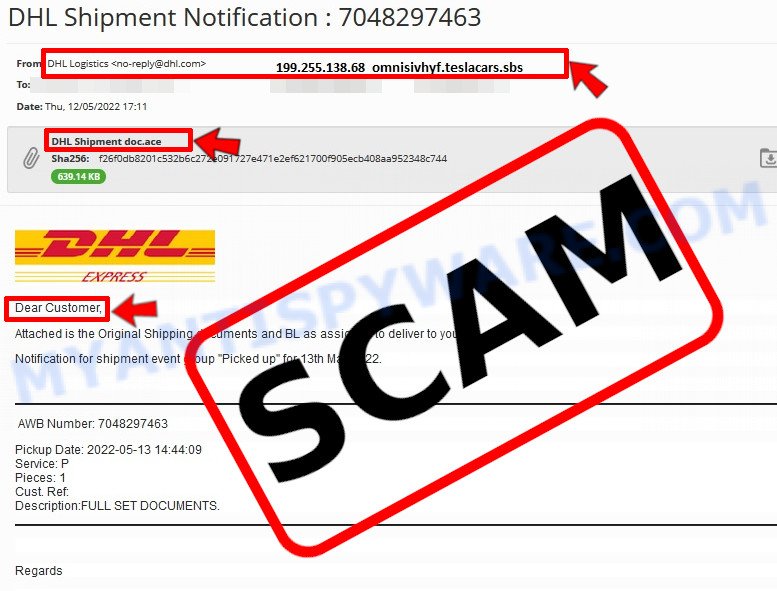
💡 Here Are Some Ways to Recognize a Phishing Email
- ✉️ Inconsistencies in Email Addresses: The most obvious way to spot a scam email is by finding inconsistencies in email addresses and domain names. If the email claims to be from a reputable company, like Amazon or PayPal, but is sent from a public email domain such as “gmail.com”, it’s probably a scam.
- 🔠 Misspelled Domain Names: Look carefully for any subtle misspellings in the domain name, such as “arnazon.com” where the “m” is replaced by “rn,” or “paypa1.com,” where the “l” is replaced by “1.” These are common tricks used by scammers.
- 👋 Generic Greetings: If the email starts with a generic “Dear Customer”, “Dear Sir”, or “Dear Madam”, it may not be from your actual shopping site or bank.
- 🔗 Suspicious Links: If you suspect an email may be a scam, do not click on any links. Instead, hover over the link without clicking to see the actual URL in a small popup. This works for both image links and text links.
- 📎 Unexpected Attachments: Email attachments should always be verified before opening. Scan any attachments for viruses, especially if they have unfamiliar extensions or are commonly associated with malware (e.g., .zip, .exe, .scr).
- ⏰ Sense of Urgency: Creating a false sense of urgency is a common tactic in phishing emails. Be wary of emails that claim you must act immediately by calling, opening an attachment, or clicking a link.
- 📝 Spelling and Grammar Errors: Many phishing emails contain spelling mistakes or grammatical errors. Professional companies usually proofread their communications carefully.
- 🔒 Requests for Sensitive Information: Legitimate organizations typically do not ask for sensitive information (like passwords or Social Security numbers) via email.
Conclusion
The MetaMask Wallet Status Verification Email is a phishing scam designed to steal your private information by masquerading as an official message from MetaMask. The email uses urgent and routine maintenance language to pressure recipients into clicking a malicious link labeled “Verify Wallet Activity”, which directs users to a fake website (metamaks.iceiy.com) flagged as malicious by VirusTotal.
This scam employs deceptive tactics, including professional-looking branding and fake security messages, to create a false sense of legitimacy and urgency. The phishing site may then attempt to capture your private keys, passwords, or other sensitive wallet information — putting your cryptocurrency assets at serious risk.
Bottom Line: Never click on links in unsolicited emails asking you to confirm wallet activity or provide login credentials. Always verify any communication by directly accessing your MetaMask wallet through official channels or apps. Remember, MetaMask does not send emails requesting wallet verification or sensitive details via links.





