Ledger users are being targeted by a sophisticated phishing scam disguised as a critical security alert. The fraudulent email claims there’s a severe vulnerability in Ledger’s device firmware and demands immediate “entropy verification” by directing victims to a fake website, ledger.verify-hardwares.com. Here’s the catch: this site tricks users into handing over their 12- to 24-word recovery phrases, a move that hands scammers full access to their cryptocurrency wallets—access that can’t be undone.
The giveaway? The suspicious URL uses “ledger” as a subdomain, not the official ledger.com domain, a classic phishing trick to create false trust. Legitimate Ledger communications never ask you to verify device entropy online or provide sensitive info like your PIN or recovery phrase. If you spot urgent calls to action paired with unfamiliar URLs or “technical” jargon like “entropy generation validation”, consider it a red flag.
In essence, this scam is a textbook example of how cybercriminals prey on fear and urgency to swipe digital assets. Always double-check the sender’s domain, avoid clicking links in unsolicited security alerts, and never reveal your recovery phrase—your crypto’s security depends on it. Keep reading to learn how to spot these tricks before you lose your digital fortune.
A typical “Ledger – Important Security Update” scam email reads as follows:
Subject: Important Security Update: Protect Your Crypto Assets Now
Ledger
Dear Ledger User,
We have identified a critical security vulnerability in our entropy generation system that requires immediate attention. This affects devices running firmware versions prior to 6.52.12.Action Required: Your device may be at risk. Please complete the verification process immediately to ensure the security of your crypto assets.
To protect your funds and maintain the highest security standards, we need you to verify your device’s entropy generation. This process is quick and secure, and will help us ensure your Ledger device is functioning properly.
The verification process includes:
Device connection verification
Firmware version check
Entropy generation validation
Security protocol confirmationVerify Device Now
Important: This verification is mandatory for all Ledger users. Failure to complete this process may result in restricted access to your device’s security features.
If you have any questions or need assistance, please contact our support team immediately.
This email was sent to you because you signed up at Ledger.com or purchased a Ledger product. We respect your right to privacy. Read our Privacy Policy and Cookie Policy.
© Ledger SAS. All rights reserved. Ledger brands are registered trademarks of Ledger SAS. Ledger SAS, 106 Rue du Temple, 75003 Paris.
Unsubscribe from future emails or to update your email preferences, click here.
Follow us on:
YouTube Twitter Facebook TikTok
🕵️♂️ How the Ledger Security Update Scam Operates
Ledger Security Update Scam is a phishing fraud targeting cryptocurrency users. 🚨 This scam tricks users into revealing their recovery phrases and device PINs by posing as an urgent security update from Ledger, a trusted crypto hardware wallet company. 🔗 Step-by-Step Breakdown of the Scam:
🛒 Targeting Ledger Device Owners
Scammers send emails claiming there is a critical security vulnerability affecting Ledger devices running certain firmware versions. The emails urge immediate action under the guise of protecting crypto assets.
🕸️ Creating Fake Verification Websites
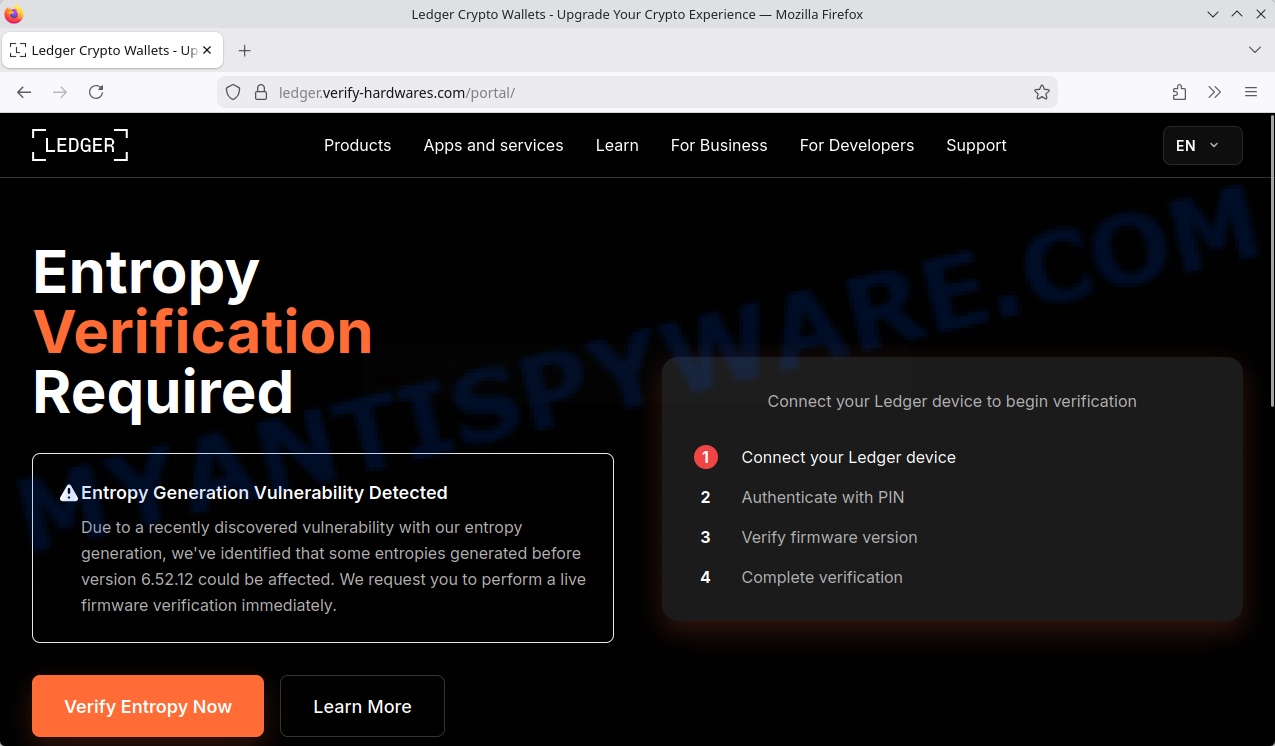
Recipients are directed to a fraudulent website with a deceptive URL like ledger.verify-hardwares.com. This site mimics Ledger’s official branding and uses a URL trick—”ledger” is only a subdomain, not the real ledger.com domain—intended to confuse users into trusting the site.
📢 Urgent Calls to Verify Entropy
The fake site pressures users to perform an “Entropy verification” immediately to safeguard their funds. This urgency is designed to cause panic, making users less likely to question the request.
💼 Requesting Sensitive Information
Users are asked to enter their 12, 18, or 24-word recovery phrase along with their device PIN and firmware details on this website. Legitimate Ledger communications never ask for recovery phrases or PINs online.
🚫 Exploiting Submitted Data
The scammers capture the entered recovery phrases and PINs, which they use to take full control of victims’ crypto wallets and drain their funds. Because crypto transactions are irreversible, victims usually lose their assets permanently.
In summary, the Ledger Security Update Scam tricks cryptocurrency holders by impersonating Ledger’s brand and creating fake urgency to steal recovery phrases and device PINs. Users should only trust communications from the official domain ledger.com and never share their recovery phrase or PIN online. Always verify website URLs carefully and beware of unsolicited emails urging immediate action regarding your crypto assets.
Summary Table
| Name | Ledger – Important Security Update, Critical Security Vulnerability Email Scam |
| Type | Phishing / Cryptocurrency Wallet Scam |
| Targeted Brand | Ledger (cryptocurrency hardware wallet) |
| Scam Method | Phishing email prompting urgent verification; fake website ledger.verify-hardwares.com requesting recovery phrases and device PIN |
| Fake Website Domain | ledger.verify-hardwares.com (misleading subdomain) |
| Requested Information | 12, 18, or 24-word recovery seed phrase; device PIN; firmware and security info |
| Key Indicators of Scam |
|
| Potential Consequences | Theft of cryptocurrency by stealing recovery phrase and PIN; irreversible loss of funds |
| Category | Cryptocurrency Fraud, Phishing Scam |
| Tips for Readers |
|
📧 What to Do When You Receive the “Ledger – Important Security Update” Scam Email
We advise everyone who receives this email to follow the simple steps below to protect yourself from potential scams:
- ❌ Do not believe this email.
- 🔒 NEVER share your personal information and login credentials.
- 📎 Do not open unverified email attachments.
- 🚫 If there’s a link in the scam email, do not click it.
- 🔍 Do not enter your login credentials before examining the URL.
- 📣 Report the scam email to the FTC at www.ftc.gov.
If you accidentally click a phishing link or button in the “Ledger – Important Security Update” Email, suspect that your computer is infected with malware, or simply want to scan your computer for threats, use one of the free malware removal tools. Additionally, consider taking the following steps:
- 🔑 Change your passwords: Update passwords for your email, banking, and other important accounts.
- 🛡️ Enable two-factor authentication (2FA): Add an extra layer of security to your accounts.
- 📞 Contact your financial institutions: Inform them of any suspicious activity.
- 🔄 Monitor your accounts: Keep an eye on your bank statements and credit reports for any unusual activity.
🔍 How to Spot a Phishing Email
Phishing emails often share common characteristics; they are designed to trick victims into clicking on a phishing link or opening a malicious attachment. By recognizing these signs, you can detect phishing emails and prevent identity theft:
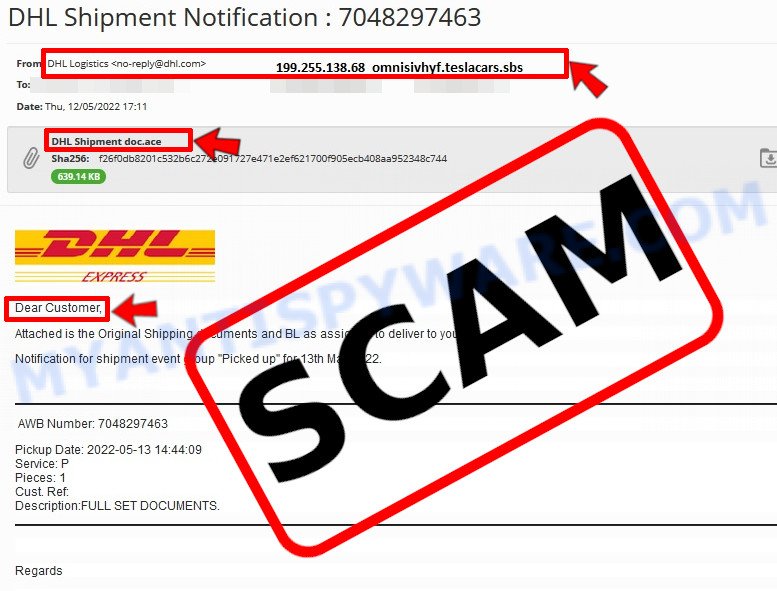
💡 Here Are Some Ways to Recognize a Phishing Email
- ✉️ Inconsistencies in Email Addresses: The most obvious way to spot a scam email is by finding inconsistencies in email addresses and domain names. If the email claims to be from a reputable company, like Amazon or PayPal, but is sent from a public email domain such as “gmail.com”, it’s probably a scam.
- 🔠 Misspelled Domain Names: Look carefully for any subtle misspellings in the domain name, such as “arnazon.com” where the “m” is replaced by “rn,” or “paypa1.com,” where the “l” is replaced by “1.” These are common tricks used by scammers.
- 👋 Generic Greetings: If the email starts with a generic “Dear Customer”, “Dear Sir”, or “Dear Madam”, it may not be from your actual shopping site or bank.
- 🔗 Suspicious Links: If you suspect an email may be a scam, do not click on any links. Instead, hover over the link without clicking to see the actual URL in a small popup. This works for both image links and text links.
- 📎 Unexpected Attachments: Email attachments should always be verified before opening. Scan any attachments for viruses, especially if they have unfamiliar extensions or are commonly associated with malware (e.g., .zip, .exe, .scr).
- ⏰ Sense of Urgency: Creating a false sense of urgency is a common tactic in phishing emails. Be wary of emails that claim you must act immediately by calling, opening an attachment, or clicking a link.
- 📝 Spelling and Grammar Errors: Many phishing emails contain spelling mistakes or grammatical errors. Professional companies usually proofread their communications carefully.
- 🔒 Requests for Sensitive Information: Legitimate organizations typically do not ask for sensitive information (like passwords or Social Security numbers) via email.
Conclusion
The Ledger Important Security Update email is a scam, designed to deceive recipients with fake urgency and fraudulent claims of a critical security vulnerability. The scammers use a convincing but fake email and website—such as ledger.verify-hardwares.com—to trick users into revealing their 12, 18, or 24-word recovery phrase, which is the master key to their cryptocurrency wallets.
Instead of providing a legitimate security update, this scam attempts to harvest sensitive information that allows criminals to gain full access to victims’ crypto assets and irreversibly steal their funds. The fake website mimics Ledger’s branding but uses suspicious URLs and subdomains that are not connected to the official Ledger domain (ledger.com). It also requests unusual and sensitive actions, like “entropy verification” and device PIN authentication, which legitimate Ledger communications never do.
Bottom Line: Never trust emails or websites prompting you to urgently enter your recovery phrase, device PIN, or firmware details outside of the official Ledger app or website. Always verify the sender’s domain and only access Ledger services via ledger.com. If you receive such an email, do not click any links and report it to Ledger’s official support channels. Staying vigilant and informed is the best defense against this and similar crypto phishing scams.





