![]() | Do you have pop-ups or your computer infected with trojan or spyware ? Learn how to ask us for help, click here! |
How to remove AntiVira Av virus
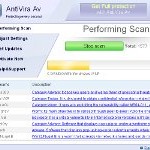
AntiVira Av is a fake security program that blocks Windows legitimate applications, hijacks Internet Explorer, displays false information that your computer is infected with viruses, trojans and malware.The software pretends to be a legitimate antivirus but, in reality, it is a totally scam. AntiVira Av is a malicious program from the same family of malware as Antivirus .NET, Antivirus Scan and Antivirus Action. It is unable to detect and remove any infections! The program “detects” numerous false infections in order to trick you into purchasing so-called full version of the software. Thus, do not pay for AntiVira Av, simply ignore all that the bogus software will display you.
Like other fake security software, the authors of AntiVira Av use various misleading methods to distribute their bogus software, e.g. trojans, various misleading programs, social networks (Twitter, Facebook, etc) and spam emails. Please be careful when opening attachments and downloading files or otherwise you can end up with a rogue program on your computer. Remember that the rogue is a highly dangerous application and you need remove AntiVira Av as soon as possible!
During installation, the rogue will be configured to start automatically when Windows loads. Once AntiVira Av is started, it will simulate a system scan and state that your computer is infected with a lot of viruses. The rogue will prompt you to purchase a full version of the program to fix supposedly found infections. Important to know, all of these reported infections are fake and don’t actually exist on your computer! So you can safely ignore the scan results that AntiVira Av gives you.
While AntiVira Av is running, it will flood your computer with warnings and fake security alerts. Some of the alerts:
Windows Security alert
Windows reports that computer is infected. Antivirus software
helps to protect your computer against viruses and other
security threats. Click here for the scan your computer. Your
system might be at risk now.
INFILTRATION ALERT
Your computer is being attacked by a Internet
Virus. It could be a password stealing attack, a
trojan – dropper or similar.
Moreover, AntiVira Av will hijack Internet Explorer so that it will randomly show a warning page which states:
Internet Explorer Warning – visiting this web site may harm your computer!
Most likely causes:
The website contains exploits that can launch a malicious code on your computer
Suspicious network activity detected
There might be an active spyware running on your computer
Of course, like false scan results above, all of these alerts are just a fake. All of them are created in order to convince you that you must purchase the full version of AntiVira Av and, thus, fix the entire system. So, you can safely ignore the fake warnings and alerts.
As you can see, all AntiVira Av does is fake and you should stay away from the malicious application! If your PC has been infected with the rogue, then ignore all it gives you and follow the removal instructions below in order to remove AntiVira Av and any associated malware from your computer for free.
Automatic removal instructions for AntiVira Av
Step 1. Reboot your computer in Safe mode with networking
Restart your computer.
After hearing your computer beep once during startup, start pressing the F8 key on your keyboard. On a computer that is configured for booting to multiple operating systems, you can press the F8 key when the Boot Menu appears.
Instead of Windows loading as normal, Windows Advanced Options menu appears similar to the one below.
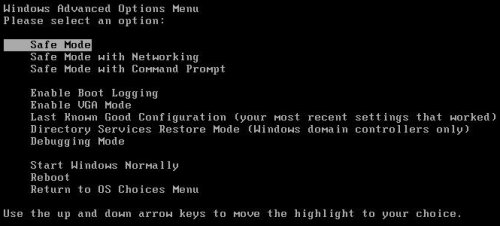
Windows Advanced Options menu
When the Windows Advanced Options menu appears, select Safe mode with networking and then press ENTER.
Step 2. Reset Internet Explorer Proxy options
Run Internet Explorer, Click Tools -> Internet Options as as shown in the screen below.
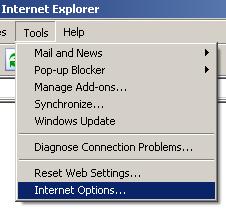
Internet Explorer – Tools menu
You will see window similar to the one below.
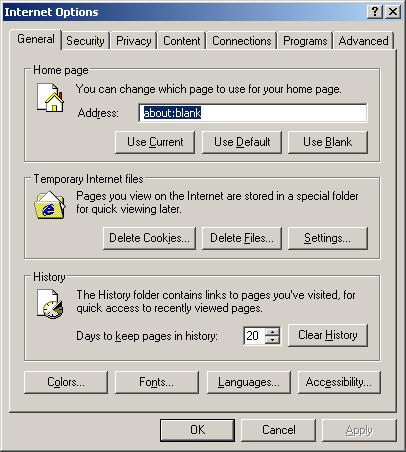
Internet Explorer – Internet options
Select Connections Tab and click to Lan Settings button. You will see an image similar as shown below.

Internet Explorer – Lan settings
Uncheck “Use a proxy server” box. Click OK to close Lan Settings and Click OK to close Internet Explorer settings.
Step 3. Stop AntiVira Av from running
Download HijackThis from here. Run it and click Scan button. Look for lines that looks like:
O4 – HKCU\..\Run: [{RANDOM}] {PATH}\Temp\{RANDOM}.exe
Example:
O4 – HKLM\..\Run: [cudpdogk] c:\docume~1\user\locals~1\temp\akotrowvc\bcgcihiagnz.exe
O4 – HKCU\..\Run: [cudpdogk] C:\Users\User\AppData\Local\akotrowvc\bcgcihiagnz.exe
Note: list of infected items may be different. If you unsure, then check it in Google. Skip this step, if you does not find any malicious lines.
Place a checkmark against each of them. Once you have selected all entries, close all running programs then click once on the “fix checked” button. Close HijackThis.
Step 4. Remove AntiVira Av associated malware
Download MalwareBytes Anti-malware (MBAM). Close all programs and Windows on your computer.
Double Click mbam-setup.exe to install the application. When the installation begins, keep following the prompts in order to continue with the installation process. Do not make any changes to default settings and when the program has finished installing, make sure a checkmark is placed next to Update Malwarebytes’ Anti-Malware and Launch Malwarebytes’ Anti-Malware, then click Finish.
If an update is found, it will download and install the latest version.
Once the program has loaded you will see window similar to the one below.

Malwarebytes Anti-Malware Window
Select Perform Quick Scan, then click Scan, it will start scanning your computer. This procedure can take some time, so please be patient.
When the scan is complete, click OK, then Show Results to view the results. You will see a list of infected items similar as shown below. Note: list of infected items may be different than what is shown in the image below.
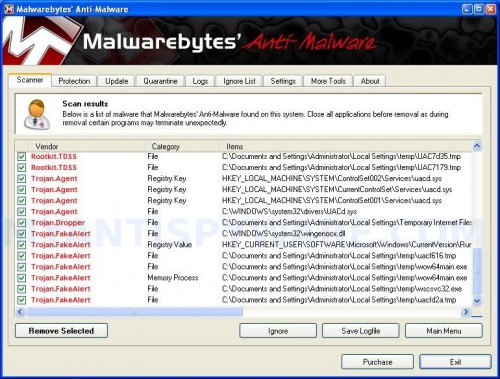
Malwarebytes Anti-malware, list of infected items
Make sure all entries have a checkmark at their far left and click “Remove Selected” button to remove AntiVira Av. MalwareBytes Anti-malware will now remove all of associated AntiVira Av files and registry keys and add them to the programs’ quarantine. When MalwareBytes Anti-malware has finished removing the infection, a log will open in Notepad and you may be prompted to Restart.
AntiVira Av removal notes
Note 1: if you can not download, install, run or update Malwarebytes Anti-malware, then follow the steps: Malwarebytes won`t install, run or update – How to fix it.
Note 2: if you need help with the instructions, then post your questions in our Spyware Removal forum.
Note 3: your current antispyware and antivirus software let the infection through ? Then you may want to consider purchasing the FULL version of MalwareBytes Anti-malware to protect your computer in the future.
AntiVira Av creates the following files and folders
%Temp%\{RANDOM}\
%Temp%\{RANDOM}\{RANDOM}.exe
AntiVira Av creates the following registry keys and values
HKEY_CURRENT_USER\Software\Microsoft\Internet Explorer\PhishingFilter | “Enabled” = “0″
HKEY_CURRENT_USER\Software\Microsoft\Windows\CurrentVersion\Internet Settings | “ProxyOverride” = “”
HKEY_CURRENT_USER\Software\Microsoft\Windows\CurrentVersion\Internet Settings | “ProxyServer” = “http=127.0.0.1:18215″
HKEY_CURRENT_USER\Software\Microsoft\Windows\CurrentVersion\Internet Settings | “ProxyEnable” = “1″
HKEY_LOCAL_MACHINE\SOFTWARE\Microsoft\Windows\CurrentVersion\Run | {RANDOM}
HKEY_CURRENT_USER\Software\Microsoft\Windows\CurrentVersion\Run | {RANDOM}
69 Comments »
RSS feed for comments on this post.
Leave a comment
My Anti Spyware - Free antispyware programs and Spyware Removal Instructions.


I just wanted to say that I have NEVER been able to quickly and overall easily find a solution to something like this until now. I appreciate what you all have done here. I was able to follow your instructions and get this virus off my PC within an hour. I was considering cleaning my computer and startin fresh again, but the virus didnt allow me to do anything! The malwarebytes program was great, considering buying it myself now. Again, thanks for the help!
Comment by Anthony — February 10, 2011 #
i got this dumb virus earlier today i thought i would never get rid of this crap anyhow this instructions worked thanks and very easy to follow
Comment by darthuub — February 10, 2011 #
It worked!! Thank you very much!
Comment by Patty — February 11, 2011 #
This thing was giving me hell until I follow these instructions, thank you so much!! I was able to save my files instead of having to reprogram the whole laptop and lose everything. Does anyone know where this came from?
Comment by Gina from TX — February 11, 2011 #
Thank you so much for your help. It works wonder. I am able to remove this dumb virus by myself
Comment by Kelly — February 11, 2011 #
Okay, pardon my ignorance but…I have printed this out at work and will try to use it when I get home to my infected pc. Given my circumstances, how do I follow step 3? Download Hijackthis from HERE. There will be no ‘here’ when I’m at home on my pc. Is there a way to get to gotrendmicro.com when my pc is hobbled and in this recovery mode? Thanks…and I guess my question applies for the malwarebytes part too…should I try to download these programs on a disc and take em home to my pc?
Comment by allen — February 11, 2011 #
I cannot get rid of this thing still!!! My malware does not pick up anything, but the hack this does. Any pointers?
Comment by Sean — February 11, 2011 #
Just got it! There was a line hidden a little ways down the list on hack this. Great fix!
Comment by Sean — February 11, 2011 #
THANKS A MILLION!!!!! Luckily my wife had a computer I could look this up on! I was about 30 seconds shy of breaking a ton of valuable equipment! This was simple, and fast, and 100% accurate! It seemed I was completely locked out of any options I could do aside from this. Anything apart from this would require years of computer training.
Comment by Jerrod — February 11, 2011 #
Thanks, this guide helped for removing the virus. Had to go into registry and change the proxyserver and proxyenable values so I could access the internet again afterwards though. But its all fine now
Comment by ak — February 11, 2011 #
Great site! I too though my PC was doomed after being infected by antivira AV. The steps were concise, easy to follow, and effective. I would have thought my McAfee high $ subscription would have blocked this virus. McAfee wanted $89 to remove this virus….
Thank You Malwarebytes!
Comment by Bill — February 12, 2011 #
allen, you need to complete the first two steps, then open the instructions and go to step 3.
Comment by Patrik (Myantispyware admin) — February 12, 2011 #
@Sean: if your anti malware program is unable to remove this virus, then you should try the manaul removal method prescribed on this page, hope that helps u get rid of the virus,
good luck dude
Comment by Zaini — February 12, 2011 #
Logfile of Trend Micro HijackThis v2.0.4
Scan saved at 4:49:55 PM, on 2/12/2011
Platform: Windows XP SP2 (WinNT
5.01.2600)
MSIE: Internet Explorer v6.00 SP2
(6.00.2900.2180)
Boot mode: Safe mode with network support
Running processes:
C:\WINDOWS\System32\smss.exe
C:\WINDOWS\system32\csrss.exe
C:\WINDOWS\system32\winlogon.exe
C:\WINDOWS\system32\services.exe
C:\WINDOWS\system32\lsass.exe
C:\WINDOWS\system32\svchost.exe
C:\PROGRA~1\McAfee\MSC\mcmscsvc.exe
C:\Program Files\McAfee\MPF\MPFSrv.exe
c:\PROGRA~1\mcafee.com\agent\mcagent.exe
C:\WINDOWS\system32\restore\rstrui.exe
C:\WINDOWS\explorer.exe
…
Comment by Sherri — February 12, 2011 #
thank you so much
Comment by Casey — February 12, 2011 #
question…my computer will not let me complete step 3. The virus is preventing me from running hijackthis. Does anybody have a solution to this problem? Also am i supposed to perform step 3 while in safe mode with networking or restart my computer in regular mode, because i have no internet connection while in safe mode with networking. Somebody please help i have been dealing with this virus since last night.
Comment by Jase — February 12, 2011 #
OMG Thank you! This has been the only thing I’ve found that worked! Thanks!!!!!!!!!!!!
No problem with the directions. I already had malware so I didn’t have trouble with that, I just needed to update it.
THANKS!!
Comment by Rachel — February 12, 2011 #
Thank you; I too thought my laptop computer was junk. Thanks to you it works again. Found this site on my desktop. Step 3 was confusing, then figured out I had to open this site on the infected computer. Thank you again Malwarebytes.
Comment by John — February 13, 2011 #
Thank you for your help! This really did the job on my husband’s computer and we’re very grateful.
Comment by Mary — February 13, 2011 #
This thing was giving me FITS! This seems to have worked! Thanks!
Comment by Neil — February 13, 2011 #
Your site just saved my computer from being thrown in the trash, A BILLION THANKS!!!!!!!!!
Comment by Roxy — February 13, 2011 #
i also got this virus on windows 7 on my laptop through safe mode i was able to go on the net to get rid of it. but my daughter just got it, she has XP ops. In safe mode she cant get on the net, how dose she get round this? she did click on (safe mode networking). hope you can help.
Comment by Warrick — February 14, 2011 #
Someone please help me! I’ve done full system scans with malwarebytes, spyware doctor, and avast!, and have removed some Trojans and malware each time, but the stupid thing is still there! I think it’s maybe because I haven’t done the manual removal, can someone please explain with detail how to remove this thing manually? I really do not want to format my hardrive.
Comment by Andrew — February 14, 2011 #
OK I have tried step one & two, I am using a different laptop to read these instructions I do steps 1 & 2 then insure how to download anything BUT at this point my laptop keeps shutting itself off, any suggestions?
Comment by Nikki — February 14, 2011 #
My laptop keeps turning off after I complete steps 1 & 2, I am unsure how to download hackthis when OI am on the infected computer? Any suggestions?
thanks!
Comment by Nikki — February 14, 2011 #
great walkthru! i spent more time looking for a good site just to help me than in repair! keep up the great work! will recommend highly ! ty!
Comment by scott — February 14, 2011 #
Superb instructions. I’m no expert and this was easy to follow and resolve. Very pleased to have such a quick solution. Thank you.
Comment by Bruno — February 15, 2011 #
I got this virus even though I had Webroot anti-virus 2010 installed on my computer. I called Webroot and they wanted to charge me $129 to have it removed. I will purchase the full version of your software after my Webroot subscription expires. I want to thank you for the guide in removing this virus.
Comment by Warren — February 15, 2011 #
Thanks so much for posting this. I almost went to the geek squad to get it fixed which they said would start at 200 bucks just to do a “diagnostics” test. Glad google did enough diagnostics for me! I was worried my husband would have to do this but it was easy enough for me to do myself. Thanks so much-this was a huge saver!
Comment by Juliet — February 15, 2011 #
Jase, try rename HijackThis.exe to iexplore.exe and run it once again.
Comment by Patrik (Myantispyware admin) — February 15, 2011 #
Warrick and Nikki, try the following in Normal mode:
Run Internet Explorer, Click Tools -> Internet Options. Select Connections Tab and click to Lan Settings button. Click Advanced button to open Proxy settings. Copy and paste the following text into “Do not use proxy server for addresses beginning with:”
Click OK to save Proxy settings, then Click OK to close Lan Settings and Click OK to close Internet Explorer settings.
Download HijackThis from here. Once Save dialog opens, you need first to rename hijackthis.exe to iexplore.exe
Further click Save button to save it to desktop. If you are using the Firefox, then you need right click to the above link to open a Save dialog.
Run HijackThis. Click Scan button. Select entries that looks like:
Example:
Place a checkmark against each of them. Once you have selected all entries, close all running programs then click once on the “fix checked” button. Close HijackThis.
Reboot your computer.
Go to step 4 above.
Comment by Patrik (Myantispyware admin) — February 15, 2011 #
Andrew, ask for help in our Spyware removal forum.
Comment by Patrik (Myantispyware admin) — February 15, 2011 #
wow! you guys are awesome! the steps worked and I couldn’t be more appreciative! i can’t wait to tell everyone about your website!
Comment by Yishai — February 15, 2011 #
Thank you so much. It worked perfectly.
Jonathan
Comment by Jonathan — February 15, 2011 #
WOW!!!! Appreciate the step by step instructions to remove this POS virus. Thanks a ton.
Comment by Paco — February 15, 2011 #
So in the hijackthis program, is it only the HKCU and HKLM entries that should be deleted? What about HKUS?
Thanks!
Comment by Becky — February 15, 2011 #
Wow! I searched on the internet for 2 hours when my laptop got infected with the antivira-av virus. Found you guys and followed instructions and wow, nasty virus all gone! Thank you so so much! I will purchase the anti malware you suggested. My only question is if I need to go back into IE to lan settings and make any changes.
Thanks again!
Comment by Donna Gallegos — February 16, 2011 #
I tried the malware fix above, but upon reboot, the virus alert keeps coming up again..!! Aaarrggghhh!! Plus it will not allow me to re-launch the malware fix program..
How else can I resolve this nightmare?
Thanks so much
Comment by Chris — February 16, 2011 #
well this will be the second time this site has saved my computer
Comment by lunar — February 16, 2011 #
Becky, if you have found some HKUS malicious entries, then fix them too. If you unsure, then ask for help in our Spyware removal forum.
Comment by Patrik (Myantispyware admin) — February 16, 2011 #
Donna Gallegos, NO. You can use your current settings.
Comment by Patrik (Myantispyware admin) — February 16, 2011 #
Chris, probably your computer is infected with a trojan that reinstalls the rogue. Open a new topic in our Spyware removal forum. I will help you to remove the rogue.
Comment by Patrik (Myantispyware admin) — February 16, 2011 #
Im really confused with Step 3. The examples you mentioned dont make any sense to me, so I dont know what to remove at all. Could someone please explain this a bit more
Comment by Tammy — February 16, 2011 #
My PC running Windows XP (with all updates) has this problem on one (non-administrator) account. I know where the malicious .exe file is located. I tried the process set out above, but Windows won’t boot in Safe Networked mode. While all the safe options are discplayed, when a safe mode is selected the machine runs for afew seconds then a message appears saying that it cannot run in Safe Mode possibly due to a recent hardware or softrware change. Anyone have a solution to this?
Comment by Col — February 16, 2011 #
My computer didn’t come up with any of those register keys or values.
so now what?
Comment by kalli — February 17, 2011 #
Thanks a million. It took me hours to took this infection out and could not do it. It took me a few minutes from your instruction. Without you, I really don’t know what to do. Thank you very much.
Comment by John — February 17, 2011 #
AntiVira AV got into my PC when I tried to update definitions from AdAware!
The only way to stop it recurring was to uninstall AdAware.
Ironic that a trusted malware detector should carry this problem.
Comment by elsan closet — February 17, 2011 #
i can not change the name from you hijackthis.exe to iexplore.exe in the save box, what do I do?
Comment by jessica — February 17, 2011 #
?4u please. Accessing this info from my laptop.I had to download info ( HiJackThis)to my home infected PC thru a memory stick Everytime I click on anything another alert pops up .Any further advice Thanks
Comment by Jeff Hann — February 17, 2011 #
I can’t get rid of this stupid AntiVira… I can’t launch explorer or any other program so I am at a loss for a way to get rid of this!!
Comment by Stacey U — February 17, 2011 #
Thank you so much for this!! this is awesome. should i keep the malwarebytes and the hijackthis programs on my computer tho??
Comment by Larissa — February 17, 2011 #
thank you so much!!!! i couldn’t do anything on my computer!!!
Comment by emily — February 17, 2011 #
This site helped so much!! I was able to get my computer working back to normal within half an hour. The only thing I did differently is I downloaded the programs before restarting and entering safe mode.
Comment by Michelle — February 17, 2011 #
nice
Comment by brandon — February 17, 2011 #
PLEASSEEE. I cannot put my computer in Safe Mode. I have Windows XP. I have this crap in my computer (Antivira av). I tried the F8 key and it takes me to the Windows Advanced Options Menu. I chose the Safe Mode with Networking, also the Safe Mode and after scanning, it goes back to the option Start Windows Normally. I CANNOT GET INTO THE SAFE MODE. I have tried many times. Please, I need to start my computer in Safe Mode. If you can help me i will thank you forever because my dad is going to kill me!!!!
Comment by kafa — February 19, 2011 #
HOW TO START SAFE MODE IN WINDOWS XP TO REMOVE ANTIVIRA AV????
PLEASSEEE. I cannot put my computer in Safe Mode. I have Windows XP. I have this crap in my computer (Antivira av). I tried the F8 key and it takes me to the Windows Advanced Options Menu. I chose the Safe Mode with Networking, also the Safe Mode and after scanning, it goes back to the option Start Windows Normally. I CANNOT GET INTO THE SAFE MODE. I have tried many times. Please, I need to start my computer in Safe Mode. If you can help me i will thank you forever because my dad is going to kill me!!!!
Comment by kafa — February 19, 2011 #
kafa, ask for help in our Spyware removal forum.
Comment by Patrik (Myantispyware admin) — February 20, 2011 #
Thanks for the fix – I was at my wit’s end! Thank you thank you thank you!! It works people – follow the directions exactly as they are listed!!
Comment by mkra — February 20, 2011 #
Great fix guys. Worked like a charm. Cannot thank you enough!
Comment by Sam — February 20, 2011 #
Thanks, this seemed to work… got really worried when I was having problems deleting the virus AppData/Local/[random]/[random].exe and it was blocking my task manager from running. whew… luckily i found this post.
Comment by Jon — February 21, 2011 #
Thank you so much!!! The fact I live in a different country and was hit with the reality that I might never be able to fix my laptop or do my work through me into a downward spiral until I found this site.
Comment by Janeen — February 21, 2011 #
I think i’ve managed to get rid of most of the virus by using mbam (even though i couldn’t update) and then deleting some suspicious registries by typing ‘regedit’ in run.
I am using vista basic by the way.
BUT despite disabling the proxy I can’t access google on internet explorer but i can access other webpages fine on ie – The usual fake warning message comes up when i try google on ie.
I can access google however from firefox and google chrome etc. These other web browsers are working fine. Please help – (does this mean the virus is still on my pc???!!!)
Comment by zzzzzzz — February 22, 2011 #
Thank you so much for the guide, I was able to remove quickly and resourcefully. AntiVira Av had locked me out of job applications and other important documents that are of great need to me. Once again, thank you so much.
Comment by Veronica — February 22, 2011 #
my computer has different accounts (since its shared with other family members) only my account got hacked. is it okay to do all of this on an uninfected account? will it still clear up this stupid virus that’s on my account?
Comment by Nova — February 24, 2011 #
Great instructions. I followed it exactly and got rid of my virus. Thank you!
Comment by LTH — February 25, 2011 #
Nova, yes you can use an account to cure your PC.
Comment by Patrik (Myantispyware admin) — February 27, 2011 #
Can someone please tell me which if any are bad? I have followed the step by step instructions. I removed one that had the word worm in it but am reluctant to remove more in case they are necessary.
Logfile of Trend Micro HijackThis v2.0.4
Scan saved at 6:52:10 PM, on 3/2/2011
Platform: Windows XP SP3 (WinNT 5.01.2600)
MSIE: Internet Explorer v8.00 (8.00.6001.18702)
Boot mode: Normal
Running processes:
C:\WINDOWS\System32\smss.exe
C:\PROGRA~1\AVG\AVG10\avgchsvx.exe
C:\WINDOWS\system32\winlogon.exe
C:\WINDOWS\system32\services.exe
C:\WINDOWS\system32\lsass.exe
C:\WINDOWS\system32\svchost.exe
C:\WINDOWS\System32\svchost.exe
C:\WINDOWS\system32\svchost.exe
C:\WINDOWS\Explorer.EXE
C:\WINDOWS\system32\LEXBCES.EXE
C:\WINDOWS\system32\LEXPPS.EXE
C:\WINDOWS\system32\spoolsv.exe
C:\Program Files\AVG\AVG10\avgtray.exe
C:\WINDOWS\system32\ctfmon.exe
C:\Program Files\Common Files\Apple\Mobile Device Support\bin\AppleMobileDeviceService.exe
C:\WINDOWS\System32\NOTEPAD.EXE
C:\Program Files\AVG\AVG10\avgwdsvc.exe
C:\Program Files\Bonjour\mDNSResponder.exe
C:\WINDOWS\System32\svchost.exe
C:\Program Files\AVG\AVG10\Identity Protection\Agent\Bin\AVGIDSAgent.exe
C:\Program Files\AVG\AVG10\Identity Protection\agent\bin\avgidsmonitor.exe
C:\Program Files\AVG\AVG10\avgnsx.exe
C:\PROGRA~1\AVG\AVG10\avgrsx.exe
C:\Program Files\AVG\AVG10\avgcsrvx.exe
C:\Program Files\AVG\AVG10\avgscanx.exe
C:\Program Files\AVG\AVG10\avgcsrvx.exe
C:\Program Files\Mozilla Firefox\firefox.exe
C:\Documents and Settings\Owner\My Documents\Downloads\HiJackThis(2).exe
…
–
End of file – 9592 bytes
Thanks for any help
Comment by Lesley — March 2, 2011 #
Lesley, log looks ok.
Comment by Patrik (Myantispyware admin) — March 4, 2011 #
I have more difficult problem. XP Anti spyware has inflitrated my PC and still runs even when I am in safe mode. Also when I am in safe mode it blocks access to malwarebytes web site and so I cannot download their anti virus tool. I have been running Security Essentials but it seems to be able to deactivate that somehow. Suggestions?
Comment by honeyrose — May 2, 2011 #
