Do you have pop-ups or your computer infected with trojan or spyware ? Learn how to ask us for help, click here!

How to remove Desktop Security 2010 (Uninstall instructions)

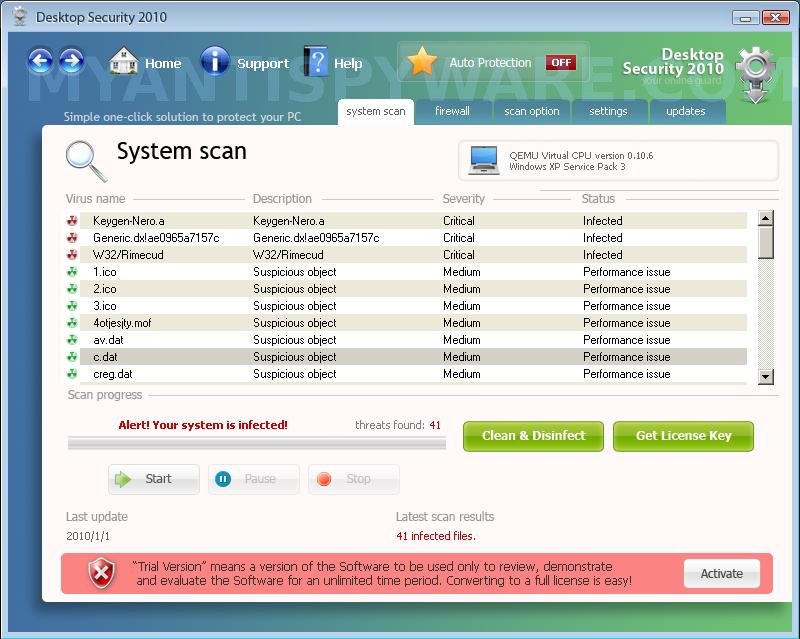
Desktop Security 2010 is a rogue antispyware program. It is a clone of Total PC Defender, which is also a rogue antispyware application. Desktop Security 2010 usually installs itself onto your computer through the use of trojans that come from various misleading websites.

During installation, Desktop Security 2010 configures itself to run automatically every time, when you start your computer. Once running, the rogue will scan your computer and reports a variety of infections that can not be removed unless you pay for a paid version of the rogue. However, this is a scam, because Desktop Security 2010 is unable to detect or remove any infections. So you can safely ignore the false scan results.

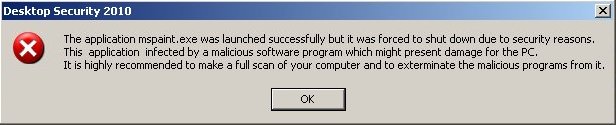
Desktop Security 2010 may block the ability to run any programs. The following warning will be shown when you try to run the MS Paint:

Desktop Security 2010
The application mspaint.exe launched successfully but it was forced to shut down due to security reasons.
This application infected by a malicious software program which might present damage for the PC.
It is highly recommended to make a full scan of your computer and to exterminate the malicious programs from it.

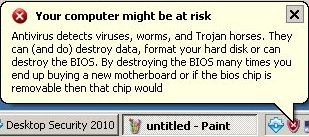
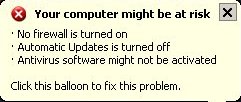
What is more, while Desktop Security 2010 is running you will be shown a lot of popups, nag screens and fake security alerts from Windows task bar such as the following:

Your computer might be at risk
Antivirus detects viruses, worms, and Trojan horses. They
can (and do) destroy data, format your hard disk or can
destroy the BIOS. By destroying the BIOS many times you
end up buying a new motherboard or if the bios chip is
removable then that chip would

Your computer might be at risk
- No firewall is turned on
- Automatic Updates is turned off
- Antivirus software might not be activated
Click this balloon to fix this problem.

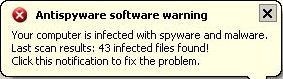
Antispyware software warning
Your computer is infected with spyware and malware.
Last scan results: 43 infected files found!
Click this notification to fix the problem.

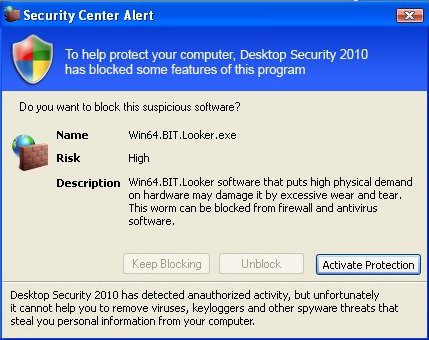
Security Center Alert
To help protect your computer. Desktop Security 2010
has blocked some features of this program.
Do you ant to block this suspicious software ?
Name Win64.BIT.Looker.exe

Desktop Security 2010
Spyware Warning
Your online guard helps to stop unauthorized
changes to your computer.

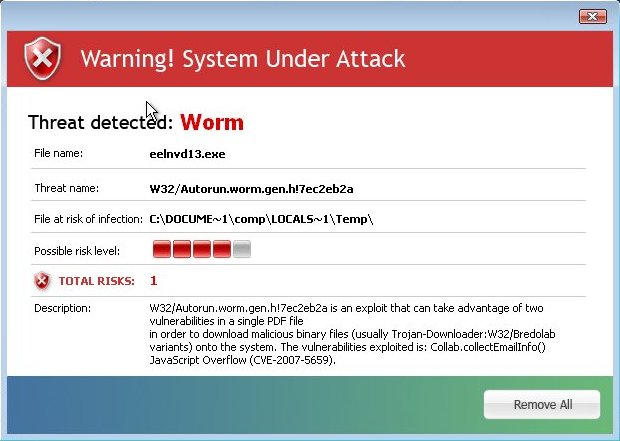
Warning! System Under Attack
Threat detected: Worm

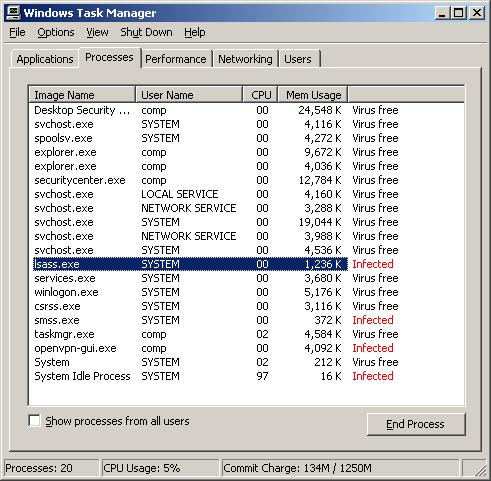
Last, but not least, Desktop Security 2010 will display a screen that looks like legitimate Windows Task Manager with one exception, it have a column that states whether a process is infected or not. Of course, all of these warnings and alerts are fake and like false scan results supposed to scare you into purchasing so-called full version of the program. So you can safely ignore all that Desktop Security 2010 gives you.

As you can see, Desktop Security 2010 is scam and designed only for one – to trick you into buying the software. Instead of doing so, use the removal guide below to remove Desktop Security 2010 from your computer for free.

More screen shoots of Desktop Security 2010
Symptoms in a HijackThis Log

O4 – HKLM\..\Run: [Desktop Security 2010] C:\Program Files\Desktop Security 2010\Desktop Security 2010.exe
O4 – HKLM\..\Run: [SecurityCenter] C:\Program Files\Desktop Security 2010\securitycenter.exe
O4 – HKLM\..\Run: [[random].exe] C:\WINDOWS\system32\[random].exe

Use the following instructions to remove Desktop Security 2010 (Uninstall instructions)

Step 1.

Download HijackThis from here and save it to your Desktop. If you cannot run HijackThis, then re-download it, but before saving HijackThis.exe in the Save dialog, rename it first to explorer.exe and click Save button to save it to desktop.

Run HijackThis. Click “Do a system scan only” button. Now select the following entries by placing a tick in the left hand check box, if present:

O4 – HKLM\..\Run: [Desktop Security 2010] C:\Program Files\Desktop Security 2010\Desktop Security 2010.exe
O4 – HKLM\..\Run: [SecurityCenter] C:\Program Files\Desktop Security 2010\securitycenter.exe

Make sure your Internet Explorer and any other browsers and programs are closed, then click Fix Checked. Close HijackThis.

Step 2.

Download MalwareBytes Anti-malware (MBAM). Once downloaded, close all programs and windows on your computer.

Double-click on the icon on your desktop named mbam-setup.exe. This will start the installation of MalwareBytes Anti-malware onto your computer. When the installation begins, keep following the prompts in order to continue with the installation process. Do not make any changes to default settings and when the program has finished installing, make sure a checkmark is placed next to “Update Malwarebytes’ Anti-Malware” and Launch “Malwarebytes’ Anti-Malware”. Then click Finish.

MalwareBytes Anti-malware will now automatically start and you will see a message stating that you should update the program before performing a scan. If an update is found, it will download and install the latest version.

As MalwareBytes Anti-malware will automatically update itself after the install, you can press the OK button to close that box and you will now be at the main menu. You will see window similar to the one below.

malwarebytes-antimalware1
Malwarebytes Anti-Malware Window

Make sure the “Perform quick scan” option is selected and then click on the Scan button to start scanning your computer for Desktop Security 2010 infection. This procedure can take some time, so please be patient.

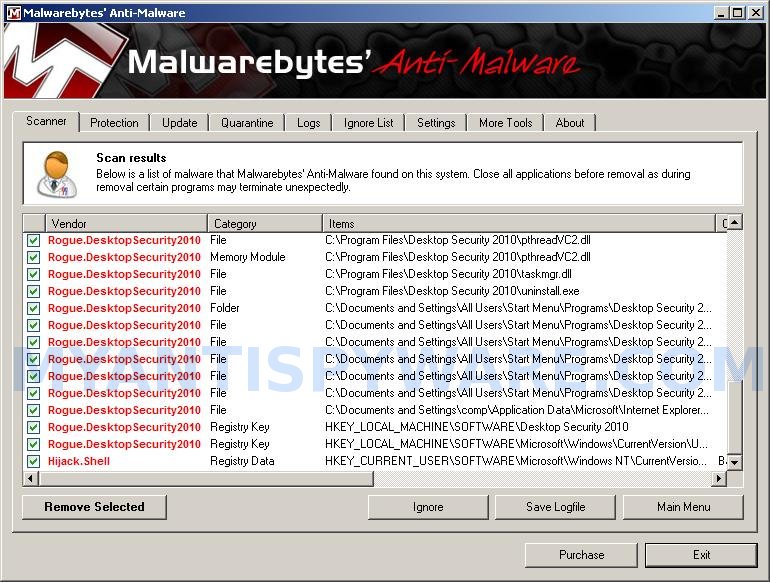
When the scan is finished a message box will appear that it has completed scanning successfully. Click OK. Now click “Show Results”. You will see a list of infected items similar as shown below.
Note: list of infected items may be different than what is shown in the image below.
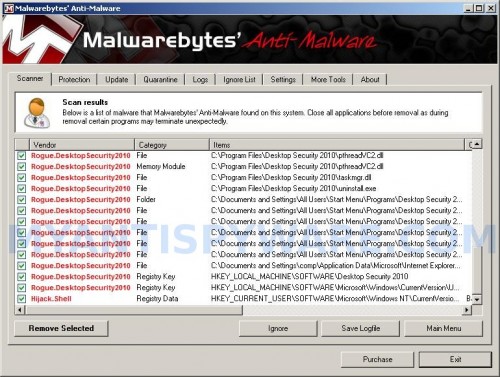

Malwarebytes Anti-malware, list of infected items

Make sure all entries have a checkmark at their far left and click “Remove Selected” button to remove Desktop Security 2010. MalwareBytes Anti-malware will now remove all of associated Desktop Security 2010 files and registry keys and add them to the programs’ quarantine. When MalwareBytes Anti-malware has finished removing the infection, a log will open in Notepad and you may be prompted to Restart.

Note: if you need help with the instructions, then post your questions in our Spyware Removal forum.

Desktop Security 2010 creates the following files and folders

C:\Program Files\Desktop Security 2010
C:\Documents and Settings\All Users\Start Menu\Programs\Desktop Security 2010
C:\Program Files\Desktop Security 2010\Desktop Security 2010.exe
C:\Program Files\Desktop Security 2010\securitycenter.exe
C:\WINDOWS\system32\[random].exe
C:\Program Files\Desktop Security 2010\daily.cvd
C:\Program Files\Desktop Security 2010\guide.chm
C:\Program Files\Desktop Security 2010\hjengine.dll
C:\Program Files\Desktop Security 2010\mfc71.dll
C:\Program Files\Desktop Security 2010\MFC71ENU.DLL
C:\Program Files\Desktop Security 2010\msvcp71.dll
C:\Program Files\Desktop Security 2010\msvcr71.dll
C:\Program Files\Desktop Security 2010\pthreadVC2.dll
C:\Program Files\Desktop Security 2010\taskmgr.dll
C:\Program Files\Desktop Security 2010\uninstall.exe
C:\Documents and Settings\All Users\Start Menu\Programs\Desktop Security 2010\Activate Desktop Security 2010.lnk
C:\Documents and Settings\All Users\Start Menu\Programs\Desktop Security 2010\Desktop Security 2010.lnk
C:\Documents and Settings\All Users\Start Menu\Programs\Desktop Security 2010\Help Desktop Security 2010.lnk
C:\Documents and Settings\All Users\Start Menu\Programs\Desktop Security 2010\How to Activate Desktop Security 2010.lnk
C:\Documents and Settings\All Users\Start Menu\Programs\Desktop Security 2010.LNK
%UserProfile%\Application Data\Microsoft\Internet Explorer\Quick Launch\Desktop Security 2010.LNK

Desktop Security 2010 creates the following registry keys and values

HKEY_LOCAL_MACHINE\SOFTWARE\Desktop Security 2010
HKEY_LOCAL_MACHINE\SOFTWARE\Microsoft\Windows\CurrentVersion\Uninstall | Desktop Security 2010
HKEY_LOCAL_MACHINE\SOFTWARE\Microsoft\Windows\CurrentVersion\Run | desktop security 2010
HKEY_LOCAL_MACHINE\SOFTWARE\Microsoft\Windows\CurrentVersion\Run | securitycenter
HKEY_LOCAL_MACHINE\SOFTWARE\Microsoft\Windows\CurrentVersion\Run | 8uw5jpvrct81
HKEY_CURRENT_USER\SOFTWARE\Microsoft\Windows NT\CurrentVersion\Winlogon | Shell=”C:\Program Files\Desktop Security 2010\Desktop Security 2010.exe”

Share and Enjoy:

  • Print
  • Digg
  • Sphinn
  • del.icio.us
  • Facebook
  • Mixx
  • Google Bookmarks
  • Slashdot
  • Twitter
January 23, 2010 on 7:57 am | In Rogue Anti Spyware, Tutorials - HowTo | 56 Comments |


56 Comments »

RSS feed for comments on this post.

  1. It really works just follow the instructions im so happy that pussy ass desktop shit is off my computer it was annoying the hell outta me

    Comment by tate gordon — January 26, 2010 #

  2. Tried this, doesn’t seem to be working for me. Can’t get rid of the damn thing. :(

    Comment by Mark — February 14, 2010 #

  3. Mark, ask for help in our Spyware removal forum.

    Comment by Patrik — February 15, 2010 #

  4. I have pcdoctor on my laptop. Somehow Desktop security 2010 got through. When I try to power up a box pops up with desktop security is unable to locate component hjengine.dll. Then my screen goes totally black with no icons. I cant open any files or run any programs. I really need your help. How can I get rid of this?

    Comment by brad radford — February 15, 2010 #

  5. Brad, you have tried boot your PC in safe mode ?

    Comment by Patrik — February 16, 2010 #

  6. After saving when I attempt to “Run” I am asked What program I want to open this application in. What’s the answer?

    Comment by Kevin — April 16, 2010 #

  7. It worked for me.

    Comment by rick jones — April 16, 2010 #

  8. Kevin, maybe you have made a mistake, Try redownload HijackThis. Use “explorer.exe” as new name (w/o quotes).

    Comment by Patrik — April 17, 2010 #

  9. Hi, when I try to run Hijack this (saved under explorer.exe), I get a box “16 bit MS-DOS Subsystem” A temporary file needed for initialization could not be created or could not be written to. Make sure that the directory path exists, and disk space is available”

    And then I tried running it on safe mode, but it said “A device attached to the system is not functioning” :(

    Comment by Dorothy — April 25, 2010 #

  10. Dorothy, try use “iexplore.exe” (w/o quotes) as new name to HijackThis. If it does not help, then open a new topic in our Spyware removal forum.

    Comment by Patrik — April 27, 2010 #

  11. I’ve run Malwarebytes and it scans / finds rogue files. When I click on the “Remove Selected” the Malwarebytes program freezes.

    Any ideas please

    Comment by John — April 28, 2010 #

  12. John, probably a trojan blocks Malwarebytes. Try run it from Safe mode.

    Comment by Patrik — April 29, 2010 #

  13. When i ran hijack this, i only found one symptom in the log, i removed it and then ran a quick scan using MBAM, i restarted the computer when prompted after restarting it, and getting to the log in screen, i restarted it again and ran it in safe mode, did it all again in safe mode for good measure, even tho the MBAM scan found no malware… i then restarted it normally again… as soon as i logged in Desktop Security popped up again… this didnt seem to help at all…

    Comment by Jared — May 3, 2010 #

  14. this is so easy to get rid of… If it blocks ur pc just go to windows task manager by clicking (Ctrl + ALT + Delete) and you can remove it.
    You then go into ur files and remove it… Search its name… The files go back into ur computer when u try to remove them but one of them doesnt…. Remove them all… (which means try everyone with its name in it)

    Comment by Bob — May 4, 2010 #

  15. Jared, begin a new topic in our Spyware removal forum. I will check your PC.

    Comment by Patrik — May 5, 2010 #

  16. Does anyone know what this executable is: TgloBtjjgA.exe? I had Desktop Security 2010 on my computer and I think that I successfully got rid of it. Now this executable, which I have never noticed before on my processes tab of Task Manager, is taking up the majority of my CPU. Thanks for any thoughts!

    Comment by Kristin — July 6, 2010 #

  17. Kristin, start a new topic in our Spyware removal forum. I will check your computer.

    Comment by Patrik — July 7, 2010 #

  18. Worked for me the first time. Just takes a little time and patience. After 3 days of being able to do little or nothing on my PC i’m back in business. Thanks a million.

    Comment by Gregory — July 15, 2010 #

  19. I recently was infected by Desktop Security 2010. I tried making a notebook entry titled fix. This did not work. My McAffe would not load. So I installed PC Tools SpyWare Doctor. It would scan and say it got rid of it but I still get attacked from the Desktop Security 2010. The Desktop Security has also a “permanent image” that looks like a pop up for and advertisement. It will not let me “X” close it out. If you click no it will load and it does not give and option to click yes… that box is faded and does not activate. What do I do now??? I just paid $40 for PC Tools Spyware Doctor and it did not fully correct or remove Desktop Security 2010. PLEASE HELP!!!!

    Comment by Heather — July 17, 2010 #

  20. Heather, please start a new topic in our Spyware removal forum. I will help you to remove this malware.

    Comment by Patrik — July 17, 2010 #

  21. This worked for me as well – removed it. What a pain in the ASS

    Comment by asdf — July 19, 2010 #

  22. i have the same problem, jet i dont know how o deal with it..can anyone help me?

    Comment by tomaz — July 21, 2010 #

  23. OH MY GOD! Thank you soooo much! I’m ridiciliously happy right now!

    Comment by Deardre — July 21, 2010 #

  24. ok, I did step 1 above, all good. But when I run Malwarebytes I get a windows pop up which states: “Program mbam.exe is infected with virus PWS:Win32/Frethog.gen!B …. Would you like to disinfect this program with Antivirus”

    Any ideas?

    Comment by don — July 23, 2010 #

  25. don, please open a new topic in our Spyware removal forum. I will help you.

    Comment by Patrik — July 24, 2010 #

  26. Thanks a bunch mate, worked a treat.

    Comment by Emily — July 26, 2010 #

  27. We cannot get the desktop security 2010 to uninstall from the programs list. Your directions are amazing but we want to remove the program all together. Can you help?

    Comment by deborah — August 1, 2010 #

  28. deborah, if the instructions above does not help you, please start a new topic in our Spyware removal forum. I will help you.

    Comment by Patrik — August 2, 2010 #

  29. For thos of you that cant get the highjack this started, its because its no longer there, search for it in google and the first hit is the one.

    Comment by Alejandro — August 3, 2010 #

  30. Alejandro, i have updated the link above.

    Comment by Patrik — August 3, 2010 #

  31. It didn’t work. When it restarted I still get the spyware warning. Help!

    Comment by kvh — August 5, 2010 #

  32. I have followed the steps but can not completely delete the desktop security 2010 virus.

    Comment by mike — August 6, 2010 #

  33. the only way for me to use the internet on my laptop is through Safari.

    Comment by mike — August 6, 2010 #

  34. Hey, I ran the program and MBAM and got rid of 8 files, but when I restarted my computer Desktop Security was still running. I checked my Add/remove Programs list and Desktop Security is still listed there but it won’t let me remove it. I ran both programs again but MBAM came up with no results. Any ideas?

    Comment by Francis — August 6, 2010 #

  35. If the instructions above does not help, please start a new topic in our Spyware removal forum. I will help you to remove this malware manually.

    Comment by Patrik — August 6, 2010 #

  36. it worked for me. thanks

    Comment by Chris — August 6, 2010 #

  37. After removing this virus completely (Or so I think), I still have a problem with internet explorer. My computer is acting as if I have an outdated version of IE (6), but I actually have the latest version. Some websites will give me error messages saying they aren’t compatible with older versions. I’ve tried reinstalling IE8 but still having the same problem. When I try to get onto Facebook, it actually says I’m using IE on a MAC (but, I’m on a PC!). I’ve seen someone else mention this same problem, but the response was ‘That has nothing to do with the virus’ but I know for a fact it does. Any thoughts other than a reformat?

    Comment by Jeff — August 10, 2010 #

  38. Guys, I simply came off the internet and did a system restore bcak a few days. hey presto it was gone

    Comment by Bill Wilkie — August 11, 2010 #

  39. Hey all! I followed the instructions, but Malwarebytes didn’t find anything and the damn thing came back. Soooo…I did some digging: It seems that a large number of the files are located in the %userprofile%\local settings\temp folder. So I ran the rkill.com app to stop the program and deleted all the files (save dat files) from the temp folder. I then did a manual search for the registry for anything called “Desktop Security” and deleted the keys & strings. Also got rid of a entry under

    HKEY_LOCAL_MACHINE\Software\Microsoft\Windows\CurrentVersion\Run “Security Center”

    Did a search of the local HDD for the same and deleted those as well. Rebooted and WOO-HOO! Gone!

    Comment by Rick — August 12, 2010 #

  40. MBAM didn’t work for me either.
    Have a licensed upto date version of Kaspersky 2010 running and it didn’t protect me. Now it’s complaining about a corrupt Kaspersky blacklist. Seems this virus knobbled Kaspersky when it installed. Did Bills trick of system restore back a week and now all seems fine.

    Comment by Barry — August 13, 2010 #

  41. Jeff, ask for help in our Spyware removal forum.

    Comment by Patrik — August 14, 2010 #

  42. OHHH MY GOD, IT WORKS FOR REAL. I CAN’T BELIEVE THAT IT DID THE JOB THANK YOU TO ALL.

    Comment by Towana — August 16, 2010 #

  43. This solution worked great. I had tried to just run just rkill.com then Malwarebytes, but I was still getting the pop up on startup. I down loaded Hijackthis and ran that and found “O4 – HKLM\..\Run: [Desktop Security 2010] C:\Program Files\Desktop Security 2010\Desktop Security 2010.exe” was still there. Once I selected it and fixed it, I had no further issues.

    Thanks for the solution.

    Comment by Mark Sleighter — August 17, 2010 #

  44. I ran these steps and now all the pop ups and notices have stoped but it still shows that Desktop Security 2010 is still installed.. Everything is running fine and I am having no issues.. What do I do?

    Comment by Dustin — August 17, 2010 #

  45. Make sure you do the hijackthis and delete those 2 entries before running MBAM and you’ll have no problems getting rid of this. Just got rid of this on my neighbors’ computer for him. Also, run them in safe mode.

    Comment by Ageek — August 18, 2010 #

  46. IT WORKS!
    Thank you so much!!!

    Comment by nan — August 22, 2010 #

  47. Dustin, who shows it ? you mean Add/Remove programs panel ?

    Comment by Patrik — August 22, 2010 #

  48. I just want to let everyone know that this software and accompanying instruction works as claimed. I had a difficult hour, or so, before finding the solution on this website. I am happy and grateful to the people who figure these fixes out and provide the victims of malicious software with a way back to sanity. Thank you very much!

    Comment by Jim Daly — August 24, 2010 #

  49. NOTE: Found a .pf file lurking in C:\Windows\Prefetch\SECURITYCENTER.EXE-*HASH*.PF that was calling desktop security exe file.

    Comment by Patrick — August 25, 2010 #

  50. Desktop Security 2010 appreared out of nowehere yesterday afternoon and it was driving me CRAXY!!!
    There is no way I could remove it on my own. I did an internet search and came up with your website. Praise the Lord! I followed your instructions, restarted my computer and IT WAS GONE!!!
    Thank you SO very much!
    Erv

    Comment by Erv — August 26, 2010 #

  51. When I downloaded HijackThis and also renamed it to explorer.exe I ran the “Do a system Scan Only”
    And looked through the files but I wasn’t able to see
    O4 – HKLM\..\Run: [Desktop Security 2010] C:\Program Files\Desktop Security 2010\Desktop Security 2010.exe
    O4 – HKLM\..\Run: [SecurityCenter] C:\Program Files\Desktop Security 2010\securitycenter.exe
    I would appreciate it very much if I could get some help!

    Comment by Hikari — August 27, 2010 #

  52. @ Patrick.. Yes.. Add remove programs still shows its there but its not causing problems anymore..

    Comment by Dustin — August 28, 2010 #

  53. Hikari and Dustin, please begin a new topic in our Spyware removal forum. I will help to remove this malware.

    Comment by Patrik — August 28, 2010 #

  54. Thank you so much. This really helped me. It worked

    -God bless
    Myles Z

    -Proverbs 3:5-6

    Comment by Myles — August 28, 2010 #

  55. worked like a charm. Thank you so much.

    Comment by Michael — August 30, 2010 #

  56. A friend of mine has this malware desktop thing now. I tried to delete it but no success and now I see this forum and it looks like it’s alot of work. My advice, get a Mac! I gave up helping him, he’s on his own now.

    Comment by ericdraven — August 31, 2010 #

Leave a comment

XHTML: <a href="" title=""> <abbr title=""> <acronym title=""> <b> <blockquote cite=""> <cite> <code> <del datetime=""> <em> <i> <q cite=""> <strike> <strong>


My Anti Spyware - Free antispyware programs and Spyware Removal Instructions.