The Recovery Console is tool very useful in situations such as removing malware, spyware, trojans and recover Windows installation. It may be the only way to save your system one day. But anyway, if you want to remove/uninstall Microsoft Recovery Console from your computer, then please use the instructions below to make it.
Use the following instructions to remove/uninstall Microsoft Recovery Console.
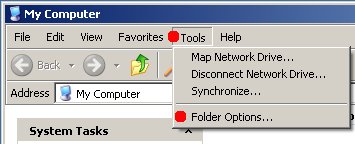
Click My Computer, Toos, Folder Options as shown below.
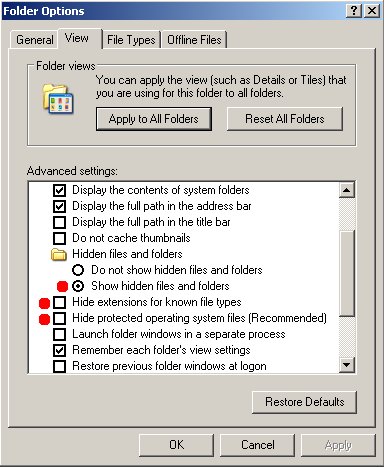
You will see Folder Option Window, select View tab

Under Hidden Files and Folders, select Show Hidden Files and Folders, uncheck Hide extensions for known file types, uncheck Hide protected operating files (Recommended). As shown below.
Click Apply and click OK.
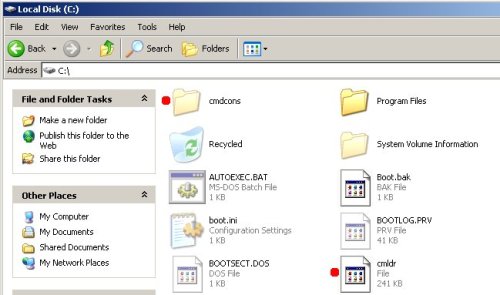
Open C drive, you will see a screen as shown below. Delete the following files/folders: cmdcons and cmldr.
If boot.bak exist, then delete boot.ini and rename boot.bak to boot.ini.
If boot.bak is not exist. Right-click the Boot.ini file and then click Properties option.
Uncheck the Read-only check box and then click the OK button. Click twice to boot.ini. You will see notepad window similar to the one below.

Remove C:\CMDCONS\BOOTSECT.DAT=”Microsoft Windows Recovery Console” /cmdcons line and save the file.
Reboot your computer.





THis is very good info..Thanx for posting..Tho i have used Combo fix to try and get rid of Malware and also used Rcovery Console, i still get my browsers search results hijacked. I ran Avast, Superantispyware and others and checks out clean…But i had trouble getting the recovery console from booting at startup, there’d be that black screen with Windows XP or Recovery Console as choices..This info got rid of it, but the original problem exists..lol
JC, ask for help in our Spyware removal forum.
I’ve tried this method and even though I’m not using microsoft recovery console it still won’t let me delete the folder cmdcons. I get this message …
Cannot delete “any file name in that folder” access denied. Make sure the disk is not full or write protected and that the file is not currently in use. Even when I try to delete them manually not just right click and delete . Any suggestions why it’s I can’t delete the folder?
Oh another note, I even tried it in safemode with the same result.
DA, you are logged as Administrator ?