Do you have pop-ups or your computer infected with trojan or spyware ? Learn how to ask us for help, click here!

How to use Kaspersky online scanner (Free Virus Scan)

Kaspersky online scanner is a free service which you can use to find out if you have any viruses, trojans, worms or spyware on your machine without having to install new software. You can also see what viruses your current antivirus software let slip through! You just need to be online and using Internet Explorer.

Kaspersky online scanner uses Java tecnology to perform the scan. If you do not have the latest Java version, then follow the instructions – How to update Java, to download and install the latest version.

Use the following instructions to scan your computer with Kaspersky online scanner.

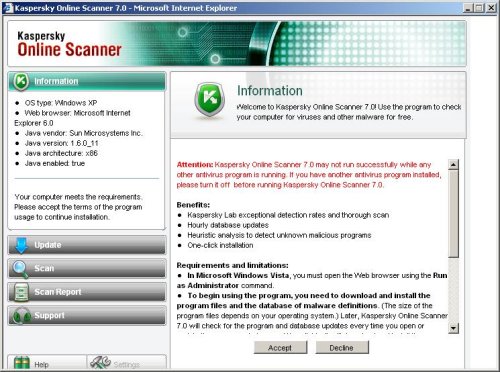
Click here or here to open Kaspersky online scanner site. Click on SCAN NOW. When Kaspersky online scanner Java applet has finished downloading you will see window similar to the one below.
kaspersky_online_scanner_2
Kaspersky online scanner – Information

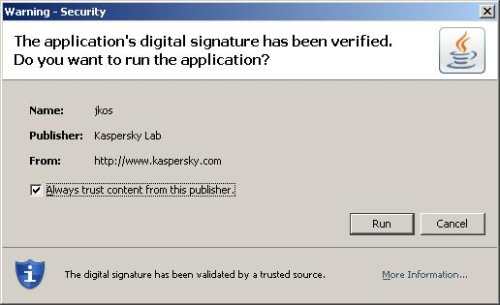
Read requirements and limitations and press Accept button. You may see a prompt similar to the one below.
kaspersky_online_scanner_3
Java security warning

This is perfectly normal and safe and you can click on the Run button to continue.

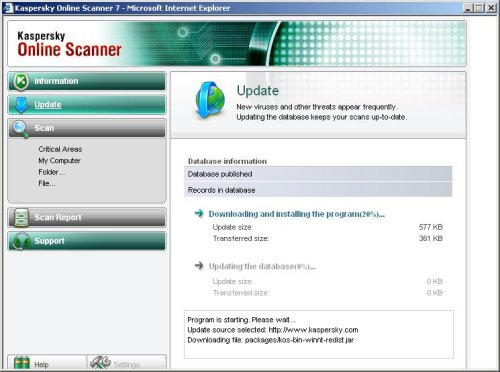
Kaspersky online scanner will start downloading and installing the scanner and virus definitions as shown in the image below.
kaspersky_online_scanner_4
Kaspersky online scanner – Update

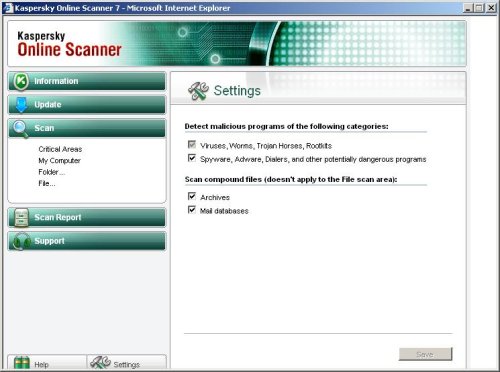
Once the downloads have finished, click on Settings. Make sure the following is checked.

  • Spyware, Adware, Dialers, and other potentially dangerous programs
  • Archives
  • Mail databases

Now you will see window similar to the one below.
kaspersky_online_scanner_10
Kaspersky online scanner – Settings

Click on My Computer under Scan. Kaspersky online scanner will now start scanning your computer for known infections. This procedure can take some time, so please be patient.
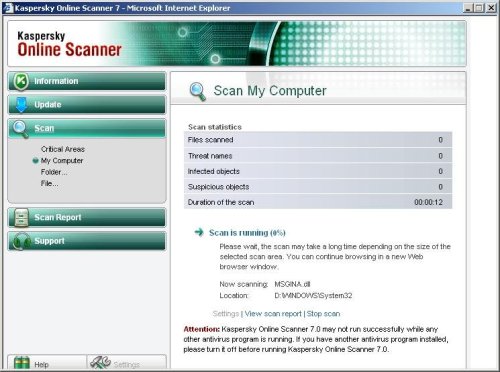
kaspersky_online_scanner_6
Kaspersky online scanner – Scan My Computer

When Kaspersky online scanner has finished scanning, you will see a screen as shown below.
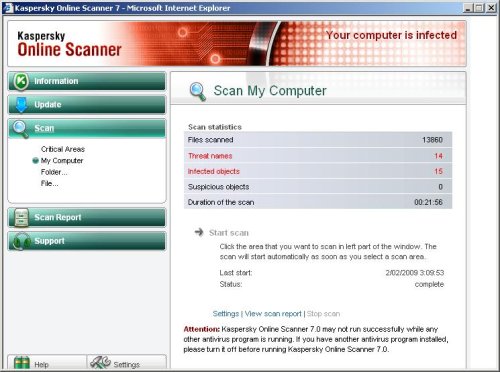
kaspersky_online_scanner_7
Kaspersky online scanner – Scan is complete

Click Scan Report. You will see a list of infected items similar as shown below.
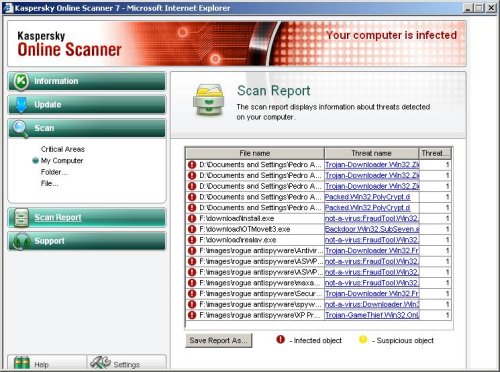
kaspersky_online_scanner_8
Kaspersky online scanner – Scan report

Click on Save Report As button, if you need to save result of scanning.

Share and Enjoy:

  • Print
  • Digg
  • Sphinn
  • del.icio.us
  • Facebook
  • Mixx
  • Google Bookmarks
  • Slashdot
  • Twitter
February 7, 2009 on 5:13 am | In Tutorials - HowTo | 28 Comments |


28 Comments »

RSS feed for comments on this post. TrackBack URI

  1. thank you

    Comment by fermas — February 10, 2009 #

  2. can you delete the viruses with the online scanner ?

    Comment by migh — March 5, 2009 #

  3. PLZ SCAN MY PC AND MAKE IT OK

    Comment by praveen — March 5, 2009 #

  4. migh, Kaspersky Online Scanner can`t remove threats, but you can use F-Secure Online Scanner to find out if your computer is infected and disinfect your computer if needed.

    Comment by Patrik — March 5, 2009 #

  5. can you scan my pc in safe mode

    Comment by Canny nguyen — March 15, 2009 #

  6. Thank for all you don

    Comment by Canny nguyen — March 15, 2009 #

  7. grazie

    Comment by fabio — March 23, 2009 #

  8. danke

    Comment by ataski — March 25, 2009 #

  9. ok

    Comment by marion — April 3, 2009 #

  10. SUPERRRR

    Comment by desperado — April 13, 2009 #

  11. Thank U

    Comment by Jahangeer — April 28, 2009 #

  12. PLEASE SCAN THANKS

    Comment by tom mcferren — May 28, 2009 #

  13. I just tried to use F-Secure Online but would not install on my system. I am using Vista Home Premium, is this the problem because it is not supported by this program?

    Comment by Heather Burridge — June 10, 2009 #

  14. No, should work w/o problems.

    Comment by Patrik — June 10, 2009 #

  15. Are there any free scanners which will delete the viruses, besides F-Secure?

    - btw Patrik i think you do a fantastic job on these forums!

    Comment by JJJASON — July 13, 2009 #

  16. free scanners which will delete the viruses, besides F-Secure

    BitDefender, Panda Active Scan, Trend Micro HouseCall. Looks here – http://www.myantispyware.com/online-scanners/

    Comment by Patrik — July 13, 2009 #

  17. Thanks! Also, i’d like to know which virus scanner is the best/most effective. Thank you Patrik :D

    Comment by JJJASON — July 13, 2009 #

  18. Kaspersky online scanner is Very good scanner.

    Comment by Patrik — July 15, 2009 #

  19. If Kaspersky Online Scanner can’t remove threats, then what good is it ? I need another tool to find AND remove.

    Comment by Mike — July 18, 2009 #

  20. Mike, these online scanners can remove threats: F-Secure, BitDefender, Panda Active Scan, Trend Micro HouseCall. Links here -> http://www.myantispyware.com/online-scanners/

    Comment by Patrik — July 19, 2009 #

  21. it is very good

    Comment by mahi — July 31, 2009 #

  22. thaking for scening i hope your turth full.

    Comment by sunil kumar — August 9, 2009 #

  23. I gotta agree with Mike. Why would someone use Kapersky scanner when it only finds the viruses?? TM House Call is MUCH better.

    Comment by James — August 13, 2009 #

  24. James, Kaspersky online scanner have a very good detect ratio, You need use it for checking your PC.
    You can to use free AVP tool (by kaspersky lab) to remove viruses, trojans, etc.

    Comment by Patrik — August 14, 2009 #

  25. thanks kespersky…………

    Comment by sanjay — August 18, 2009 #

  26. Free scanner is useless without the antivirus beside it is very slow when it scan from the online. I would rather use the full version or free trials version to speed up the scan process.

    Comment by Renew Antivirus — July 27, 2010 #

  27. I have Kespersky anti-virus installed, will this detect and/or delete trouble files?

    Comment by Eugene — July 31, 2010 #

  28. Eugene, yes. You can use the scanner with any antivirus.

    Comment by Patrik — August 2, 2010 #

Leave a comment

XHTML: <a href="" title=""> <abbr title=""> <acronym title=""> <b> <blockquote cite=""> <cite> <code> <del datetime=""> <em> <i> <q cite=""> <strike> <strong>


My Anti Spyware - Free antispyware programs and Spyware Removal Instructions.
