Winweb Security 2008 is a rogue antispyware application. It being distributed through the spam, keygen sites and trojans. In all cases, reported that the computer is infected and that you must download and install the Winweb Security 2008 to clean your computer. During installation, Winweb Security 2008 configures itself to run automatically every time, when you start your PC.
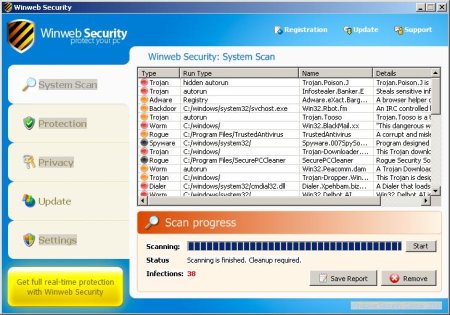
Once running, Winweb Security 2008 starts scanning the computer and found a lot of trojans and spyware. Then, it said that you should purchase Winweb Security 2008 in order to remove them and protect your PC. Computer users are urged to avoid purchasing this bogus program!
Winweb Security 2008 generates false security alerts such as the following.
Winweb Security Warning
Your PC is still infected with dangerous viruses. Activate
antivirus protection to prevent data loss and to avoid the
theft of your credit card details.
Click here to activate protection.
Winweb Security Warning
Some critical system files of your computer were modified by
malicious program. It may cause system instability and data
loss.
Click here to block unathorised modification by removing
threats (Recommended)
These fake warnings may drastically slow the performance of your computer. Please ignore them. If you are a non-techie computer user then this method of removing Winweb Security 2008 and any associated malware from your computer is for you.
Symptoms in a HijackThis Log.
O2 – BHO: BHOws Object – {D5DF7C9D-6069-4552-8B0C-D02A912FC889} – ws.dll (file missing)
O4 – HKLM\..\Run: [adpws] “C:\Documents and Settings\All Users\Application Data\5689887B.exe”
O4 – HKLM\..\Run: [{90BF8224-CD63-4081-A4C7-EF9A2CF6596F}] “C:\Documents and Settings\All Users\Application Data\A974FA49.exe”
O4 – HKLM\..\Run: [WinwebSecurity] “C:\Documents and Settings\All Users\Application Data\WinwebSecurity\WinwebSecurity.exe”
Use the following instructions to remove Winweb Security 2008 (Uninstall instructions).
- Download and install HijackThis.
- Run HijackThis. Click on the Do a system scan only button.
- Look for these lines and place a checkmark against each of the following, if still present
O2 – BHO: BHOws Object – {D5DF7C9D-6069-4552-8B0C-D02A912FC889} – ws.dll (file missing)
O4 – HKLM\..\Run: [adpws] “C:\Documents and Settings\All Users\Application Data\5689887B.exe”
O4 – HKLM\..\Run: [{90BF8224-CD63-4081-A4C7-EF9A2CF6596F}] “C:\Documents and Settings\All Users\Application Data\[RANDOM_NAME].exe”
O4 – HKLM\..\Run: [RANDOM_NUMBERS] “C:\Documents and Settings\All Users\Application Data\[RANDOM_NUMBERS]\[RANDOM_NUMBERS].exe”
O4 – HKLM\..\Run: [WinwebSecurity] “C:\Documents and Settings\All Users\Application Data\WinwebSecurity\WinwebSecurity.exe”Note: a few examples: [RANDOM_NUMBERS] – 764082672, 1612374962; RANDOM_NAME – 5828ADFF.exe, A974FA49.exe
- Click on Fix Checked when finished and exit HijackThis.
- Download Avenger from here and unzip to your desktop.
- Run Avenger, copy,then paste the following text in Input script Box:
Registry values to delete:
HKEY_LOCAL_MACHINE\Software\Microsoft\Windows\CurrentVersion\Run | WinwebSecurity
HKEY_LOCAL_MACHINE\Software\Microsoft\Windows\CurrentVersion\Run | adpws
HKEY_LOCAL_MACHINE\Software\Microsoft\Windows\CurrentVersion\Run | {90BF8224-CD63-4081-A4C7-EF9A2CF6596F}Registry keys to delete:
HKEY_LOCAL_MACHINE\software\microsoft\windows\currentversion\explorer\Browser Helper Objects\{D5DF7C9D-6069-4552-8B0C-D02A912FC889}Files to delete:
C:\Documents and Settings\All Users\Application Data\5689887B.exe
C:\Documents and Settings\All Users\Application Data\A974FA49.exe
C:\Documents and Settings\All Users\Application Data\5828ADFF.exeFolders to delete:
C:\Documents and Settings\All Users\Application Data\WinwebSecurityThen click on ‘Execute’.
- You will be asked Are you sure you want to execute the current script?. Click Yes.
- You will now be asked First step completed — The Avenger has been successfully set up to run on next boot. Reboot now?. Click Yes.
- Your PC will now be rebooted.
- Download MalwareBytes Anti-malware (MBAM). Close all programs and Windows on your computer.
- Double Click mbam-setup.exe to install the application. When the installation begins, keep following the prompts in order to continue with the installation process. Do not make any changes to default settings and when the program has finished installing, make sure a checkmark is placed next to Update Malwarebytes’ Anti-Malware and Launch Malwarebytes’ Anti-Malware, then click Finish.
- If an update is found, it will download and install the latest version.
- Once the program has loaded, select “Perform Quick Scan”, then click Scan.
- The scan may take some time to finish,so please be patient.
- When the scan is complete, click OK, then Show Results to view the results.
- Make sure that everything is checked, and click Remove Selected.
- When disinfection is completed, a log will open in Notepad and you may be prompted to Restart.
If you need help with the instructions, then post your questions in our Spyware Removal forum.





Yesterday i removed winmeb security 2008 from my system using your published instructions and it worked very well so thank you for that. I now have a red shield in my tool bar and occasionaly it says i have security problems and it keeps trying to launch internet explores with the address http:///in.php?url=130&affid=. Is it possible i could stop this happening? could someone please give me some advice
Regards
Mitch Tayles
Looks like your computer also infected with hidden trojan. Please follow these instructions. I will help you.
i have the same problem i removed the virus but the red shield is there and keeps telling me that i have a security threat
Hamid, Please follow these instructions. Myantispyware team will help you.
I had follow all the instruction to uninstall the winweb security from my pc but its not working.The winweb security is still disturbing me when using my pc.Can anyone help me?
izzat, looks like your computer infected with new version of a trojan that used for display a fake alerts. Please follow these instructions. Myantispyware team will help you.
I tried to remove WinWeb Security from my computer using the following instructions and it seemed to work up until the computer requested to restarted. Once the computer was restarted WinWeb started scanning as usual. I can’t seen to uninstall WinWeb no matter what instructions I follow. I had previosuly tried …
THANK YOU! I followed the instruction and it worked. I was close to throwing this computer out the window. Me and my sanity appreciate the help!
UMMM THAT POPPED UP AND I TRIED TO DOWNLOAD IT…BUT MY COMPUTER WULDN LET IT IT SAID IT NEEDED A PERMISSION…DID IT INFEVT IT??
MARIA, please follow these steps.
I did the whole process described above to remove the winweb security spyware by using malwarebytes antimalware. The permanent popups of winweb security requiring to registry and purchase the spysoftware are now gone.
But there is still the problem of 7 infected registry keys by so called Adware.zango and Trojan.FakeAlert on my pc. After scanning by malwarebytes these 7 infections are reported plus the infection of C:/windows/system32/ws.dll with a TRojan.FakeAlert. I tried to remove with malwarebytes though always the removal process stops immediately when coming to mentioned file. The malwarebytes programm can then only be closed by pressing ctrl+alt+del.
This happens even if i do not select this file for removing. Can you help me?
Malawarebytes will take care of this problem (and more). It’s free to scan and REMOVE any issues. You pay only if you want the program to scan automatically. Otherwise, you run the program to run scans manually. Enjoy, and goodluck…
Frieder, please read and follow these steps.
Ive downloaded hijack and it say to cheek these files and fix them, well my problem is none of these files are showing up, how can I find them
Josh
Josh, please read and follow these steps. Myantispyware site team will help you.
fantastic! we beat winweb security! thanks for the instructions, easy for even me to follow. system all cleaned and that annoying pop up has gone.
Amazing Instructions. Im really very thankfull to you, as these instruction helped remove that winweb security which was really a headache for me.
Now I request u to plz help how to remove win32.dll relocated in memory error.
Thanking you a lot
Mubeen, please follow these steps.
THANK YOU! I followed the instruction and it worked. I was close to throwing this computer out the window. Me and my sanity appreciate the help!
Thank you Thank you
I have followed your easy instructions and I am now win web free . I had to do the check twice as I didn’t get winweb the first time. Cheers
Finally I found the soultion myself today. I deleted it, my computer works so well. Here you are. Damn Winweb bug hides itself as a every different combination munbers in every infected computers. my bug was “488750511”. Maybe yours is different from mine. It was hiding itself in C:/documents and settings/All users/Applicaton Data/488750511. When I saw it, it looked very suspicious. and then I opened the file “488750511”, there was 4 winweb files finally. I spent 3 hours for the damn thing. I deleted them. and I went to START->RUN->REGEDIT, Enter, HKEY_LOCAL MACHINE ->SOFTWARE ->Microsoft ->Windows ->CurrentVersion ->Run. There was the same nuber combination of Winweb file.exe. I deleted it. and restart the computer. END.
I recommend that you better try to find the same number combination in whole files in your computer, and if you find them, delete them. Thanks. Have a wonderful day.
Ok guys, This worked for me %100 percent i had my doughts when starting the instrutions but my computer is runnin fully back to Normal THANK YOU SO MUCH!
Thanks, your tips seem to have worked well. I think Winweb was removed after the first step, but the malware took off 13 contaminated processes. Appreciate the help. Hope it stays away.
Jason, Thanks for being a darling and being detailed with the instructions on how to remove winweb from my computer. I was really annoying and I thought I would have to shell out bucks to have it remved, following your instructions it only took me 10 minutes. Thanks Again!
Thanks Ruddy!
it really worked !
Thank You Patrik foor kind services ! 🙂
Thanx a lot Patrik, for those steps now I did as per those instructions and already post the Hijackthis log. I hope soon I’ll get solution.
Jason Sung, dude whoever you are I LOVE YOU you helped me remove this oiece of S**** Malware from my PC. Give me your paypall details I will pay you whateve I would have paid these Bulls**** Virus removal companies.
i need free renovel antivirus
If this method did not help you, then please follow these steps.