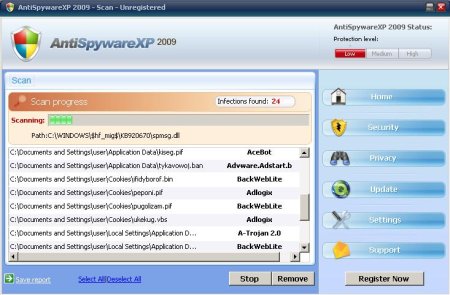
Antispyware XP 2009 is a rogue antispyware application. It is distributed via fake online scanners and a variety of malicious software. In both cases, reported that the computer is infected and that you must download and install the program to clean your computer. During installation, it configures itself to run automatically every time, when you start your computer. In addition the program creates some files with random names(for example):
C:\Documents and Settings\user\Application Data\fotupawa._dl
C:\Documents and Settings\user\Application Data\kiseg.pif
C:\Documents and Settings\user\Cookies\ifidyborof.bin
C:\WINDOWS\osipo.pif
C:\Documents and Settings\user\Local Settings\Application Data\ixaxal.ban
C:\Program Files\Common Files\over.com
C:\Documents and Settings\user\Application Data\epekuxu._dl
C:\Documents and Settings\user\Local Settings\Temporary Internet Files\pulywor.dl
C:\WINDOWS\umames.bin
C:\Program Files\Common Files\atog.dll
C:\Documents and Settings\All Users\Application Data\tuwe.exe
C:\Documents and Settings\user\Local Settings\Application Data\evasyw.ban
C:\Documents and Settings\user\Application Data\amyvawose.vbs
C:\Documents and Settings\user\Cookies\pugolizam.pif
C:\Documents and Settings\All Users\Application Data\ybedavo.dl
C:\Documents and Settings\user\Cookies\peponi.pif
C:\Documents and Settings\user\Application Data\tykavowoj.ban
C:\Documents and Settings\user\Cookies\ukekug.vbs
C:\WINDOWS\ylawanyve.bin
C:\Documents and Settings\All Users\Application Data\some.inf
Which later during the scan will determine as trojans and spyware.
Immediately after launch, the program starts scanning the computer and found a lot of trojans and spyware. Then, it said that you should purchase AntispywareXP 2009 in order to remove them and protect your PC. Do not do it!
Symptoms in a HijackThis Log:
O4 – HKLM\..\Run: [AntiSpywareXP 2009] “C:\Program Files\AntiSpywareXP2009\AntiSpywareXP2009.exe” /hide
Use the following instructions to remove AntiSpywareXP2009.
1. Download Malwarebytes’ Anti-Malware (MBAM). The program designed to quickly detect, destroy and prevent malware, spyware, trojans.
2. Once downloaded, close all programs and Windows on your computer (including this one).
3. Double-click on the icon named mbam-setup.exe to install the application.
4. When the installation begins, keep following the prompts in order to continue with the installation process. Do not make any changes to default settings and when the program has finished installing, make sure a checkmark is placed next to Update Malwarebytes’ Anti-Malware and Launch Malwarebytes’ Anti-Malware, then click Finish.
5. If an update is found, it will download and install the latest version.
6 Once the program has loaded, select “Perform Quick Scan”, then click Scan.
7. MBAM will now start scanning your computer for malware. This process may take some time to finish,so please be patient.
8. When the scan is complete, click OK, then Show Results to view the results.
9. Make sure that everything is checked, and click Remove Selected.
10. MBAM will now delete all of the files and registry keys and add them to the quarantine.
11. When disinfection is completed, a log will open in Notepad and you may be prompted to Restart.
AntispywareXP 2009 creates the following files:
c:\Program Files\AntiSpywareXP2009
c:\Program Files\AntiSpywareXP2009\AntiSpywareXP2009.cfg
c:\Program Files\AntiSpywareXP2009\AntiSpywareXP2009.exe
c:\Program Files\AntiSpywareXP2009\AVEngn.dll
c:\Program Files\AntiSpywareXP2009\htmlayout.dll
c:\Program Files\AntiSpywareXP2009\pthreadVC2.dll
c:\Program Files\AntiSpywareXP2009\Uninstall.exe
c:\Program Files\AntiSpywareXP2009\wscui.cpl
c:\Program Files\AntiSpywareXP2009\data
c:\Program Files\AntiSpywareXP2009\data\daily.cvd
c:\Program Files\AntiSpywareXP2009\Microsoft.VC80.CRT
c:\Program Files\AntiSpywareXP2009\Microsoft.VC80.CRT\Microsoft.VC80.CRT.manifest
c:\Program Files\AntiSpywareXP2009\Microsoft.VC80.CRT\msvcm80.dll
c:\Program Files\AntiSpywareXP2009\Microsoft.VC80.CRT\msvcp80.dll
c:\Program Files\AntiSpywareXP2009\Microsoft.VC80.CRT\msvcr80.dll
c:\Documents and Settings\%Username%\Desktop\AntiSpywareXP2009.lnk
c:\Documents and Settings\%Username%\Start Menu\Programs\AntiSpywareXP2009
c:\Documents and Settings\%Username%\Start Menu\Programs\AntiSpywareXP2009\AntiSpywareXP2009.lnk
c:\Documents and Settings\%Username%\Start Menu\Programs\AntiSpywareXP2009\Uninstall.lnk
Questions and Answers:
I cannot download Malwarebytes Anti-Malware and other antispyware tools, keep getting redirect to a message saying Internet Explorer cannot display the webpage.
Reboot your computer in the Safe mode with networking.
- Restart your computer.
- After hearing your computer beep once during startup, but before the Windows icon appears, press F8.
- Instead of Windows loading as normal, a menu should appear.
- Select the “Safe mode with networking” option, to run Windows in Safe Mode with networking.
Try download tools again.
If you need help with the instructions, then post your questions in our Spyware Removal forum.





I have successfully got rid of AntispywareXP 2009 but it’s damaged some of my programs such as The Sims2 + Microsoft Office, i don’t have the disc for Microsoft office as it was already on the computer when i bought it so i can’t re install it, is there any way i can make it work again?
I don`t know a way make it work again:(
You can make only one, reinstall damaged programs, call to shop where you bought your computer.
Is there a file i can go into on my computer to make sure none of them fake files listed above are still on my computer?
Sophie, please read these instructions.