VirusResponseLab is a rogue antispyware application.Looks like AntiVirus Lab 2009 and Antispycheck. VirusResponseLab infects systems via misleading advertising on free download, warez and porn websites, trojans (trojan.agent, trojan.fakealert) and browser security holes. VirusResponseLab reports false or exaggerated system security threats on the computer. The user is then prompted to pay for a full license of the application in order to remove the errors.
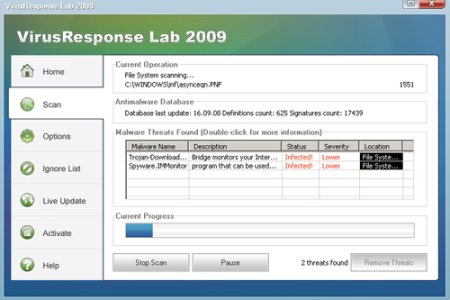
HijackThis shows infections:
O2 – BHO: AVLWarning.WarningBHO – {A21C8D81-A9C7-46c6-A488-2A32FA0DAEB6} –
O4 – HKCU\..\Run: [VirusResponseLab2009] C:\Program Files\VirusResponseLab2009\VirusResponseLab2009.exe
How to remove VirusResponseLab:
Download MalwareBytes Anti-malware (MBAM). Close all programs and Windows on your computer.
* Double Click mbam-setup.exe to install the application. When the installation begins, keep following the prompts in order to continue with the installation process. Do not make any changes to default settings and when the program has finished installing, make sure a checkmark is placed next to Update Malwarebytes’ Anti-Malware and Launch Malwarebytes’ Anti-Malware, then click Finish.
* If an update is found, it will download and install the latest version.
* Once the program has loaded, select “Perform Quick Scan”, then click Scan.
* The scan may take some time to finish,so please be patient.
* When the scan is complete, click OK, then Show Results to view the results.
* Make sure that everything is checked, and click Remove Selected.
* When disinfection is completed, a log will open in Notepad and you may be prompted to Restart.
If you are still having problems, then I would recommend you follow these instructions.





