Total Secure 2009 is a rogue antispyware. Usuallly, rogue antispyware infects systems via misleading advertising on free download, warez and porn websites, trojans and browser security holes. Total Secure 2009 reports false or exaggerated system security threats on the computer. The user is then prompted to pay for a full license of the application in order to remove the errors.
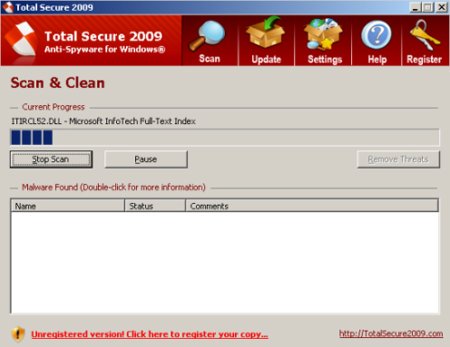
Total Secure 2009 looks like IEAntivirus.
HijackThis shows infection:
O4 – HKCU\..\Run: [TotalSecure2009] C:\Program Files\TotalSecure2009\scan.exe
Use the following instructions to remove Total Secure 2009 (Uninstall instructions).
Using SmitfraudFix.
- Download SmitfraudFix.
- Reboot your computer in Safe Mode by doing the following:
1. Restart your computer
2. After hearing your computer beep once during startup, but before the Windows icon appears, press F8.
3. Instead of Windows loading as normal, a menu should appear
4. Select the first option, to run Windows in Safe Mode. - Double-click SmitfraudFix.exe.
- Press the number 2 on your keyboard and the press the enter key to choose the option Clean (safe mode recommended).
- You will be prompted : “Registry cleaning – Do you want to clean the registry ?“; answer “Yes” by typing Y and press “Enter” in order to remove the Desktop background and clean registry keys associated with the infection.
- The tool will now check if wininet.dll is infected. You may be prompted to replace the infected file (if found); answer “Yes” by typing Y and press “Enter”.
- The tool may need to restart your computer to finish the cleaning process; if it doesn’t, please restart it into Normal Windows.
Using Malwarebytes Anti-Malware.
- Download MalwareBytes Anti-malware (MBAM). Close all programs and Windows on your computer.
- Double Click mbam-setup.exe to install the application. When the installation begins, keep following the prompts in order to continue with the installation process. Do not make any changes to default settings and when the program has finished installing, make sure a checkmark is placed next to Update Malwarebytes’ Anti-Malware and Launch Malwarebytes’ Anti-Malware, then click Finish.
- If an update is found, it will download and install the latest version.
- Once the program has loaded, select “Perform Quick Scan”, then click Scan.
- The scan may take some time to finish,so please be patient.
- When the scan is complete, click OK, then Show Results to view the results.
- Make sure that everything is checked, and click Remove Selected.
- When disinfection is completed, a log will open in Notepad and you may be prompted to Restart.
If you need help with the instructions, then post your questions in our Spyware Removal forum.





can some one help me please?
Jennifer, please read these instructions. I`ll help you.