![]() | Do you have pop-ups or your computer infected with trojan or spyware ? Learn how to ask us for help, click here! |
How to remove braviax.exe/cru629.dat/users32.dat malware
braviax.exe is a malware that also installs rogue security applications and display false alert on compromised computer. If your computer infected, then you have a red circle with a white X in your taskbar that is constantly telling you, that you have a virus
Your computer is infected!…
Starting in July 2009, this malware installs PC Security 2009.
HijackThis shows it
O4 – HKLM\..\Run: [braviax] C:\WINDOWS\system32\braviax.exe
O20 – AppInit_DLLs: cru629.dat
Follow these steps to remove braviax infection
Download SDFix and save the file to your desktop. Double click SDFix.exe and it will extract the files to %systemdrive% (Drive that contains the Windows Directory, typically C:\SDFix)
Reboot your PC in Safe mode.
1. Restart your computer
2. After hearing your computer beep once during startup, but before the Windows icon appears, press F8.
3. Instead of Windows loading as normal, a menu should appear
4. Select the first option, to run Windows in Safe Mode.
Open the SDFix folder and double-click RunThis.bat.
Type Y to begin the cleanup process.
It will remove any Trojan Services and Registry Entries that it finds then prompt you to press any key to Reboot.
Press any Key and it will restart the PC.
When the PC restarts the Fixtool will run again and complete the removal process then display Finished, press any key to end the script and load your desktop icons.
Close any open browsers.
Download MalwareBytes Anti-malware (MBAM). Close all programs and Windows on your computer.
Double Click mbam-setup.exe to install the application. When the installation begins, keep following the prompts in order to continue with the installation process. Do not make any changes to default settings and when the program has finished installing, make sure a checkmark is placed next to Update Malwarebytes’ Anti-Malware and Launch Malwarebytes’ Anti-Malware, then click Finish.
If an update is found, it will download and install the latest version.
Once the program has loaded you will see window similar to the one below.

Malwarebytes Anti-Malware Window
Select Perform Quick Scan, then click Scan, it will start scanning your computer. This procedure can take some time, so please be patient.
When the scan is complete, click OK, then Show Results to view the results. You will see a list of infected items similar as shown below. Note: list of infected items may be different than what is shown in the image below.
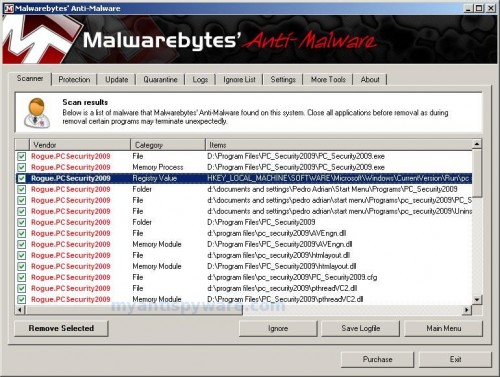
Malwarebytes Anti-malware, list of infected items
Make sure that everything is checked, and click Remove Selected.
Note: if you need help with the instructions, then post your questions in our Spyware Removal forum.
March 15, 2008 on 6:14 am | In Tutorials - HowTo | 140 Comments |140 Comments »
RSS feed for comments on this post. TrackBack URI
Leave a comment
My Anti Spyware - Free antispyware programs and Spyware Removal Instructions.


after many many failed attempts to remove braviax.exe
this instruction to use sdfix and combofix did the trick!!
Thank you thank you
Comment by Gary — April 11, 2008 #
Been really suffering with braviax etc (its a real nasty one!) but this seems to have worked….only time will tell if its still lurking somewhere on my machine…..
Brilliant THANX!
Comment by Alex — April 14, 2008 #
i checked both the above mentioned softwares yet the problem is not resolved. below is the report text of combobox
…
Comment by mahendra.t.s — May 17, 2008 #
2 mahendra.t.s, please follow the steps: How to use Spyware Removal Forum
Comment by Patrik — May 17, 2008 #
braviax is dead! THANK YOU!!
Comment by ed — June 17, 2008 #
followed these instructions and kicked braviax\’s ass.
Highly recommended, thank you very much,
Steve
Comment by steve b — June 19, 2008 #
I suggest your site and method to all my readers. Thank you very, very much.
BigDadGib
Comment by BigDadGib — June 21, 2008 #
came home, found this on the family pc – shitty norton and zonealarm did nothing to proect it, spybot and avg wouldn\’t install, hijackthis wouldn\’t run, but these two tools got me right.
one note – sdfix must be run in safe mode, and at least for me, it took a really long time to start up, I thought it had locked, but it was actually still working.
thanks for putting the info out there
Comment by Richard — June 22, 2008 #
BigDadGib, glad to help your readers.
Comment by Patrik — June 22, 2008 #
Richard, i`ve just added “Safe mode” step in the tutorial.
Glad to help you.
Comment by Patrik — June 23, 2008 #
I ran sdfix in safe mode, it took a really long time and now I can\’t get past my screensaver. It doesn\’t seem to do anything anymore. Help!
Comment by braveheart — June 23, 2008 #
braveheart, probably your screensaver has been infected and sdfix removed it.
I would recommend that you follow the instructions and post your logs in the spyware removal forum.
Comment by Patrik — June 23, 2008 #
Wow, it worked.
Ty man
Comment by Raymon — June 28, 2008 #
Patrik,
My computer has the braviax.exe malware. I followed your instructions on How to remove braviax.exe/cru629.dat/users32.dat malware . I installed ERUNT and ran it. It worked fine. Then I saved SDFix on the desktop and ran it, but it did nothing. It did not create the directory: C:\SDFix.
I registered under KASF in the forum and installed HijackThis. It provided an Icon, but when launched did nothing – it does not give – Do a system scan and save a logfile button.
Can you give me any help on what to do next?
Thanks,
KASF
Comment by KASF — June 28, 2008 #
Worked for me too! Thanks! Whew, I’m glad that piece of trash is gone.
Comment by Tom — June 28, 2008 #
Never mind the earlier note. After changing the file name to SDFix1, I was allowed to run it. Then there was a problem in Safe Mode with “Cannot load VDM IPX/SPX support”. There is a fix for that at rumkin.com/reference/problems/csnw.php. After those two changes were made, it worked!!!! It took awhile (especially the first 25% in Safe Mode), but it is well worth it.
Thank you so much! It is wonderful to have my computer back again!
KASF
Comment by KASF — June 28, 2008 #
Thank you for your help!! This is the one and only solution to get rid of the braviax problem. Great job!!
Comment by Geoffrey — June 29, 2008 #
Thanks! Great instructions. They really did the job. Who makes these shitty trojans?
Comment by Peter, Sweden — June 29, 2008 #
unknown peoples
Comment by Patrik — June 30, 2008 #
Just ran the fix, and all is well again!!!! Thanks a mil!
Comment by GA_fan — June 30, 2008 #
tried my usual methods to fix this but was unsuccessful… followed your instructions and it cleared up the infection… i would have liked to also know how to do a manual search and removal of this problem to have a better understanding of exactly what needed to be done and how to manually do that. Thanks for your clear and simple instructions and help in resolving this (these?) problems.
Comment by m_matthews — July 1, 2008 #
Wished you’d mentioned what Windows systems this is compatible with…wasted a lot of time trying to get the SDFIX.exe file to open in WIN XP…which, of course, is not compatible with either SDFIX or COMBOFIX.
Any recommendations for XP users?
Comment by t. wanner — July 5, 2008 #
My SINCEREST thanks for all who are involved in this site, and most of all, to the creators of SDFix and combofix!!! Incredible! I was terrified like a little CHILD when faced with braviax and cru629! THANK YOU! I LOVE YOU! GOD BLESS!! SDFix worked on all but the cru629 garbage, which it could not remove. Combofix took care of it easily. You have NO idea how grateful I am! Please let me know what I can do to support you! I will be spreading the good word in the meantime….
Comment by Rory Concannon — July 5, 2008 #
T.Wanner, sdfix and combofix 100% compatible with windows XP.
Comment by Patrik — July 6, 2008 #
Rory Concannon, if you want to support Myantispyware site, then make a link from your site to us.
Comment by Patrik — July 6, 2008 #
Thanks Patrik & co, that worked!
T.Wanner – It does work for XP – read note 1 above. The variant of this nasty bit of malware that I had prevented me from running hijackthis or SDFix without renaming – click on them and nothing happens.
Comment by coherers — July 6, 2008 #
Kaspersky couldn’t handle it. But you have nailed it!! Thank you . . . I was reaching for the restore disc!
Comment by Jamie — July 9, 2008 #
I battled AntiVirus XP 2008 and Malware Protector 2008 for two weeks. Never knew about Braviax or your fix until today (07/10/08). Looks like the problem is resolved. Thanks a mil.
Comment by Alvin — July 10, 2008 #
Ok…so far ive renamed SDFix and Combofix, restarted in Safe Mode, hit install in SDFix…then what? Where do i “open SDFix folder and double click RunThis.bat”? Please help, im a hack with computers…
Comment by nedo — July 10, 2008 #
wow what an ordeal. CRU629.DAT keeps on popping back, even after inserting a read-only file in it\\\\\\\’s place. All types of trojans were on the machine. Various antispyware programs were used to clean them out and none can clean up this mother of all trojans. How does it get infected in the first place? This machine never surf the web at all. And what does it do?
Comment by dennis — July 10, 2008 #
You Sir, are a GOD amongst men. I\’m right smack in the middle between PC retarded and ignorant, and with your instructions I\’m back in business in less than an hour? Where are located? If in NY I\’ll buy you a beer, if elsewhere I\’ll Paypal you the beer, LOL. THANKS
Comment by Thewhitetiger — July 12, 2008 #
Nedo, you should double click SDFix.exe and it will extract the files to %systemdrive% (Drive that contains the Windows Directory, typically C:\SDFix)
After that, reboot your PC in safe mode …
Comment by Patrik — July 13, 2008 #
Dennis, probably your PC has been infected using autorun virus/trojan. (infected USB or CD drives)
Comment by Patrik — July 13, 2008 #
Thewhitetiger, glad to help you
But BIG thank you for your BEER!!!
My help is free.
But you can to help, if you`ll make a link from your site to Myantispyware or this article.
Comment by Patrik — July 13, 2008 #
I ran the SDFix and rebooted. After the txt. file ran, my icons loaded, and now I cant cursor to anything; Im stuck on hourglass. I tried control alt delete, and I dont show any Applications working, and the processes are up. I can use the cursor on the task manager window, but when I go over to the desktop it goes to hourglass. I hit my windows key, and it doesnt even pull up my Start window. I tried rebooting to no effect. Im stumped.
Comment by Numacs — July 15, 2008 #
Numacs, make a HijackThis log and post in the spyware removal forum.
Comment by Patrik — July 16, 2008 #
Thank you very much for your help. Damn the virus.
Comment by Daniel — July 16, 2008 #
Have Windows XP and I installed SDFix in safe mode and ran. Then downloaded Combofix and ran in safe mode. It automatically restarted after running Combofix. It is now in safe mode, however, no icons or windows start menu – just a black safe mode screen.
How do I even return to normal mode, with no windows toolbar? What should I do next? Please help!!
Comment by Clayton — July 23, 2008 #
see: Win32.Renos
at: http://www.microsoft.com/security/portal/Entry.aspx?name=Win32%2fRenos
Easier to remove…
Comment by Frank — July 23, 2008 #
Clayton, are you have black safe mode screen everytime when you starting Windows ?
Comment by Patrik — July 23, 2008 #
Hi Patrik,
I was able to get to normal mode and I ran Combofix again. All desktop icons and windows menu comes back after running. However, after rebooting again, nothing comes back except for the wallpaper picture. I can use task mananger to run programs. By the way, braviax is the reason I was running these programs.
Comment by Clayton — July 23, 2008 #
Clayton, make a new topic and post your sdfix log (usually at C:\sdfix\logReport.txt)and last combofix log (usually at C:\QooBox\combofix.txt) in the spyware removal forum.
Comment by Patrik — July 23, 2008 #
I followed the instructions and was able to clean up 2 pcs just fine. So THANK YOU!. Here are my notes about the process:
Download SDFix.exe and Combofix.exe as stated. SDFix needs to be run first from a DIFFERENT computer to unpack the files; the virus prevents it from unpacking them on the infected machine. So unpack the files somewhere else and then copy them to the infected machine. OR perhaps they will unpack after you start the pc in Safe Mode.
When the pc reboots in the middle of SDFix (started in Safe Mode), let it reboot in NORMAL Mode. SAFE MODE DOES NOT WORK if you invoke it here so just let it boot.
For combofix.exe it is then OK to restart in Safe Mode (well, it worked for me).
If all goes well, the tray icon and popups will only disappear at the end of the combofix run.
If the nasty icon disappears, you are doing well, and your pc is running in normal (not Safe) mode. Now run your anti-virus program (you DO have one, dont you?) and download the latest updates. You will find that it runs again. Also download Spybot S&D (www.safer-networking.org), and run that including all updates and immunizations
Comment by PJBeee — July 25, 2008 #
remainder of the posting –
Find Problems (Search and Destroy) part of the program yet.
Reboot in Safe Mode, do a FULL Anti-Virus scan of all hard drives, and run a full scan after that with Spybot S&D.
The anti-virus program will find lots of leftover stuff, and Spybot will probably find at least one leftover registry entry and who-knows-what-else.
Now reboot again in normal mode. You should be good to go at this point, based upon my experience and what I’ve read online.
FYI, My anti-virus program is the Symantec corporate edition, version 10.x. It is possible that their latest definitions will clean up more of this than mine did with previous definitions. They were able to clean some of the parts of this version of the virus as of 7/25/08.
Comment by PJBeee — July 25, 2008 #
The above instructions worked for me. I can’t promise that they will work for you, nor can I assure you that you won’t do further damage. BACK EVERYTHING UP FIRST IF YOU CAN.
Comment by PJBeee — July 25, 2008 #
THANK YOU! works like a charm, took 20 minutes though. Very much worth it
Comment by vorak — July 27, 2008 #
It took awhile to run, but it worked. Thank you. Now to break the fingers of the guy who was stupid enough to run this thing in the first place…
Comment by Rosewood — August 3, 2008 #
God Bless you….it works….
Comment by Lisa — August 4, 2008 #
It was touch and go there for awhile, but everything worked out great! Thank you for the tutorial! Works Great!
Comment by Craig — August 16, 2008 #
Your removal program for the braviax trojan was wonderful. It is worth the time it takes! Thanks so much!
Comment by Dan K — August 19, 2008 #
This works. Thanks alot
Comment by Akar — August 20, 2008 #
I tried everything to kill that virus. I got rid of 6 trojans with Mcafee, hundreds of spyware programs with Spybot S&D, killed the processes in Task Manager, deleted the startup programs with RegCure, and shredded the braviax.exe file in SYSTEM32 and it still wouldnt go away. After googling braviax.exe I found this site as third on the list and followed your instructions. Everything went perfectly, and although SDFix didnt kill braviax, Combofix did. Its like battery acid for viruses. You deserve way more credit than you get from the hotshots like Mcafee and Norton.
A brief list of things akin to SDFix and ComboFix:
Battery Acid
Nuclear Bombs
Bleach
The Death Star
etc.
Cheers!
Comment by Will — August 21, 2008 #
Wow, that was a stubborn little bastard. Im pretty computer savvy, but couldn’t get rid of it even after deleting files, editing the registry, etc. The steps /programs you suggested worked great!! Thanks for posting some simple, clear, steps. I couldnt find the answer anywhere! Im curious, though, as to what the programs are actually doing to get rid of the downloader.mislead.app trojan.
Comment by CJ — August 25, 2008 #
Thanks! You saved my life.
Comment by Alberto — August 27, 2008 #
Let me add my thanks and kudos to the long list of satisfied users. I got SDFIX to run OK, but COMBOFIX would not fire up, even with a name change. I had thrown everything I could think of at it and then I saw your recommendation for CounterSpy and SuperAntiSpyware. I already had CounterSpy (version 3 with current defs) on the infected system and it would not see or remove BRAVIAX, so I downloaded and installed SuperAntiSpyware and it did the trick. The system is finally clean. Thanks again.
Comment by Tampa Red — September 1, 2008 #
Got this virus – bah. Spent about $200 on various anti this and that software. This free one was the first one that seemed to find and fix the problem.
Comment by Jens Frandsen — September 5, 2008 #
Thank you, your instructions worked perfectly.
Comment by Grateful — September 9, 2008 #
Great tips Guys, looked very convincing that program did, can see why people fall for it.
it was knocking out avast and spybot.
three cheers for myantispyware – hip hip, hooray !
Comment by JON WILSON — September 12, 2008 #
I can’t get SDFIX to run .. does it work on Vista?
When I double click RunThis.bat the box just won’t stay, just flashes up for a split second??? Any hints?
Comment by Mopsa — September 12, 2008 #
Looks like spyware blocked it.
Read these instructions.
Comment by Patrik — September 12, 2008 #
simple instructions and 2 bad MF programs.
Thanks!!!!!
Comment by Steve D — September 14, 2008 #
I ran the two programs without problems. But afterwords, the Spybot still detect the braviax in my system. What is my next step?
Comment by peter — February 26, 2009 #
Peter, then follow these steps.
Comment by Patrik — February 26, 2009 #
I am having major problems with this braviax infection. It has shut down every spyware/antivirus program I have tried to use leaving them useless. I keep getting a error code stating that I do not have permissions to run these programs. I have tried to boot my computer in safe mode to no avail. Is there anything else that I can do to get this off of my machine?? Desperate for help!
Comment by Marcie — July 17, 2009 #
It worked perfectly thanks heaps. Thank god the world has people like you to get rid of all this shit.
All that is necessary for the triumph of evil is that good men do nothing.
Comment by matt — July 18, 2009 #
Marcie, ask for help at our Spyware removal forum.
Comment by Patrik — July 18, 2009 #
It looks like there’s a variation to the braviax.exe virus now. It doesn’t come with the usual cru629.DAT anymore, but other spyware files.
The computer I saw that was infected would shut itself down soon after login. The fix was to download and install malwarebytes, and run it in Safe Mode w/Network support (in order to get the updated engine and definitions). I ran that, and then superantispyware (also in Safe Mode), and that seems to crush this undesirable variation of the annoying braviax.exe virus.
Comment by Mario — July 21, 2009 #
Worked like a charm, thanks so much!
For this virus from WorldCarFans.
Comment by Ben — July 22, 2009 #
i cant install SDFix. i double click on it and nothing happens
Comment by SImon — July 28, 2009 #
SImon, try rename it before running.
Comment by Patrik — July 29, 2009 #
I ran SD fix in safe mode and got this
16 bit MS-DOS Subsystem
SDFix
C:\ProgramFiles\AlwilSoftware\Avast\aswMonVd.dll. An installable virtual device driver failed Dll initiation. choose ‘Close’ to terminate the application.
Comment by jimbo — August 1, 2009 #
Run notepad and open file
C:\Windows\System32\config.ntComment (set REM before start a line) or remove a line that looks like:
device=C:\ProgramFiles\AlwilSoftware\Avast\aswMonVd.dllClick File->Save. Close notepad.
Try run SDFix again.
Comment by Patrik — August 1, 2009 #
I ended up clicking the choice ignore when that option came. SDfix ended up running through completeion. The red circle white x is no longer present. I installed Malwarebytes but the program fails to launch.
Prior to installing SDfix, I had a failed attempt to install Malwarebytes, not sure if that is an factor.
Comment by jimbo — August 1, 2009 #
The only line that looks remotely close is
device=%systemRoot%\\system32\\himem.sys
Comment by jimbo — August 1, 2009 #
All of the following has been done in Safemode as the administrator.:
So I have gottten to the point where I can launch malwarebytes after installing it. It required renaming the file. I ran an update. Then I proceeded to run malwarebytes quickscan. At 3 seconds into the scan it aborts and closes. When I attempt to relaunch the program it says I do not access rights. I attempt to launch again and it will not start
Comment by jimbo — August 1, 2009 #
jimbo, looks like your PC also infected with trojan (probably TDSS) that blocks MalwareBytes Anti-malware. Ask for help at our spyware removal forum.
Comment by Patrik — August 2, 2009 #
Hi!
first of all, thank you very much – am glad that i found this site.
Everything seem to work, both programs run. But for some reason my pc shuts down and restarts itself (in safe mode after approx. 5 minutes, normal mode only after 2 minutes). So neither the sdfix nor the malwarebytes cannot finish the scan. after reboot they found the same trojans again and again.
any idea?
thanks in advance
Comment by gabikka — August 3, 2009 #
gabikka, ask for help at our Spyware removal forum.
Comment by Patrik — August 4, 2009 #
i used regrun reanimator and removed it in 5 minutes dont know how to hotlink but google it its its no1 as of this date
Comment by cawa paccol — August 7, 2009 #
best of all its free
Comment by cawa paccol — August 7, 2009 #
Patrik, just wanted to express my gratitude towards you and your site for providing this fix. Your site be permanently bookmarked and the first stop for all my users mal-ware problems from now on. Thanks.
Comment by awu — August 7, 2009 #
Thank you very much for this most helpful advice. I followed the proceedure and everything went as stated. During the SDfix run there were two occasions (one while in safe mode and one after the reboot) when a message was presented about a .dll file not loading. Both times I selected “Ignore” and the process continued. The braviax.exe is gone.
I have two questions: 1) A program called reader_s.exe keeps trying to run. My antivirus software (Trend Micro) blocks it. How do I get rid of reader_s.exe? 2) How does something like this get onto a computer that never goes anywhere risky and is protected by antispyware and antivirus software and a firewall?
Thanks again for your help.
Comment by traingeek — August 8, 2009 #
Just had to post a very grateful thank you…spent 3 days battling the the PC Antispyware 2010 virus and nothing worked until I realized i couldn’t get rid of braviax.exe and found this site. Thank you bringing normalcy back into my life!
Comment by GB — August 9, 2009 #
i did every thing as required and it was gone only to come back the next time i terned on the pc. help!!!!!!!
Comment by iceeecool — August 10, 2009 #
I downloaded what I thought was a UPS notice and bought a whole load of trojans, spyware and such. Took my computer into our local geeks’r'us and they eliminated 90% but missed the barviax.exe. I was able to reload AVG 8.5 free and after a 2 hour scan, it found and eliminated all 4 remaining threats. The red X pop-up is gone and it didn’t reboot on me. Hope it is the last of it.
Comment by Lee — August 10, 2009 #
traingeek, bad news for you, probably (not 100%) your computer infected also with Virut virus. Try to scan your PC using Kaspersky online scanner.
Comment by Patrik — August 12, 2009 #
iceeecool, then only one, ask for help at our Spyware removal forum.
Comment by Patrik — August 12, 2009 #
i’m gonna try it, I hope this works!
Comment by eloy — August 15, 2009 #
I had AVG installed and got this virus. Can you recommend any antivirus or internet security software that does actually detect this please?
Comment by Bob — August 16, 2009 #
I followed the instructions at the begining of this page. I downloaded SDfix. Extracted the files. Rebooted the computer into safe mode. Started SDfix. Rebooted the computer after SDfix was done. Let SDfix finish its course in normal mode. Ran MBAM and no braviax was found. But there were 3 files called “userinit.exe” that were found. MBAM said (and has been saying for 3 days) that these files would be deleted upon reboot. I rebooted. Then Spyware Doctor said it “blocked” the braviax threat again. I’m sure if I ran MBAM again the 3 files stated above would return. My computer does not seem to be effected in any way, it’s just annoying to know there are virus/trojans/etc. that I can’t get out. Seriously, what is going on!! I’ve spent 3 days trying to deal with this thing.
Any help would be greatly appreciated.
Steve
Comment by Steve — August 16, 2009 #
Hey,
Just wanted to say thanks for this fix. It has been driving me NUTS! But after a few minutes following through your great post, I’ve been able to completely resolve this issue.
Thanks sooooooo much Patrik!!!!!
Comment by Tony — August 16, 2009 #
Bob,try Kaspersky.
Comment by Patrik — August 17, 2009 #
Steve, looks like your PC is infected with new version of braviax, Please make new topic at our Spyware removal forum.
Comment by Patrik — August 17, 2009 #
Thanks a lot for this post. You saved me a lot of time…:-)
Comment by Claude — August 17, 2009 #
Hi,
I’ve had three serious virus attacks over the last two years, the first two required a reformat.
I was running Nod32 & Superantispyware and still I got infected with Braviax…
In my view an anti virus program should prevent infection in the first place… Nod32 failed to do this.
secondly, if infected it should be able to clean it off. Nod32 + Superantispyware & Vipre failed to do this.
Desperate I tried SDFix and it looks like it’s working…
I’d be hapy to pay for this software..
I’ll let you know if it works…
Comment by Carl — August 17, 2009 #
Yes,It has just finished it’s scan and it definately looks like it worked..
Thanks
Comment by Carl — August 17, 2009 #
Information for other readers.
The version of Braviax that infected my PC would not allow me to install SDFix until after I had changed the program name to SDFix2.
It also disables any attempt to load other anti-virus or spybot programs – I tried several.
Once SDFix is installed, reboot in WIndows safte mode with networking and download Malwarebytes Anti-malware. Install that and any updates. At this point I diconnected the PC from internet (removed Ethernet cable) as during several attempts to resolve this, I had the impression the virus was replicating and maybe downloading copies from the internet – I may have been wrong.
Then run SDFix, allow that process to work through (it will reboot, start WIndows normally and run a second process to finish) then again reboot and come back into Windows Safe Mode. Run Malwarebytes – it will find other bad files and registry entries and fix these. As a precaution, I had also downloaded and installed SuperAntiSpyware while installing Malware bytes above – so I now ran SAS but this did not detect any virus or bad files – so Malwarebytes is probably enough.
Very nasty virus took me a whole day to fix. Have no idea how the PC came to be infected. It was all ok one night but in the morning AVG had detected the virus. I pre-screen all emails, don’t visit dodgy websites and have Zone Alarm installed. I’ve now taken Patriks advice and purchased the Kaspersky software.
Many thanks Patrik for producing SDFix – your work is much appreciated!
Comment by Bob — August 18, 2009 #
Yeah this rock hard!!!
After almost a day of trying to fight this stupid thing by finding and deleting it in start up reg. and in my systems. SDfix kills it in about half an hour. Great stuff just simply great.
(Important) if you save the extractable file and it will not open when clicked. simply add a ’2′ at the end of the name and it will open. (Important)
Comment by Max — August 20, 2009 #
Hey thanks a lot dude…….this trick worked for me,i was trying to stop this shit (braviax.exe) from eve but i cudn’t,at last saw ur trick and the problem has been solved……
cheers!!!!!!!!
Comment by Arjun — August 20, 2009 #
Helped me. Thank you!
Comment by Yakov — August 21, 2009 #
Thank You guys! It worked!
Comment by joe — August 22, 2009 #
Patrik,
Was infected by the braviax virus from a website, but managed to find your site. Followed your instructions — SDFix, Malwarebytes, etc. — and virus eradicated. I run both Norton Antivirus and Zonealarm, but the virus easily evaded both. Any ideas on how did my machine get infected? And, seeing that those two apps can’t protect me, what should I do to prevent infection in the future?
Too bad you don’t have a PayPal link — the service you provide is worth compensation.
Comment by Red — August 23, 2009 #
Red, probably your Windows verison is not up to date. Check it. Also use Firefox or Opera as your default browser. Also you should have an antispyware program. Full version of MalwareBytes or SuperAntispyware (only full version have autoprotection) or good and free SpyBot.
Comment by Patrik — August 23, 2009 #
What the F. hell is “safe mode”?
Comment by Tim — August 24, 2009 #
Tim, read more about safe mode here – http://www.myantispyware.com/2009/03/01/how-to-reboot-computer-in-safe-mode/
Comment by Patrik — August 24, 2009 #
It helped to remove. But Spybot doesn’t work anymore. I reinstalled it. But then was computer immediately again infected – NOD32 informed. And Spybot stpped to work. I repeated SDfix and mbam and I cleaned computer again. But now I don’t know what to do, that I can use Spybot again. I am afraid to install again, because I think braviax come again. Can someone help?
Comment by Rajko — August 26, 2009 #
Hi again. After 1st reboot computer was infected again – it was worse – instead 5 treads, noe there were 17!!!!!!!
Please, help me – I don’t know what to do anymore. Must I really format disk?
Heeeeeelp!
Comment by Rajko — August 26, 2009 #
Rajko, probably your PC infected with a new version of braviax. Ask for help at our Spyware removal forum.
Comment by Patrik — August 26, 2009 #
Thank you so much….all of the sudden my lap top puked out like 143 infections of all kinds of nasty things, including braviax. I don’t know what I did to deserve that honor, but my lap top was hijacked and I couldn’t use anything. I followed the steps, and got rid of all that junk….so I hope and pray that it won’t come back. Thank you sooooooooo much, you rock.
Comment by Jacko — August 27, 2009 #
Please help…I am trying to remove the braviax trojan from the computer using the steps you\’ve given. However, when I get to the part that says to reboot the computer in safe mode, it wont allow me to do that. When I press F8, and select safemode, a blue screen pops up saying that I am seeing this screen because my computer is trying to protect itself, and there is a virus detected. The only thing I can do at that point is reboot again. The only way I can get through is to select start normally. What can I do to get through this?
Comment by Mina — August 29, 2009 #
Hey, I have the braviax crap, and I can’t get rid of it. I followed the instructions step by step 110%, and it’s still there. I have Avast! Pro, Spyware Doctor, and AVG, and they all seem to catch it but it keeps coming back.. any help? Thanks..
Comment by Trevor — September 1, 2009 #
Thanks Guys – My computer picked up the Braviax virus and Eset couldn’t deal with it.
I tried everything from Smit Fraud Fix, to CC Cleaner, to Hijack This, and more.
Only did SD Fix do the trick.
Fantastic, my short lived relationship with Braviax is now over!
Comment by Gaz H — September 1, 2009 #
This worked a treat..that Bravia was doing my nut ion…..thanks so much.
That’ll teach me to go to PtP sites…I got it off Piratebay!!!
It was quite easy to follow the simple instructions…and I’m def not a PC whizz by any means.
Thanks again.
Comment by Norrie — September 1, 2009 #
Trevor, ask for help at our Spyware removal forum.
Comment by Patrik — September 2, 2009 #
Hi, Just started up my PC this morning..Its back!!!
And, its NOT allowing me entry to my Security section in Control Panel…
Anyone got any ideas why??
Comment by Norrie — September 2, 2009 #
Norrie, then make a new topic at our spyware removal forum.
Comment by Patrik — September 2, 2009 #
Hah! Ha-HAH! Die, braviax, DIE!! Wow, thank you so much for this…I was fighting with the thing until 3 a.m. this morning and a couple more hours today and nothing worked. Symantec didn’t even notice it. So far this procedure seems to have worked like a charm!
Comment by Sarah — September 2, 2009 #
I have a client that got caught by the BRAVIAX.EXE rootkit. However, when I start downloading your SDFix.exe, AVG Internet Security v.8.5 with all the latest updates (as of 9/2/2009) tells me that your SDFix.exe is Malware/Adware.
What’s up with that?
Comment by Wolfgang — September 2, 2009 #
Wolfgang, this is false alert. SDFix is not a virus. Its contains file that used to stop system processes. Antivirus programs cannot distinguish between “good” and “malicious” use of such programs, therefore they may alert the user.
Comment by Patrik — September 2, 2009 #
I actually have the same problem that Mina has when I try to launch Windows in Safe Mode. I don’t see any other responses to her question, so I don’t know if it is known what would cause Windows to not be able to boot up in safe mode. I get the exact screen that she described as well.
Comment by Noe — September 3, 2009 #
Noe, ask for help at our Spyware removal forum.
Comment by Patrik — September 3, 2009 #
to kill braviax.exe :
1-shut down internet.
2-open task manager
3-end braviax.exe and its creator sys32_nov.exe
4-than open windows/system32/
5-search find and delete with unlocker these found files sys32_nov.exe and braviax.exe in system32 folder..it means you survived braviax.exe))
Comment by taylocan — September 5, 2009 #
Thanks, I was actually able to fix it. I ran the a2cmd.exe and that allowed me to clean the virus without restarting Windows in safe mode.As for the error message that I got when trying to restart in safe mode, it is probably corruption on the drive which I’ll look further into and I’ll fix. Anyways, thanks to you, I was able to clean that virus. You’re a lifesaver!
Comment by Noe — September 5, 2009 #
Bless you! I am so computer impaired I usually just reformat when I get a virus but these two programs worked for me! A curse on all virus writers…. may all their teeth fall out except for one and that one stays abscessed forever.
Comment by Terry — September 5, 2009 #
taylocan, you only removed a small part of infection. Braviax also replaced beep.sys and ntfs.sys (new version). You should repair them too.
Comment by Patrik — September 5, 2009 #
I tried the above steps – no avail. It is killing SPFix as well – shuts down the process in Safe Mode. Any new options our there – this one is nasty.
Comment by Don — September 7, 2009 #
thank you! thank you! thank you! thank you! I dont know what I would have done if i hadnt found your site!!!!! I’m telling everbody!!!
Comment by zoyiab — September 12, 2009 #
Thanks so much. Malwarebyte totally took care of it.
P.S. I think I got braviax/antivirs2010 off of Pirate Bay. I was looking for an XP CD and while i was browsing it totally rebooted my system and loaded the virus. . . so watch out
Comment by hiyasassygal — September 14, 2009 #
Awesome! Thank you so much for helping me get rid of braviax. It worked perfectly.
Comment by Geoff — September 15, 2009 #
Thank a lot, guys! I thought I’d never get read of that peace of crap without format! You’re great!
Comment by Ivan Drago — September 17, 2009 #
I’ve tried these steps but when I enter safe mode and enter ‘y’ in during the cmd, everything disappears and nothing seems to happen. Can anybody help me?
Comment by Alex — September 20, 2009 #
Alex, probably your computer infected with a new version of braviax. Ask for help in our Spyware removal forum.
Comment by Patrik — September 20, 2009 #
Thanks,try evrything and no luck, this works for me.
Comment by NoSi — September 21, 2009 #
Hi
I got the same problem as one of the commenters above. I can’t get into SAFE MODE. When entering SAFE MODE the computer briefly displays a blue screen and then restarts. I can’t even read it. Also when I try to do a system repair I can’t do it, the next button won’t work.
I haven’t got a windows install cd, so I can’t repair it that way.
Anyone else got these problems ?
Or got past them?
Comment by Unsaer — September 22, 2009 #
im trying to gety rid of the braviax but when i click on the SDFix icon it sends me to a sight with a whole bunch of indecipherable text images…what can i do to fix it
Comment by doubleok — September 23, 2009 #
doubleok, looks like your PC is infected with another version of braviax. Ask for help in our Spyware removal forum.
Comment by Patrik — September 24, 2009 #
I follow your instruction to this point: Goto Start Menu > Right click My Computer > click properties > click Advanced Click Environment Variables and check that the ComSpec variable points to cmd.exe %SystemRoot%\system32\cmd.exe
and I found out that. ComSpec variable points to cmd.exe but not including %SystemRoot%\system32\cmd.exe . Please help me what should I do next.
Comment by Andy Pham — October 1, 2009 #
Andy, click twice to ComSpec and edit “Variable value”.
Comment by Patrik — October 2, 2009 #
Hi there I am on Windows Vista, I have tried everything and nothing works. SDFix keeps flashing when I want it to scan. Malware Bytes does not work at all even after downloading it several times. I have tried everything and nothing works. I really want my laptop to work again….even the internet has stopped working now. HELP!
Comment by Poonam — January 28, 2010 #
Poonam, please open a new topic in our Spyware removal forum. I will help you.
Comment by Patrik — January 28, 2010 #
