VundoFix is a freeware removal tool for many of the known variants of Trojan.Vundo, Trojan.Conhook and other similar infections.
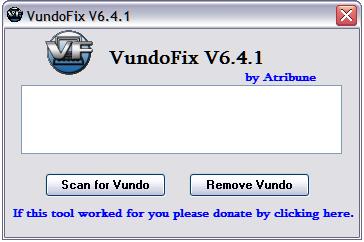
Usually when infected with Vundo the user is bombarded with popups for WinFixer, Amaena, WinAntiVirus, ErrorSafe, SystemDoctor and DriveCleaner. Downloading and running these Fraudware applications will result in a fake scan telling you that you are infected with malware then telling you that you need to buy their program to remove the malware that it found. DO NOT BUY THESE PROGRAMS. They are scams and will not remove anything but could possibly make your infection worse.
A slowdown in PC performance may also be noticed when Vundo is running as well as the possibility of random BSOD’s.
Unfortunately at the moment VundoFix is unavailable for download, as the author no longer support it, and removed from the Internet. I suggest you use the following two free programs:
1. AdwCleaner – free adware, PUP, toolbars and hijackers remover.
2. MalwareBytes Anti-malware – free spyware, malware, trojan remover.
How to use VundoFix:
- Download VundoFix from here and save it to your desktop.
- Double-click VundoFix.exe to run it.
- When VundoFix opens, click the Scan for Vundo button.
- Once it’s done scanning, click the Remove Vundo button.
- You will receive a prompt asking if you want to remove the files, click YES.
- Once you click yes, your desktop will go blank as it starts removing Vundo.
- When completed, it will prompt that it will reboot your computer, click OK.
Note: It is possible that VundoFix encountered a file it could not remove. In this case, VundoFix will attempt run on reboot, simply follow the above instructions starting from “Click the Scan for Vundo button.” when VundoFix appears at reboot.
If you encounter a variant of Vundo that VundoFix does not detect or cannot remove follow the steps outlined in the topic linked below:
How to use Spyware Removal Forum





thanks I hope it works
thx for programme lets hope it works
lET\’S HOPE IT WORKS
I am running avast4 and when I download Vundofix
it detects it as a win32 trojan-gen is this a false positve.
Thanks
Vundofix is not trojan.
Interested.
thx for the program. it works well… or would it be good?
It won’t do anything to my hardrive right….? My hardrive crashed like 3 times in one month! 🙁
How do you stop the scan thing? I’ve been sitting at my chair for about 45 miuites!!
Jordan, reboot your computer manually.
Do not work on my computer !!! 🙁
Vundo wasn’t found !!!
Natalia, please follow these steps. I will help you.
I hope to god this works…
My comp needs to be saved!
I somehow got an Antivirus 360 installed on my computer that blocks me from most of my internet sites. How do I get rid of it? I have deleted the files from my computer but it still pops up.
Vicki, please follow these steps. I will help you.
It didn’t work for me – said no vundo was found 🙁 any suggestions?
nicola, please follow these steps.
Come on, this isn’t working
very good
GOOD
EXCELENT
this isn’t working
Everytime i try to open a file it says “that file is infected” and wont open it, i downloaded your tool but it won’t let me open it because it says its infected
Chris, try rename VundoFix to iexplore before running.