Symptoms:
- IE pop-up windows, mostly to a site called www.savetheinformation.com but also to some other sites
- Yellow baloons from taskbar prompting to download antispyware software.
- Grey pop-ups, like error messages, also prompting to download antivirus/spyware software.
- 2 programs added to start menu program list: online security guide and live safety center
- when you open an IE window it goes to www.savetheinformation.com
Download VundoFix and save the file to your desktop.
Download HijackThis and save the file to your desktop. Double click on the file for install.
Download CCleaner. Double click on the file for install.
Disable your Anti-Spyware Program, once your PC is clean you can re-enable.
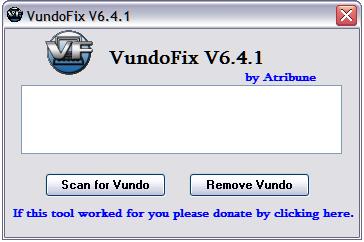
Double-click VundoFix.exe to run it.
When VundoFix opens, click the Scan for Vundo button.
Once it’s done scanning, click the Remove Vundo button.
You will receive a prompt asking if you want to remove the files, click YES
Once you click yes, your desktop will go blank as it starts removing Vundo.
When completed, it will prompt that it will reboot your computer, click OK.
If you still have a problems, the follow steps:
Download FixSTI.reg to your desktop.
Double-click on the FixSTI. When it asks if you would like to merge the information, press the Yes button and then the OK button when it is done.
Run HijackThis, Close all programs leaving only HijackThis running. Place a check against each of the following if found, making sure you get them all and not any others by mistake:
O2 – BHO: (no name) – {33BF7E26-185B-46C7-87FB-A8F94C7E696C} – C:\WINDOWS\system32\pmnlk.dll
O2 – BHO: (no name) – {5a2e9fa3-5acd-4013-961b-aae311cdb902} – C:\WINDOWS\system32\****.dll (file missing)
O2 – BHO: (no name) – {60D97635-E582-E002-F541-EA2B589ED998} – C:\WINDOWS\system32\****.dll (file missing)
O2 – BHO: (no name) – {89AD4D75-2429-462e-BD4E-443F233F6033} – C:\WINDOWS\system32\****.dll
O2 – BHO: (no name) – {A95B2816-1D7E-4561-A202-68C0DE02353A} – C:\WINDOWS\system32\****.dll
O2 – BHO: (no name) – {BACEB7AF-8D88-456E-82D0-7BEB9A4410FE} – C:\WINDOWS\system32\****.dll
O3 – Toolbar: Security Toolbar – {11A69AE4-FBED-4832-A2BF-45AF82825583} – C:\WINDOWS\system32\****.dll
O20 – Winlogon Notify: **** – C:\WINDOWS\SYSTEM32\****.dll
Where **** a random chars, for example: xjegktl, nuyix, ldbvcpwu, khcmkrws …
Now close all others windows except for HijackThis, and click “Fix Checked” to have HijackThis fix the entries you checked.
Run CCleaner.
Click Analyze button. After scan your system, click Run Cleaner.
If you still have a problems with your PC or cannot remove hijackers follow the steps outlined in the topic linked below:
Spyware removal – Read Before Posting.
savetheinformationcom & secirityonpagecom-hijackers
Don`t forget, we want help you, make logs and post to spyware removal forum!





VundoFix seemed to work for me. Had to manually delete online security guide and live safety center after reboot.
Let me check The information.
if you still have any problems, don`t forget to ask help at my forum!