CleanCache 3.0 is a free (for 1 – 2 systems), very powerful Internet Explorer 6.0, Mozilla, Netscape, Firefox and Windows 2000/XP cleaner.
CleanCache 3.0 requires .NET Framework 1.1
CleanCache 3.0 will clean:
- Temporary Internet Files and index.dat
- Internet Explorer History and index.dat
- Internet Explorer Cookies (with selective save) and index.dat
- Typed URLs (with selective save)
- Internet Explorer Form AutoComplete (using either CleanCache 3.0 built in AutoComplete deletion or by using IE’s built in function)
- Works with all Internet Explorer based browsers (shell browsers)
- Mozilla/Netscape/Firefox/Opera cache files
- Mozilla/Netscape/Firefox/Opera history
- Mozilla/Netscape/Firefox autocomplete
- Mozilla/Netscape/Firefox/Opera cookies
- Mozilla/Netscape/Firefox saved passwords
- Mozilla/Netscape/Opera typed urls
- Recent Documents
- Start Run History
- Search History
- Users Temporary Directory
- Windows Temporary Directory
- Root Temporary Directory
- Registry MRUs
- Recycle Bins
- Clipboard
- Windows XP Prefetch
- UserAssist registry entries
- Windows Media Player
- Word Pad
- Microsoft Office applications
- Create additives to delete user specified files/directories and registry entries
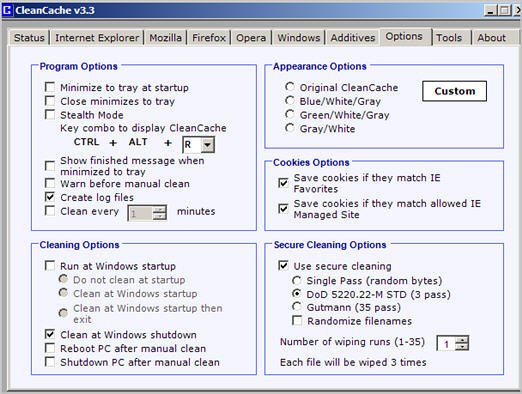
- Automatically save cookies if they match your IE favorites
- Secure file deletion using single, DoD and Gutmann wiping algorithms. Files are overwritten, renamed 26 times then deleted
- Stealth mode
- Modify the appearance of CleanCache to any color
- Reboot or shutdown the PC after a manual clean
- new Command line options to run CleanCache from a .bat file
- new Multiple user support
Tools
- Selectively delete UserAssist registry entries
- Manage startup entries
- Remove invalid software entries in the Add/Remove control panel list
- Select files to securely wipe
- Delete invalid entries in the installed software registry keys





