1. Been infected with spyware? Tell us about your problem.
2. Protect your PC from viruses, spyware.
3. For fast automatic spyware removal, try CounterSpy, SUPERAntiSpyware

Good tool for manage your HOSTS file

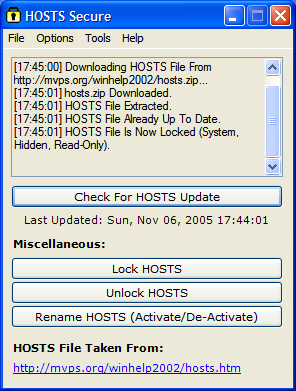
HOSTS Secure is a utility that you can use to automatically download, unzip,
and install the MVPS HOSTS file.

The Hosts file contains the mappings of IP addresses to host names. This file is loaded into memory (cache) at startup, then Windows checks the Hosts file before it queries any DNS servers, which enables it to override addresses in the DNS. This prevents access to the listed sites by redirecting any connection attempts back to the local machine. Another feature of the HOSTS file is its ability to block other applications from connecting to the Internet, providing the entry exists.
You can use a HOSTS file to block ads, banners, 3rd party Cookies, 3rd party page counters, web bugs, and even most hijackers. This is accomplished by blocking the Server that supplies these little gems.

hosts secure

Features include a scheduler to keep the file
up to Date.
Note: requires “.Net Framework 1.1″

Read more: how to use hosts file for block ads.

May 23, 2006 on 9:08 am | In Free Software, Tips | |
Submit to: Digg | SlashDot | Del.icio.us

No Comments yet »

RSS feed for comments on this post. TrackBack URI

Leave a comment

XHTML: <a href="" title=""> <abbr title=""> <acronym title=""> <b> <blockquote cite=""> <cite> <code> <del datetime=""> <em> <i> <q cite=""> <strike> <strong>

This is a captcha-picture. It is used to prevent mass-access by robots. (see: www.captcha.net)

You must read and type the 4 chars within 0..9 and A..F, and submit the form.


Oh no, I cannot read this. Please, generate a


MY ANTI SPYWARE Powered by WordPress with Pool theme design by Borja Fernandez.
Entries and comments feeds. Valid XHTML and CSS. ^Top^
