Been infected with spyware? Tell us about your problem.
For fast automatic spyware removal, try CounterSpy, SUPERAntiSpyware

How to disable Active Scripting support

Some days ago, was found IE vulnerability. Today no patches available. You can only disable Active Scripting support.
Read how to…

Open Internet Explorer and hit the “Tools” menu and click “Internet options”. Jump to the “Security” tab, chouse “Internet” and click to “Custom Level” button.
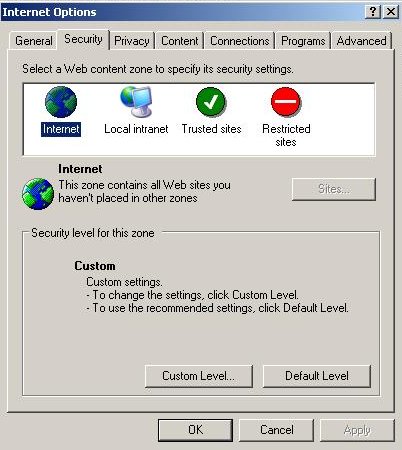
ie tools security

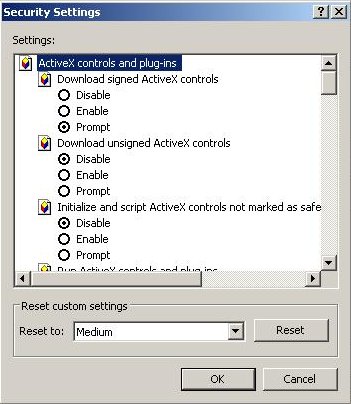
After that, you would see:

Scroll down and change Active Scripting to Disable and click “OK” button:
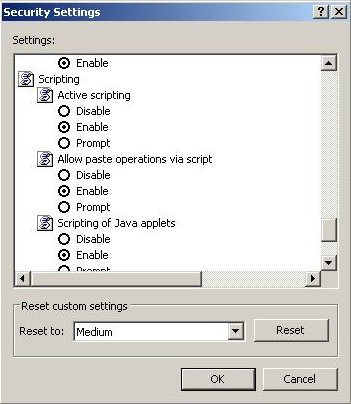
If you have trusted sites, then add them to the Trusted Group.

To add a trusted site, chouse”Trusted sites” and then click the “Sites” button.
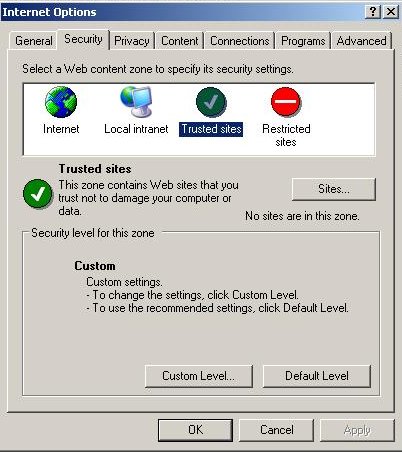
Type trusted domain name and click “Add” button.
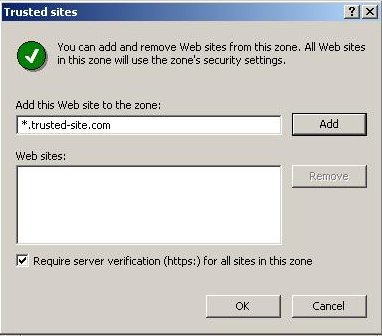
Click “Close” button and close “Internet options”.
Now your PC protected against a new exploits for the vulnerability.

March 26, 2006 on 11:44 am | In Tutorials - HowTo | |
Submit to: Digg | SlashDot | Del.icio.us

No Comments yet »

RSS feed for comments on this post. TrackBack URI

Leave a comment

XHTML: <a href="" title=""> <abbr title=""> <acronym title=""> <b> <blockquote cite=""> <cite> <code> <del datetime=""> <em> <i> <q cite=""> <strike> <strong>

This is a captcha-picture. It is used to prevent mass-access by robots. (see: www.captcha.net)

You must read and type the 4 chars within 0..9 and A..F, and submit the form.


Oh no, I cannot read this. Please, generate a


MY ANTI SPYWARE Powered by WordPress with Pool theme design by Borja Fernandez.
Entries and comments feeds. Valid XHTML and CSS. ^Top^