A new rogue anti-spyware application has surfaced as a replacement for SpyAxe/SpywareStrike. Behold: SpyFalcon!
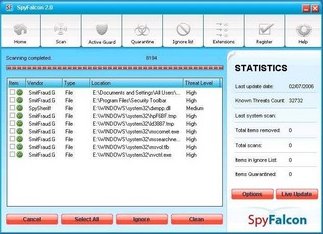
Once installed this program will issue fake taskbar alerts, which look like Windows Security alerts, stating that you are infected with various viruses and advising you to click on the icon to remove them. Once you click on the icon Spyfalcon will start, or download/install if it is the first time you clicked on it, and start scanning your computer. The program then proceeds to find malware that does not exist on your computer. It then uses these notifications to scare you into buying its software.
If you get infected with this rogue antispyware app, please do not be fooled into buying it. Instead use the instructions in the link below to remove the software.
WHOIS information:
Domain Name: SPYFALCON.COM (195.225.176.79)
Registrant:
SunShine Ltd
David Taylor
U-12 Gamma Commercial Complex # 47
Rizal Highway cor. Manila Ave Subic Bay
Olongapo City
null,98101
PH
Tel. +206.9543154
Other domains at the same IP address:
Spyfalconupdate.com
Updateyourwindows.com
SpyFalcon, and its predecessors, are known to install through exploits as well as piggyback on to users machines via the video codec that we have talked about before. This application has just appeared today, so it might be a good idea to add the domains listed above to your block lists now.
Thank to SunbeltBlog.
If you can`t uninstall or remove, please make and post HijackThis log as coment or in the forum.
Now available How to remove SpyFalcon instructions.





