Sunbelt and Spyware Warrior reports about new rogue anti spyware AlfaCleaner.
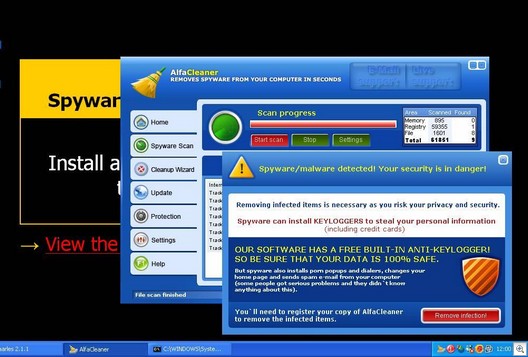
AlfaCleaner is a variant of the Anti Virus Pro, Winhound Spyware Remover, & XSRemover
Downloadable from alfacleaner.com, innovagest2000.com
We recommend to blocking specific domains and IP address:
x-stories.org – 69.50.187.19
zlex.org – 85.255.115.227, 85.255.116.213, 85.255.117.51
Noi.themovie.com that calls the x-stories.org – 69.50.187.19
Cleanchan.net – (formally fullchain.net) -195.255.177.21
If your PC don`t have WMF patch, please patch now. The Alfa Cleaner using wmf exploit for install.
Update: read How to remove AlfaCleaner





if you got AlfaCleaner, and can`t remove from your computer, please make HijackThis log and post there.
Logfile of HijackThis v1.99.1
Scan saved at 12:14:00, on 06-02-2006
Platform: Windows XP SP2 (WinNT 5.01.2600)
MSIE: Internet Explorer v6.00 SP2 (6.00.2900.2180)
Running processes:
C:\WINDOWS\System32\smss.exe
C:\WINDOWS\system32\winlogon.exe
C:\WINDOWS\system32\services.exe
C:\WINDOWS\system32\lsass.exe
C:\WINDOWS\system32\svchost.exe
C:\WINDOWS\System32\svchost.exe
C:\WINDOWS\system32\spoolsv.exe
C:\WINDOWS\Explorer.EXE
C:\PROGRA~1\Grisoft\AVGFRE~1\avgamsvr.exe
C:\PROGRA~1\Grisoft\AVGFRE~1\avgupsvc.exe
C:\Programas\Ficheiros comuns\Microsoft Shared\VS7Debug\mdm.exe
C:\Programas\Analog Devices\SoundMAX\SMAgent.exe
C:\Programas\Zone Labs\ZoneAlarm\zlclient.exe
C:\Programas\QuickTime\qttask.exe
C:\WINDOWS\system32\spool\drivers\w32x86\3\hpztsb04.exe
C:\Programas\Analog Devices\SoundMAX\SMax4PNP.exe
C:\Programas\Analog Devices\SoundMAX\Smax4.exe
C:\Programas\Babylon\Babylon.exe
C:\Programas\Hewlett-Packard\PhotoSmart\Photo Imaging\Hpi_Monitor.exe
C:\Programas\SlySoft\AnyDVD\AnyDVD.exe
C:\PROGRA~1\Grisoft\AVGFRE~1\avgcc.exe
C:\Programas\Softwin\BitDefender8\bdnagent.exe
C:\Programas\Messenger\msmsgs.exe
C:\Programas\Acesoft\Tracks Eraser Pro\te.exe
C:\WINDOWS\system32\ctfmon.exe
C:\WINDOWS\System32\svchost.exe
C:\Programas\WinZip\WZQKPICK.EXE
C:\WINDOWS\system32\ZoneLabs\vsmon.exe
C:\Programas\Ficheiros comuns\Softwin\BitDefender Communicator\xcommsvr.exe
C:\WINDOWS\system32\wscntfy.exe
C:\Programas\Ficheiros comuns\Softwin\BitDefender Scan Server\bdss.exe
c:\programas\softwin\bitdefender8\bdmcon.exe
C:\Documents and Settings\hpf\Ambiente de trabalho\HijackThis.exe
R0 – HKCU\Software\Microsoft\Internet Explorer\Main,Start Page = http://www.google.pt/
R0 – HKCU\Software\Microsoft\Internet Explorer\Toolbar,LinksFolderName = Hiperligações
O2 – BHO: AcroIEHlprObj Class – {06849E9F-C8D7-4D59-B87D-784B7D6BE0B3} – C:\Programas\Adobe\Acrobat 6.0\Reader\ActiveX\AcroIEHelper.dll
O2 – BHO: SpywareBlock Class – {0A87E45F-537A-40B4-B812-E2544C21A09F} – C:\Programas\SpyCatcher 2006\SCActiveBlock.dll
O4 – HKLM\..\Run: [Zone Labs Client] C:\Programas\Zone Labs\ZoneAlarm\zlclient.exe
O4 – HKLM\..\Run: [QuickTime Task] “C:\Programas\QuickTime\qttask.exe” -atboottime
O4 – HKLM\..\Run: [NeroFilterCheck] C:\WINDOWS\system32\NeroCheck.exe
O4 – HKLM\..\Run: [HPDJ Taskbar Utility] C:\WINDOWS\system32\spool\drivers\w32x86\3\hpztsb04.exe
O4 – HKLM\..\Run: [SoundMAXPnP] C:\Programas\Analog Devices\SoundMAX\SMax4PNP.exe
O4 – HKLM\..\Run: [SoundMAX] “C:\Programas\Analog Devices\SoundMAX\Smax4.exe” /tray
O4 – HKLM\..\Run: [Babylon Client] C:\Programas\Babylon\Babylon.exe -AutoStart
O4 – HKLM\..\Run: [CXMon] “C:\Programas\Hewlett-Packard\PhotoSmart\Photo Imaging\Hpi_Monitor.exe”
O4 – HKLM\..\Run: [H2O] C:\Programas\SyncroSoft\Pos\H2O\cledx.exe
O4 – HKLM\..\Run: [AnyDVD] C:\Programas\SlySoft\AnyDVD\AnyDVD.exe
O4 – HKLM\..\Run: [AVG7_CC] C:\PROGRA~1\Grisoft\AVGFRE~1\avgcc.exe /STARTUP
O4 – HKLM\..\Run: [HP Update 4300C] C:\DOCUME~1\hpf\AMBIEN~1\hpupdate.exe 4300C
O4 – HKLM\..\Run: [AlfaCleaner] C:\Programas\AlfaCleaner\AlfaCleaner.exe
O4 – HKLM\..\Run: [SpyCatcher Reminder] “C:\Programas\SpyCatcher 2006\SpyCatcher.exe” reminder
O4 – HKLM\..\Run: [BDMCon] “C:\Programas\Softwin\BitDefender8\bdmcon.exe”
O4 – HKLM\..\Run: [BDNewsAgent] “C:\Programas\Softwin\BitDefender8\bdnagent.exe”
O4 – HKCU\..\Run: [MSMSGS] “C:\Programas\Messenger\msmsgs.exe” /background
O4 – HKCU\..\Run: [Tracks Eraser Pro] C:\Programas\Acesoft\Tracks Eraser Pro\te.exe min
O4 – HKCU\..\Run: [ctfmon.exe] C:\WINDOWS\system32\ctfmon.exe
O4 – Global Startup: Microsoft Office.lnk = C:\Programas\Microsoft Office\Office10\OSA.EXE
O4 – Global Startup: SpyCatcher Protector.lnk = C:\Programas\SpyCatcher 2006\Protector.exe
O4 – Global Startup: WinZip Quick Pick.lnk = C:\Programas\WinZip\WZQKPICK.EXE
O8 – Extra context menu item: E&xport to Microsoft Excel – res://C:\PROGRA~1\MICROS~2\Office10\EXCEL.EXE/3000
O9 – Extra button: (no name) – {85d1f590-48f4-11d9-9669-0800200c9a66} – %windir%\bdoscandel.exe (file missing)
O9 – Extra ‘Tools’ menuitem: Uninstall BitDefender Online Scanner v8 – {85d1f590-48f4-11d9-9669-0800200c9a66} – %windir%\bdoscandel.exe (file missing)
O9 – Extra button: Messenger – {FB5F1910-F110-11d2-BB9E-00C04F795683} – C:\Programas\Messenger\msmsgs.exe
O9 – Extra ‘Tools’ menuitem: Windows Messenger – {FB5F1910-F110-11d2-BB9E-00C04F795683} – C:\Programas\Messenger\msmsgs.exe
O12 – Plugin for .mid: C:\Programas\Internet Explorer\PLUGINS\npqtplugin2.dll
O12 – Plugin for .wav: C:\Programas\Internet Explorer\PLUGINS\npqtplugin.dll
O16 – DPF: {32305793-C19A-48E7-AD2F-D87FF7B264A4} (TenebrilSpywareScanner Control) – http://www.tenebril.com/assets/activeX/SpywareScanner.ocx
O16 – DPF: {5D86DDB5-BDF9-441B-9E9E-D4730F4EE499} (BDSCANONLINE Control) – http://download.bitdefender.com/resources/scan8/oscan8.cab
O16 – DPF: {9A9307A0-7DA4-4DAF-B042-5009F29E09E1} (ActiveScan Installer Class) – http://acs.pandasoftware.com/activescan/as5free/asinst.cab
O20 – AppInit_DLLs: interceptor.dll
O23 – Service: AutoComplete Service (Autocomplete) – Acesoft – C:\Programas\Acesoft\Tracks Eraser Pro\autocomp.exe
O23 – Service: AVG7 Alert Manager Server (Avg7Alrt) – GRISOFT, s.r.o. – C:\PROGRA~1\Grisoft\AVGFRE~1\avgamsvr.exe
O23 – Service: AVG7 Update Service (Avg7UpdSvc) – GRISOFT, s.r.o. – C:\PROGRA~1\Grisoft\AVGFRE~1\avgupsvc.exe
O23 – Service: BitDefender Scan Server (bdss) – Unknown owner – C:\Programas\Ficheiros comuns\Softwin\BitDefender Scan Server\bdss.exe” /service (file missing)
O23 – Service: SoundMAX Agent Service (SoundMAX Agent Service (default)) – Analog Devices, Inc. – C:\Programas\Analog Devices\SoundMAX\SMAgent.exe
O23 – Service: TrueVector Internet Monitor (vsmon) – Zone Labs, LLC – C:\WINDOWS\system32\ZoneLabs\vsmon.exe
O23 – Service: BitDefender Communicator (XCOMM) – Unknown owner – C:\Programas\Ficheiros comuns\Softwin\BitDefender Communicator\xcommsvr.exe” /service (file missing)
Go to Start > Control Panel > Add or Remove Programs and remove the following programs, if found: AlfaCleaner
Then using Windows Explorer, delete the following folder: C:\Program Files\AlfaCleaner
Download HijackThis and save the file to your desktop.
Double click on the file to extract it to it’s own folder on the desktop.
If you do not already have Ad-Aware SE installed, follow these download and setup instructions. Also check for updates.
Again, do NOT run a scan yet.
Next, please reboot your computer in Safe Mode by doing the following:
1. Restart your computer
2. After hearing your computer beep once during startup, but before the Windows icon appears, press F8.
3. Instead of Windows loading as normal, a menu should appear
4. Select the first option, to run Windows in Safe Mode.
Now you need to run HijackThis and click “Do a system scan only.” Place a check next to the following entries (if they are still there):
O4 – HKLM\..\Run: [AlfaCleaner] C:\Programas\AlfaCleaner\AlfaCleaner.exe
Now close all browser and other windows except for HijackThis, and click “Fix Checked” to have HijackThis fix the entries you checked.
Next, run Ad-aware and perform a full scan. Remove everything found.
Finally, restart your computer normally.